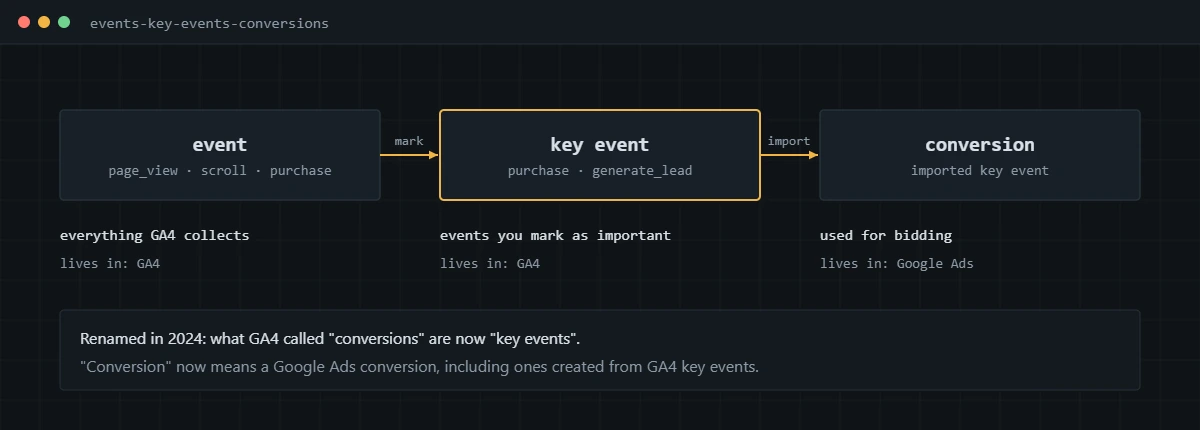
GA4 conversion tracking means sending the events that matter, such as purchases and leads, to Google Analytics 4 and marking them as key events. GA4 renamed conversions to key events in 2024. Key events can then be imported into Google Ads, where they become conversions for reporting and bidding.
The rename confused a lot of people, and I still get messages asking where the conversions went. Nothing was lost. What changed is the vocabulary, and the vocabulary matters because it maps to two different products with different rules. Below is how I set up GA4 tracking that holds up, and the mistakes I keep finding in audits.
Are GA4 conversions now called key events?
Yes. In 2024 Google renamed GA4 conversions to key events, and existing conversions were renamed automatically with no action needed.
A key event is any GA4 event you mark as important to the business, such as purchase or generate_lead. A conversion is now a Google Ads concept, a conversion action used for ad reporting and bidding. Google explains the split in its article on key events and conversions. The reason for the change was the constant mismatch between GA4 and Google Ads numbers: the two products counted the same action under the same name with different rules.
Is Google Analytics conversion tracking different in GA4?
Yes. Google Analytics conversion tracking in GA4 is built entirely on events, while the older Universal Analytics used goals tied to page destinations, durations or event categories.
Universal Analytics stopped processing data in 2023, so every Google Analytics property is now GA4. The practical difference is that a GA4 key event is only as good as the event behind it. There is no destination goal to fall back on, so a missing or broken event means a missing key event.
How do you mark an event as a key event in GA4?
Mark it in Admin, under Data display, on the Events or Key events page. It takes a minute, and it only affects data collected from that point forward.
- Open Admin, then Data display, then Events.
- Find the event, such as generate_lead, and switch on the toggle to mark it as a key event.
- If the event hasn’t been collected yet, go to Key events and create it by name instead, using the exact event name your tag will send.
- Set the counting method. I use once per event for purchases and once per session for most lead forms, so a double submit doesn’t count twice.
GA4 marks purchase as a key event by default, along with a few app events, as listed in Google’s guide to marking key events. Standard properties can have up to 30 key events. I keep it to the handful that represent real outcomes.
How do you track ecommerce purchases in GA4 with GTM?
Push a purchase event with the order details into the data layer, trigger a GA4 event tag on it in Google Tag Manager, and send the ecommerce data with it. The tag should fire from the order confirmation event, never from a page view.
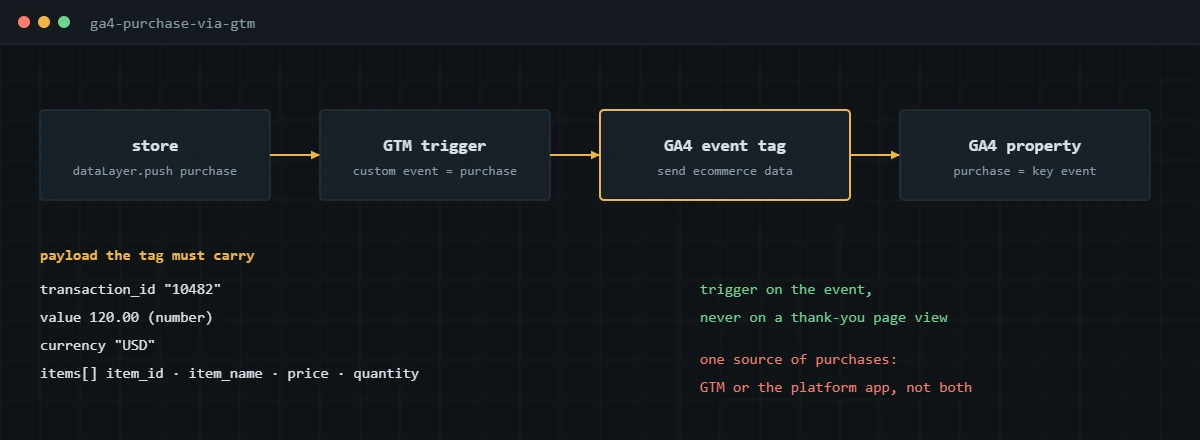
- Make sure your store pushes a purchase event to the data layer when the order is confirmed. On Shopify this comes from Customer Events; on WooCommerce from a plugin or custom code on the order-received hook.
- In GTM, create a Custom Event trigger with the event name purchase.
- Create a GA4 Event tag with the event name purchase and your Google tag ID, and turn on sending ecommerce data from the data layer.
- Confirm the payload includes transaction_id, value as a number, currency, and an items array with item_id, item_name, price and quantity.
- Publish, place a real test order, and check DebugView before you trust any report.
dataLayer.push({ ecommerce: null });
dataLayer.push({
event: ‘purchase’,
ecommerce: {
transaction_id: ‘10482’,
value: 120.00,
tax: 8.40,
shipping: 6.00,
currency: ‘USD’,
items: [{ item_id: ‘SKU-118’, item_name: ‘Trail Pack’, price: 105.60, quantity: 1 }]
}
});
The first line clears the previous ecommerce object so values from an earlier event don’t leak into this one. Decide whether value includes shipping and tax and stay consistent, because that choice is one of the main reasons GA4 revenue and store revenue drift apart. I go through the other reasons in why your GA4 revenue doesn’t match Shopify.
How do you verify GA4 conversion tracking in DebugView?
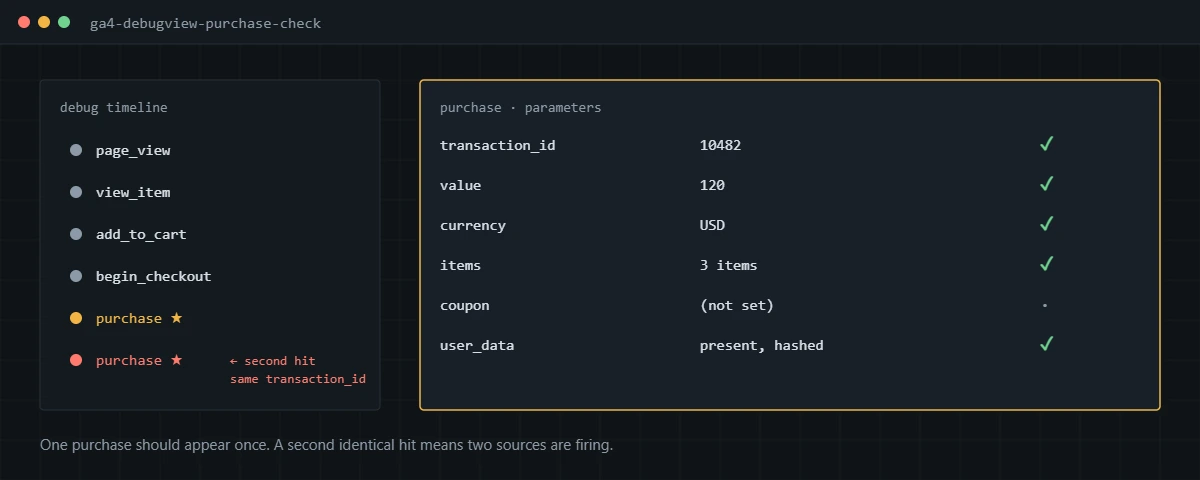
Open DebugView, complete a real conversion on the site in debug mode, and inspect the event and every parameter on it. If it looks right in DebugView, it will look right in reports.
- Turn on GTM Preview mode, which also sends debug traffic to GA4, or use the Google Tag Assistant extension.
- In GA4, open Admin, then DebugView, and select your device.
- Walk through the funnel and complete the conversion.
- Click the purchase or lead event and check each parameter: transaction ID, value, currency and items.
- Count the events. One order should produce exactly one purchase. Two purchases with the same transaction ID mean a duplicate source, usually a platform integration and GTM firing together.
- Check the key event star appears on the event, which confirms GA4 is treating it as a key event.
How do you import GA4 key events into Google Ads?
Link GA4 to Google Ads, then create a conversion in Google Ads by importing the key event. Google covers the process in its help article on GA4-based conversions.
- In GA4, go to Admin, then Product links, then Google Ads links, and link the account.
- In Google Ads, go to Goals, then Conversions, and create a new conversion action.
- Choose Import, then Google Analytics 4 properties, then Web, and select the key events you want.
- Open the goal and check whether each import is primary or secondary before campaigns rely on it.
Two limits shape how I use imports. They start counting on the import date with no historical data, and Google Ads enhanced conversions don’t apply to them. For bidding, I use a native Google Ads tag, which I explain in my Google Ads conversion tracking guide. The imported version stays as a secondary action for comparison. Sales that close later in a CRM are a separate job, covered in my offline conversion tracking guide.
What are the most common GA4 conversion tracking mistakes?
The mistakes I see most are duplicate purchase sources, page-view triggers, and values that GA4 can’t read. In rough order of how often they turn up in my audits:
- A store integration and a GTM tag both sending purchase, which inflates revenue.
- Purchase triggered on a thank-you page view, so reloads and return visits count again.
- Value sent as a string like “$120.00” instead of a number.
- No currency parameter on a store that sells in several currencies.
- Lead forms marked as key events on the form view instead of a confirmed submission.
- Cross-domain checkouts or payment gateways that start a new session and steal the purchase from the original channel.
- Internal and test traffic left in the property, which adds fake purchases.
For the bigger picture of how GA4 fits alongside ad platform tracking, see my complete guide to conversion tracking.
If GA4 doesn’t agree with your store or CRM and you want it fixed and verified, I can audit and rebuild the setup end to end.
Frequently asked questions
Are GA4 key events the same as conversions?
In GA4 they are the same idea under a new name. Since 2024, GA4 calls them key events. The word conversion now refers to Google Ads conversions, which you can create from GA4 key events or from a Google Ads tag.
How many key events can I have in GA4?
Google allows up to 30 key events on a standard property and 50 on Analytics 360. I rarely need more than five or six. Marking everything as a key event makes the reports harder to read.
Why is purchase already marked as a key event?
GA4 marks purchase as a key event by default on web and app properties. You still need to send it correctly, with transaction_id, value, currency and items, for the revenue to be usable.
Why does GA4 show fewer purchases than my store?
Some gap is expected, since GA4 only records purchases where the browser tag fires and consent allows it. Larger gaps usually come from a purchase event that fires on the wrong page, a checkout hosted on another domain, or ad blockers. A store export compared by transaction ID shows which one it is.
How long until GA4 key events appear in reports?
Events show in DebugView and Realtime within seconds of being sent. Standard reports take longer while GA4 processes the data, so I test in DebugView and check the full reports the next day.
Should I use GA4 key events for Google Ads bidding?
You can, but I prefer a native Google Ads conversion tag for bidding because it supports Google Ads enhanced conversions and does not depend on GA4 processing. I import GA4 key events as secondary actions to compare against.
About the author
I’m Ghazanfar, founder of Analytigrow and a conversion tracking specialist. For 7+ years I’ve audited and rebuilt GA4, Google Tag Manager, server-side tracking on Stape, Meta Pixel and Conversions API, and Consent Mode v2 setups for ecommerce and lead-gen businesses in the US, UK, EU and UAE. I’m Top Rated on Upwork with 100% Job Success. Reach me at [email protected] or on WhatsApp.