In this post
Every week someone sends me a screenshot of GA4 next to a screenshot of Shopify’s analytics and asks which one is right. The answer is usually Shopify, and the gap is usually one of six things. Here they are in the order I check them.
Some gap is normal
Before anything else: GA4 and Shopify will never match to the cent. Shopify records the order on the server. GA4 records it when the browser fires a purchase event, which requires the customer to actually land on the thank-you page with JavaScript running and no blocker. A 3 to 8% gap, with GA4 lower, is healthy. Anything outside that range is a configuration problem.
If GA4 is higher than Shopify, you have duplicates. If it is more than 10% lower, you are losing events. The direction of the gap tells you where to look first.
1. Shopify native GA4 plus a GTM tag
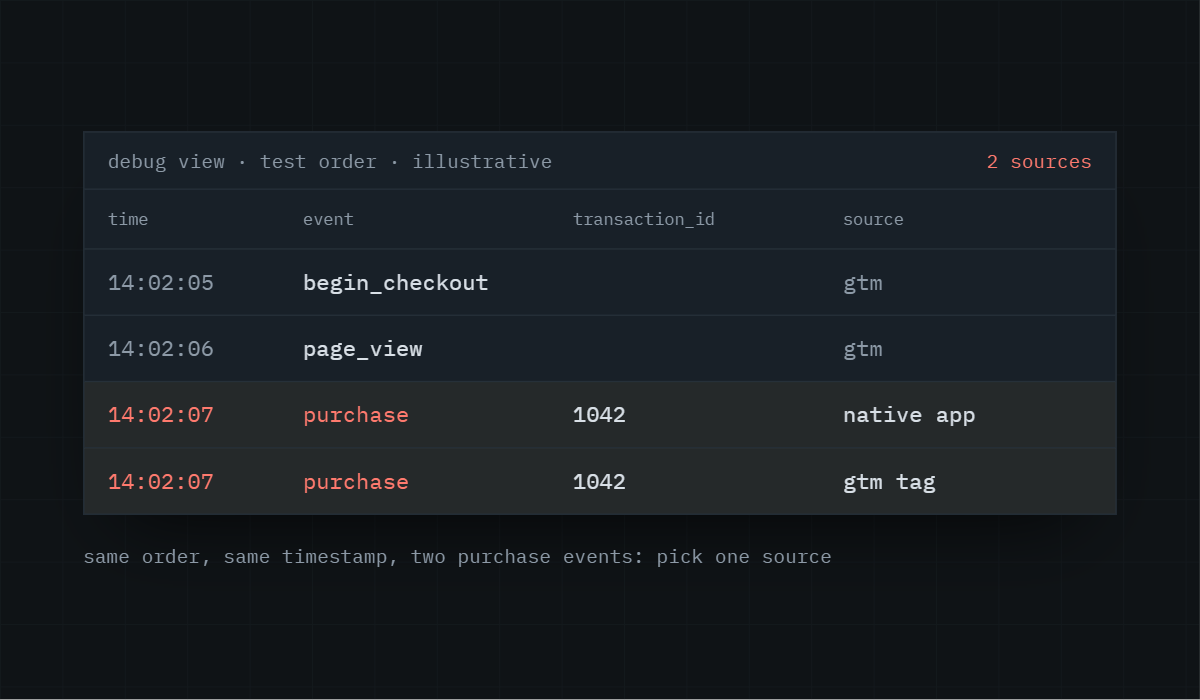
This is the one I see most. The store connected the Google & YouTube app, which sends purchases to GA4 on its own. Then someone added GTM with a purchase tag. Both fire on every order. GA4 is now at roughly 200% of real revenue.
Check: open GA4 DebugView, place a test order, and count the purchase events. If you see two, you have two sources. Pick one. For most stores, the native integration is fine if you don’t need custom events; if you run GTM for anything else, send purchases from GTM and turn the native GA4 toggle off.
2. Purchase firing on page refresh
If the purchase tag triggers on a page view of the thank-you URL, every refresh, back-button visit or bookmarked return sends another purchase. GA4 will be 5 to 10% high and the extra transactions will have the same transaction ID, which GA4 does not deduplicate across sessions.
Fix: fire the purchase from the platform’s order confirmation callback (Shopify customer events checkout_completed), not a page view. If you must use the page, store the transaction ID in a cookie and block the tag when it matches.
analytics.subscribe(“checkout_completed”, (event) => {
window.dataLayer.push({
event: “purchase”,
ecommerce: {
transaction_id: event.data.checkout.order.id,
value: event.data.checkout.subtotalPrice.amount,
currency: event.data.checkout.currencyCode,
items: event.data.checkout.lineItems.map(mapItem)
}
});
});
3. Value includes or excludes shipping and tax
Shopify’s analytics shows total sales, net sales and gross sales as different numbers. GA4’s purchase revenue is whatever you put in the value parameter. If the tag sends subtotalPrice and you compare it to Shopify total sales, you will see a gap equal to shipping and tax.
Decide what revenue means for you, usually subtotal before shipping and tax, and compare like with like. Send tax and shipping as their own parameters so GA4 has them separately.
If you’d rather I ran this comparison on your store than read about it, the audit does exactly that.
4. Currency mismatches
A store selling in GBP, EUR and USD with Shopify Markets sends purchases in the presentment currency. If GA4’s property currency is USD and the purchase event has no currency parameter, GA4 assumes USD and a £100 order becomes a $100 order. Over a month that is a material gap.
Always send currency with every purchase. GA4 converts on its end using the daily rate.
5. Consent and ad blockers
Visitors who decline cookies in the EU and UK, and visitors with uBlock or Brave, will not send a browser purchase event at all. On an EU-heavy store this is 15 to 30% of orders missing from GA4 with nothing wrong in the setup.
This is what server-side tracking through Stape fixes for blockers, and what Consent Mode modelling partially fixes for declined consent. Neither gets you to 100%.
6. Timezone and reporting lag
Shopify reports in the store timezone. GA4 reports in the property timezone. If they differ, a Monday in one is partly a Sunday in the other. GA4 also takes 24 to 48 hours to finalise a day. Comparing yesterday is pointless; compare a full week that ended three days ago.
How to find which one it is
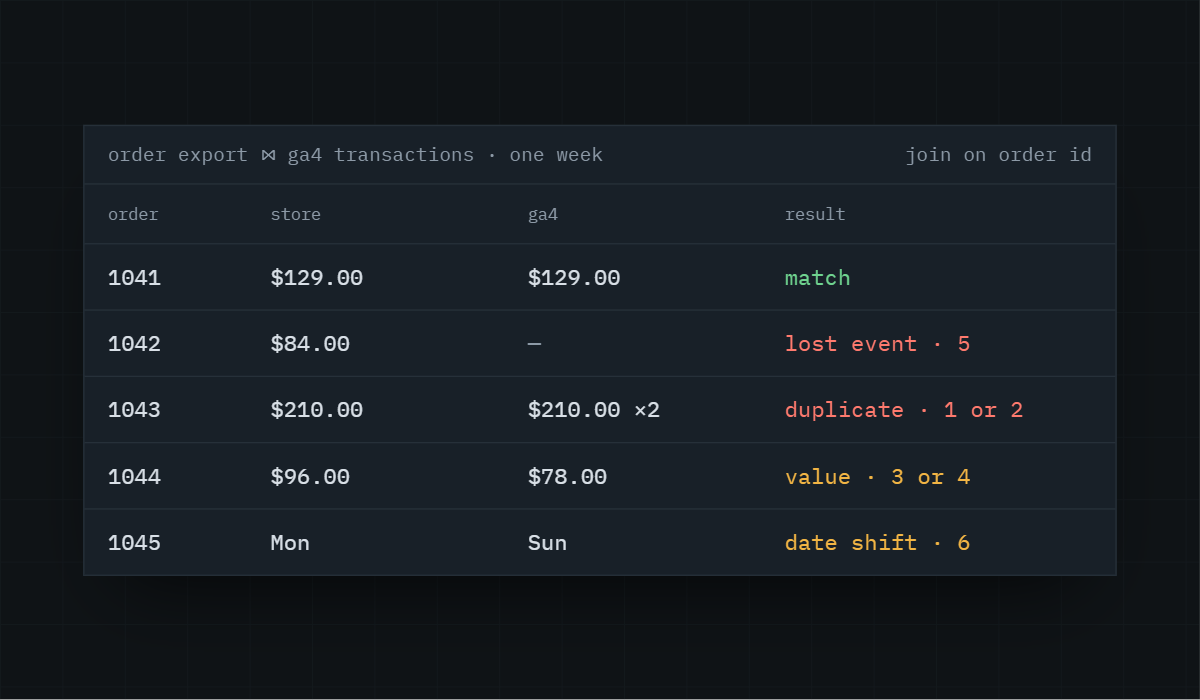
Pull the Shopify orders export for a completed week. Pull GA4’s transactions by transaction_id for the same week. Join them. Orders in Shopify but not GA4 are lost events (5 above). Transaction IDs in GA4 more than once are duplicates (1 or 2). Orders in both with different values are 3 or 4. Dates that shift by a day are 6.
If you want me to run that comparison on your store, the audit does exactly this.
Find out what's actually broken.
A tracking audit tells you exactly which events are wrong, why, and what it takes to fix them. No pitch deck, just the findings.