Shopify Google Analytics conversion tracking with pixels
Last updated November 5, 2026 · Ghazanfar · 10 min read
In this post
Shopify Google Analytics conversion tracking now runs through pixels. Purchases reach GA4 either through the Google & YouTube app or through a custom pixel that listens for Shopify’s checkout_completed event and sends it to GA4, usually via Google Tag Manager. Old checkout scripts no longer work.
Shopify rebuilt how tracking works on checkout, and a lot of stores are still carrying setups from before the change. When I audit a Shopify store now, I usually find one of three things: the Google & YouTube app and a custom pixel both sending purchases, a GTM container in the theme that someone assumes covers checkout, or a GA4 purchase that was living in the old additional scripts box and quietly stopped. This guide is about getting to one clean purchase per order under the current rules.
What changed in Shopify checkout tracking?
Shopify moved checkout tracking off scripts and onto pixels. The additional scripts box in checkout settings became view-only on August 28, 2025, and non-Plus stores had until August 26, 2026 to upgrade their Thank you and Order status pages, according to Shopify’s checkout upgrade guide.
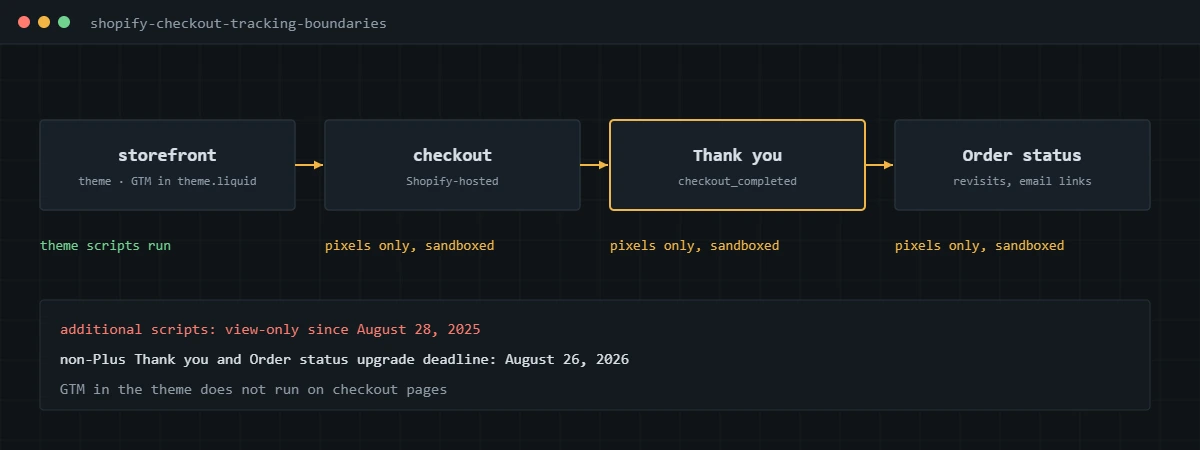
A pixel in Shopify’s sense is code that subscribes to standard customer events, such as page_viewed, product_added_to_cart and checkout_completed, rather than code dropped into a page. App pixels are installed and managed by apps. Custom pixels are code you add in Settings, then Customer events. Shopify notes in its custom pixels documentation that they run in a lax sandbox, which limits what the code can do on the page.
The consequence I explain most often: a GTM container installed in theme.liquid only runs on the storefront. It does not run on checkout or the Thank you page, so it cannot see the purchase.
Should you use the Google & YouTube app or a custom pixel?
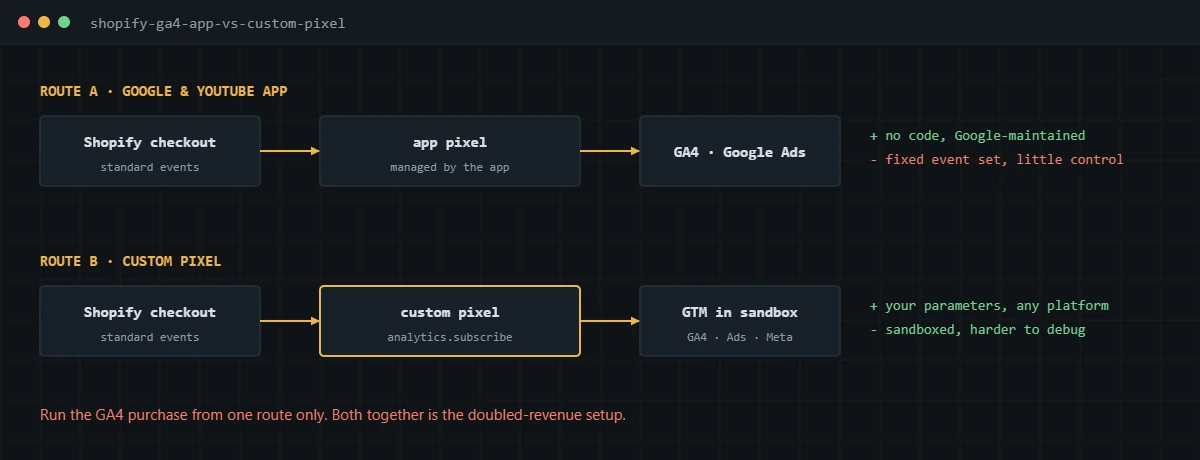
Use the app if you only need GA4 and Google Ads with standard events. Use a custom pixel if you need control over parameters or send purchases to more than Google.
| Google & YouTube app | Custom pixel with GTM | |
|---|---|---|
| Setup | Connect accounts, no code | Write pixel code and build GTM tags |
| Platforms | GA4 and Google Ads | GA4, Google Ads, Meta and others |
| Control over value and IDs | What the app sends | Whatever you map |
| Debugging | Limited | Possible, but harder in the sandbox |
| Maintenance | Handled by the app | Yours |
Many stores end up with a hybrid: the app for Google Ads and Merchant Center, and a custom pixel for GA4 and Meta. That works only if the GA4 data sharing in the app is switched off for purchases, so GA4 isn’t fed twice.
How do you track GA4 purchases with a Shopify custom pixel?
Subscribe to checkout_completed in a custom pixel, push a GA4-shaped purchase into a data layer, and let a GTM container loaded inside the pixel send it on. Shopify fires checkout_completed once per checkout, normally on the Thank you page, as described in its checkout_completed reference.
analytics.subscribe('checkout_completed', (event) => {
  const checkout = event.data.checkout;
  window.dataLayer = window.dataLayer || [];
  window.dataLayer.push({ ecommerce: null });
  window.dataLayer.push({
    event: 'purchase',
    ecommerce: {
      transaction_id: checkout.order?.id,
      value: Number(checkout.subtotalPrice?.amount),
      currency: checkout.currencyCode,
      items: checkout.lineItems.map((li) => ({
        item_id: li.variant?.sku,
        item_name: li.title,
        price: Number(li.variant?.price?.amount),
        quantity: li.quantity
      }))
    }
  });
});- In Shopify admin, go to Settings, then Customer events, and add a custom pixel.
- Paste the GTM loader snippet at the top of the pixel, then subscriptions for the events you need, including the purchase above.
- Set the pixel’s customer privacy settings so it respects the store’s consent rules.
- In GTM, trigger a GA4 event tag on the purchase custom event with ecommerce data enabled.
- Connect the pixel and place a test order with a 100% discount code.
- Check DebugView for exactly one purchase with transaction ID, value, currency and items.
Two details catch people out. The order ID in the event is Shopify’s internal ID, which differs from the #1001-style order name staff see, so export the ID column when reconciling. And if your store uses a post-purchase upsell, checkout_completed fires on the first upsell page rather than the Thank you page.
Why do Shopify stores get duplicate GA4 purchases?
Because more than one source sends the purchase. The pattern I find most is the Google & YouTube app with GA4 enabled plus a custom pixel added later by an agency or app.
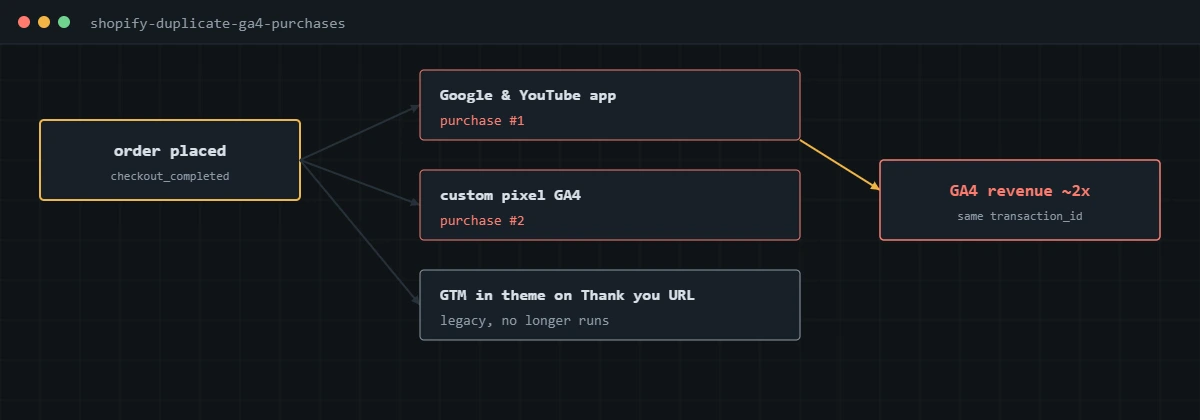
To confirm it, place one test order and count purchase events in DebugView. Two means two sources. Also check the app list for anything advertising “GA4 tracking” or “conversion tracking”, since several do it without saying so prominently. My post on why your GA4 revenue doesn’t match Shopify covers this and the other five causes of revenue gaps.
What are the limits of tracking Shopify checkout?
Pixels run in a sandbox, only on events Shopify exposes, and only when the page loads with the visitor’s consent allowing it. You can’t read or change the checkout page itself from a pixel.
- Purchases where the buyer never reaches the Thank you page with tracking allowed are lost to browser tracking.
- Visitors who decline consent in regions where it applies won’t send the event.
- Debugging is harder because GTM Preview doesn’t attach cleanly to the sandbox; I verify through DebugView and network requests.
- Checkout step events are limited to what Shopify’s standard events cover.
None of this is a reason to go back to scripts. It is a reason to reconcile against the Shopify orders export regularly, the way I describe in my ecommerce conversion tracking guide.
What are the server-side options for Shopify?
Send purchases from the pixel to your own server container, or send them from Shopify’s order webhooks. Both forward to GA4, Google Ads and Meta from your own subdomain.
The setup I use most is a server GTM container hosted on Stape, receiving events from the custom pixel through the GA4 client and forwarding them with the same transaction and event IDs. For stores with heavy blocker loss, adding the order webhook as a second source catches purchases the browser never sent, as long as deduplication by order ID is in place. More on that on my server-side tracking service page, and the GA4 side generally in my GA4 conversion tracking guide.
If GA4 on your Shopify store is doubled, missing purchases, or still relying on old checkout scripts, I can rebuild it on pixels and verify it against your orders.
Frequently asked questions
Should I use the Google & YouTube app or a custom pixel for GA4 on Shopify?
Use the app if GA4 and Google Ads are all you need and you are happy with its standard events. Use a custom pixel with GTM if you also run Meta or other platforms, or need to control parameters. Do not run both for purchases.
Can I still put GA4 code in the Shopify additional scripts box?
No. Shopify made the additional scripts section view-only on August 28, 2025, and non-Plus stores had until August 26, 2026 to upgrade their Thank you and Order status pages. Purchase tracking now belongs in an app pixel or a custom pixel.
Does GTM installed in my Shopify theme track checkout?
Not on its own. Theme code runs on the storefront, while checkout and the Thank you page are Shopify-hosted and only run pixels. For purchases, load GTM inside a custom pixel or rely on an app pixel.
Why is GA4 revenue on Shopify double the real number?
Almost always because two sources send the purchase, usually the Google & YouTube app plus a custom pixel or an old manual tag. Count purchase events in DebugView on one test order to confirm, then remove one source.
How do I debug a Shopify custom pixel?
GTM Preview is awkward inside the pixel sandbox, so I rely on GA4 DebugView, the browser network tab filtered to the GA4 collect endpoint, and Shopify’s pixel helper tools. A test order with a 100% discount code makes this easy to repeat.
Is server-side tracking worth it for a Shopify store?
For stores with meaningful ad spend, often yes. A server container on Stape can receive purchases from the custom pixel or from Shopify order webhooks and forward them to GA4, Google Ads and Meta with better data and fewer losses to blockers.
About the author
I’m Ghazanfar, founder of Analytigrow and a conversion tracking specialist. For 7+ years I’ve built and fixed Shopify tracking across GA4, Google Ads, Meta Pixel and Conversions API and server-side GTM on Stape for stores in the US, UK, EU and UAE. I’m Top Rated on Upwork with 100% Job Success. Reach me at [email protected] or on WhatsApp. For the full picture across platforms, see my conversion tracking guide.
Find out what's actually broken.
A tracking audit tells you exactly which events are wrong, why, and what it takes to fix them. No pitch deck, just the findings.