Offline conversion tracking: getting CRM sales back into Google Ads
Last updated November 5, 2026 · Ghazanfar · 11 min read
In this post
Offline conversion tracking sends sales and qualified leads that happen outside your website, usually in a CRM or over the phone, back to your ad platform so it can credit the click that started them. In Google Ads, that means storing the GCLID or customer data with each lead and uploading the outcome later.
A form submission is a promise. The money shows up later, when a salesperson qualifies the lead, sends a quote, or closes the deal. If Google Ads only ever sees the form, it optimizes for whoever fills in forms most cheaply, and in lead-gen accounts that is often the wrong audience. Offline tracking closes that gap. It is also the area where Google changed the most in 2026, so a lot of setups I audit are now running on a path that is being retired.
What is offline conversion tracking?
It is any setup that reports conversions to an ad platform from a source other than a website tag. The conversion happens offline in the sense that the browser is no longer involved by the time it occurs.
The GCLID (Google Click Identifier) is a unique ID Google Ads adds to the landing page URL on every ad click when auto-tagging is on. On iOS traffic you may see gbraid or wbraid instead, which are privacy-preserving click identifiers for app and web journeys. Enhanced conversions for leads is Google’s newer method, which matches uploaded conversions using hashed customer data, such as an email address, instead of relying on the click ID alone.
For the wider picture of how this fits with tag-based tracking, my guide to conversion tracking covers the full chain.
How does Google Ads offline conversion tracking work?
It works by carrying an identifier from the click into your CRM, then sending the sales outcome back with that identifier attached. Google matches the two and credits the campaign, ad group and keyword.
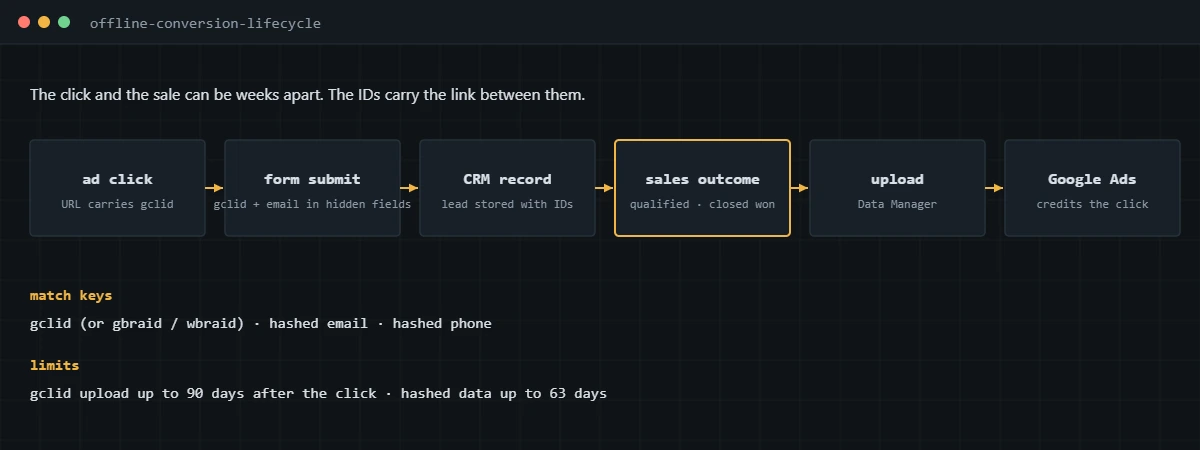
- A visitor clicks an ad and lands with a GCLID in the URL.
- The site stores the GCLID in a first-party cookie so it survives page navigation, then writes it into hidden fields on the lead form.
- The lead arrives in the CRM with the GCLID and the contact’s email and phone.
- When the lead reaches a stage you care about, such as qualified or closed won, the CRM or a connector sends a conversion to Google Ads with the GCLID, hashed contact data, conversion time and value.
- Google matches the conversion to the click and reports it in the conversion action you created for it.
How do you capture and store the GCLID?
Read it from the URL or the Google Ads cookie, persist it, and pass it into a hidden form field so it lands in the CRM with the lead. Most of the broken offline setups I see fail at this step, long before any upload happens.
- Make sure auto-tagging is on in the Google Ads account, so every ad click carries a GCLID.
- Run the Conversion Linker tag in GTM on all pages. It stores the click data in the _gcl_aw cookie, which keeps it available when the visitor converts on a later page.
- Add hidden fields to every lead form for gclid, gbraid and wbraid, and populate them from the URL parameter or the cookie with a small script or your form plugin’s dynamic field feature.
- Map those fields to custom properties in the CRM, and confirm with a test click that the value actually arrives on the contact or deal record.
- Check redirects. A redirect that drops query parameters, common with vanity URLs and some landing page tools, removes the GCLID before your site ever sees it.
Also capture the email and phone cleanly. Even if you upload GCLIDs today, enhanced conversions for leads needs that data, and it gives Google a second match key when the click ID is missing.
What changed with the Data Manager API in 2026?
Google moved offline conversion uploads to the Data Manager API. Since June 15, 2026, offline conversion imports and enhanced conversions for leads uploads are blocked in the Google Ads API for anyone not already importing, according to Google’s offline conversion import documentation.
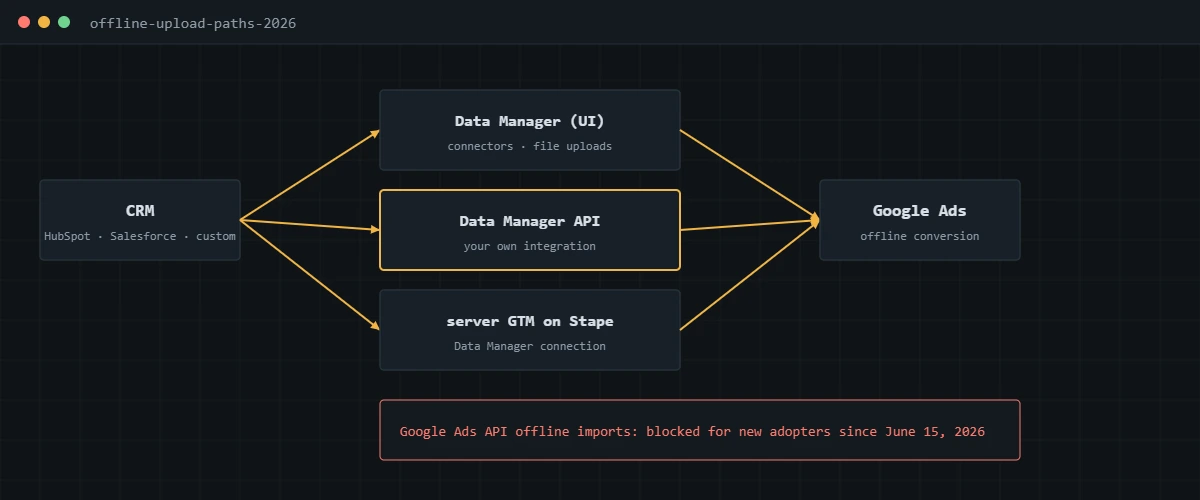
Existing importers were not cut off overnight. Developer tokens that had been sending these requests can keep using the Google Ads API under legacy access while they move, and Google states that tokens which sent no requests between January and June 2026 won’t be allowlisted. In practice, I treat any GCLID-only import through the old API as legacy and plan its replacement.
The routes I use now:
- Data Manager in the Google Ads interface, for scheduled file uploads or the built-in connections to supported data sources. It needs no code and suits most small and mid-size businesses.
- The Data Manager API, for a custom integration from your own CRM or backend.
- Server-side GTM on Stape, using Stape’s Data Manager API connection with Google’s conversion events tag. Stape notes in its Data Manager API connection documentation that this is available on Pro plans and above.
Google also recommends enhanced conversions for leads over classic offline import for new setups, and since April 2026 the account can accept user-provided data from the tag, Data Manager and the API at the same time. My Google Ads conversion tracking guide covers the tag side of that.
What upload windows and timing rules apply?
The limits are set by Google and conversions outside them are rejected without much ceremony. These are the ones from Google’s offline conversion import FAQ that I plan around:
| Rule | Limit | What it means in practice |
|---|---|---|
| Conversion with a GCLID | Up to 90 days after the click | Long sales cycles need an earlier stage, such as qualified lead, uploaded as its own action |
| Conversion matched on hashed personal data | Up to 63 days | Upload stages as they happen; don’t wait for the final close |
| Adjustments | Up to 55 days after the conversion is recorded | Restate values and retract refunds promptly |
| Conversion time | Cannot be before the click | Wrong time zones are a frequent cause of rejections |
| Upload frequency for bidding | At least daily | Run consistently for one to two conversion cycles before bidding on it |
If an upload is rejected because Google is still processing the click, re-uploading it later fixes it. I schedule uploads to run daily with a lag of several hours so fresh clicks have time to process.
How do you adjust or retract an offline conversion?
Upload an adjustment that references the original conversion’s order ID. A restatement changes the value and keeps the count. A retraction removes the conversion and sets its value to zero. Google describes both in its guide to conversion adjustments.
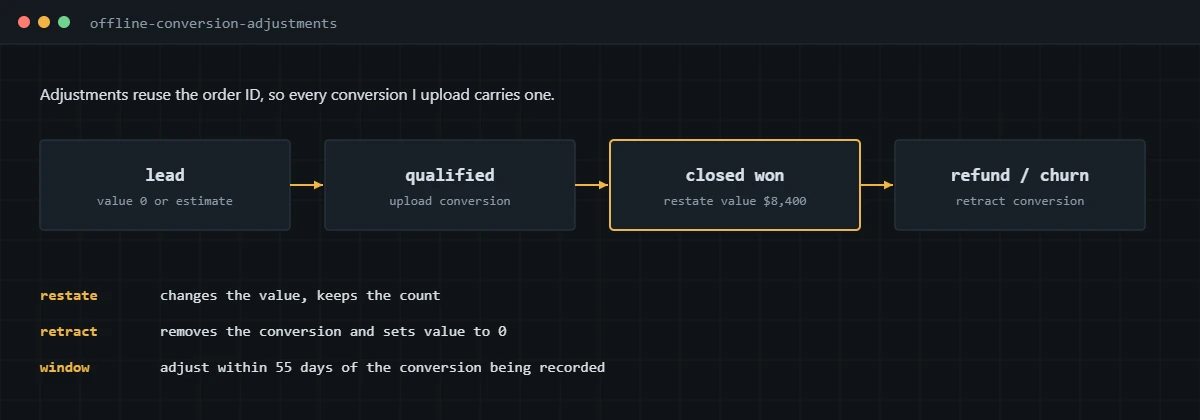
This is why I give every uploaded conversion an order ID, usually the CRM deal ID. Without it, you have to match on GCLID and conversion time, which is fragile. A retracted conversion can’t be adjusted again, and re-uploading with the same order ID is rejected as a duplicate, so retraction is final.
How do you connect a CRM to Google Ads offline conversions?
Pick the simplest route that runs reliably every day. The connection matters less than the discipline around it: one conversion action per stage, consistent order IDs, and a person who checks the upload results.
- Create a conversion action in Google Ads for each stage you want to send, with Import as the source.
- Decide the trigger in the CRM, such as a deal moving into Qualified or Closed won.
- Choose the transport: a supported connection in Data Manager, a scheduled file, a server-side GTM container, or your own integration with the Data Manager API.
- Map the fields: GCLID, gbraid, wbraid, hashed email and phone, conversion time with time zone, value, currency and order ID.
- Run a test batch, read the results file line by line, and fix rejections before scheduling it.
- Keep the stage conversions secondary until they have a few weeks of steady data, then move the one you want to bid on to primary.
Imported key events from GA4 can’t replace this, because GA4 never sees the CRM outcome. My GA4 conversion tracking guide explains where GA4 imports do fit.
Why do offline conversion uploads fail?
Almost always because the identifier never reached the CRM or the data arrived in the wrong shape. The ones I find most:
- The hidden GCLID field exists but is never populated, so every lead has a blank click ID.
- The GCLID is overwritten by a later visit from organic search, losing the paid click.
- Uploads go to a different Google Ads account than the one that served the click.
- Conversion times are in local time without a time zone, so some appear to happen before the click.
- Phone numbers are uploaded without the country code, which hurts hashed matching.
- Nobody reads the upload results, so rejections pile up for months.
If your leads close in a CRM and Google Ads only sees form fills, I can set up offline tracking end to end and verify the uploads against your deals.
Frequently asked questions
What is the difference between offline conversion import and enhanced conversions for leads?
Classic offline import matches your sales back to ads using the GCLID you stored with each lead. Enhanced conversions for leads matches using hashed customer data, such as email or phone, and can work alongside the GCLID. Google now recommends enhanced conversions for leads for new setups.
How long after a click can I upload an offline conversion?
Google accepts a conversion with a GCLID for up to 90 days after the click. Conversions matched on hashed personal data have a 63-day limit. Anything older is rejected, so long sales cycles need intermediate stages uploaded as their own conversions.
Can I still use the Google Ads API to upload offline conversions?
Only if your developer token was already importing before the cutoff and is allowlisted for legacy access. Since June 15, 2026, new offline imports have to go through the Data Manager API or Data Manager in the Google Ads interface.
Do I need the GCLID if I use enhanced conversions for leads?
Not strictly, because hashed email or phone can be the match key. I still capture the GCLID on every form, because sending both gives Google two ways to match the conversion to the click.
How often should I upload offline conversions?
At least daily if the conversion is used for Smart Bidding. Google recommends running consistent uploads for one to two conversion cycles before you switch an offline conversion to a primary bidding action.
Why are my uploaded conversions not showing in Google Ads?
Check the upload results for rejections first. The common causes are a GCLID from a different Google Ads account, a conversion time before the click time, a wrong time zone, or a click Google has not finished processing yet.
About the author
I’m Ghazanfar, founder of Analytigrow and a conversion tracking specialist. For 7+ years I’ve audited and rebuilt Google Ads, GA4, Google Tag Manager, server-side tracking on Stape, Meta Pixel and Conversions API, and CRM conversion uploads for ecommerce and lead-gen businesses in the US, UK, EU and UAE. I’m Top Rated on Upwork with 100% Job Success. Reach me at [email protected] or on WhatsApp.
Find out what's actually broken.
A tracking audit tells you exactly which events are wrong, why, and what it takes to fix them. No pitch deck, just the findings.