
Enhanced conversions for leads: setup and how to verify it
Published November 23, 2026 · Ghazanfar · 9 min read
Enhanced conversions for leads lets Google Ads credit a sale that closes offline, in your CRM, to the ad click that produced the lead. The Google tag captures a hashed email or phone number when the form is submitted, and later you upload the closed deal with the same hashed identifier. This post is for US lead-gen businesses running Google Ads who want bidding to learn from sales instead of raw form fills.
Google describes it as using first-party user-provided data from your website to measure sales and transactions that happen off the site (Google Ads Help). The part people underestimate is that it is two separate pieces of tracking that only work together. When I audit a broken setup, one half is usually fine and the other half is quietly sending nothing.
How does enhanced conversions for leads work?
The match happens on hashed customer data. On the website, the tag hashes what the visitor typed and sends it to Google Ads with the conversion. When you import the sale later, Google compares your hashed upload with that stored data and with hashed data of signed-in Google Accounts, then attributes the sale to the ad interaction (Google).
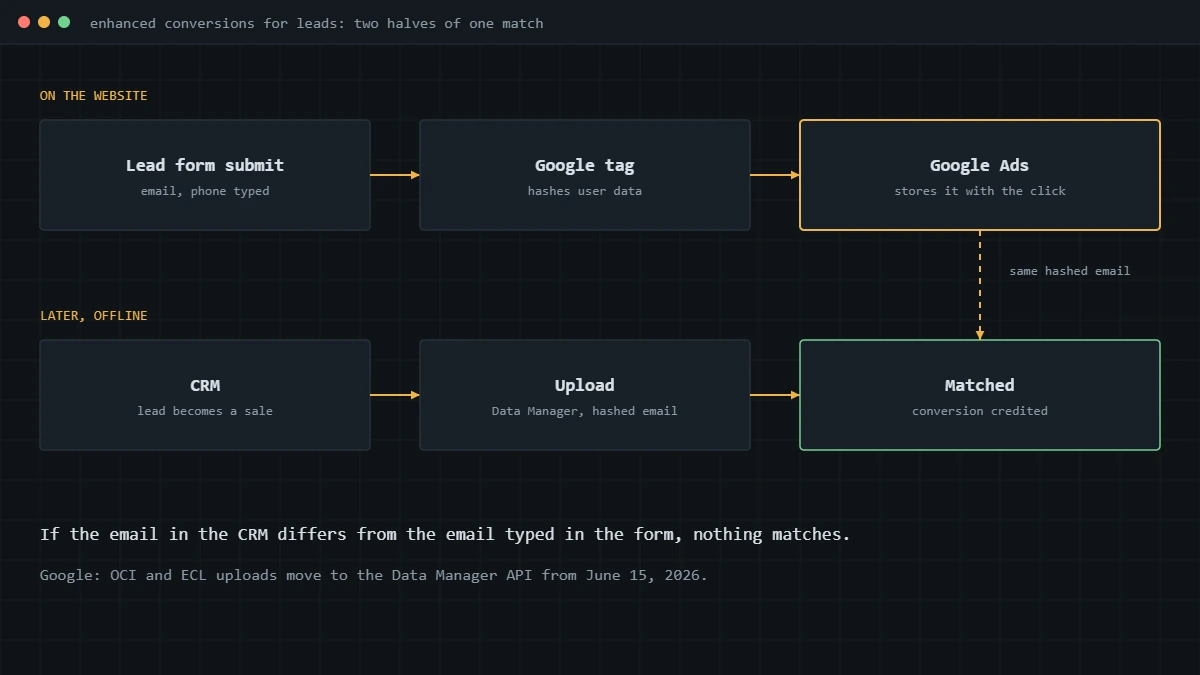
Compared with classic offline conversion import, the click ID stops being the only thread. Google says this method uses information already captured about your leads, such as email addresses, to measure conversions (About enhanced conversions). I still keep the GCLID when I can get it, and my notes on capturing and storing the GCLID for offline imports cover that side.
How do I set up enhanced conversions for leads?
Turn it on in Google Ads, accept the customer data terms, then make sure the website tag sends user data. The order I follow:
- In Google Ads, open Goals, then Conversions, then Settings. Expand enhanced conversions for leads, tick the box and choose Google tag or Google Tag Manager as the method.
- Accept the customer data terms. The status should read Accepted.
- Pick how the tag captures the data. Google offers automatic collection of form interactions, CSS selectors, or code that passes the values to the tag. Forms hosted by a third-party tool or inside an iframe may need the code option (Google).
- In GTM, the Google tag or the Google Ads user-provided data settings carry the fields. Google’s GTM steps are in Configure Google Tag Manager for enhanced conversions for leads.
- Create or choose the offline conversion action you will upload sales into, and connect the CRM or upload source.
On automatic collection: it works on plain HTML forms. On WordPress sites with form plugins that submit by AJAX, or on embedded HubSpot and Typeform forms, I usually switch to a data layer push with the email in it, because I want to know exactly which field is being read. If your forms are on WordPress, the setup for each plugin is in my post on tracking WordPress form submissions.
// After a successful submit, push the address the visitor typed
window.dataLayer = window.dataLayer || [];
dataLayer.push({
  event: "lead_submit",
  lead_email: "[email protected]",   // raw value; the Google tag hashes it
  lead_phone: "+15551234567"         // E.164 format
});
// GTM: User-Provided Data variable, Manual configuration,
// Email = {{DLV - lead_email}}, Phone = {{DLV - lead_phone}}
What changed with the Data Manager API in 2026?
The upload side moved. Google states that starting June 15, 2026, offline conversion imports and enhanced conversions for leads uploads are migrated to the Data Manager API and blocked in the Google Ads API (Google Ads Help). If a developer built your upload against the Google Ads API, check that it was moved. A script that still calls the old method fails, and the website half keeps looking healthy, so nobody notices for weeks.
For warehouse sources, Google also notes that Data Manager imports the last 14 days of data on every run for BigQuery, Redshift, Snowflake, MySQL and PostgreSQL connections. That matters if your sales team updates deal stages late.
How do I verify enhanced conversions for leads is working?
Check each half separately, then the match. Google points to the enhanced conversions diagnostics report as the place to find missing or badly formatted user data and code problems (Google). Before that report fills in, I run these checks myself:
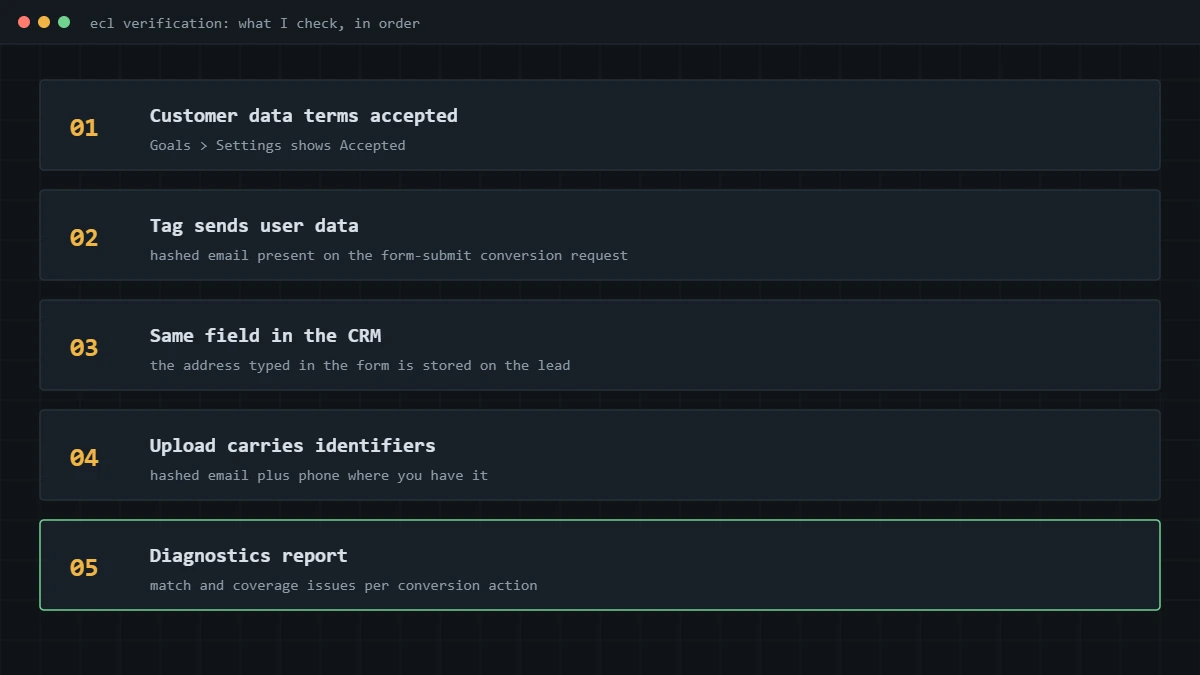
- Submit a test lead with GTM Preview open and confirm the conversion request for the lead carries hashed user data. If the hash is missing, the tag is reading an empty field, usually because it fires before the form populates the value. I mark my own device first with the GA4 internal traffic filter so test leads stay out of GA4 key events.
- Open the test lead in the CRM and confirm the same email is stored. Sales teams often overwrite it with a work address after a call, and then the upload never matches.
- Look at one upload file or API payload. Emails should be trimmed and lowercased before hashing, and phone numbers in E.164 format.
- After a few upload cycles, read the diagnostics report for the offline action.
A rule I hold to: do not judge the setup on day one. Leads take days or weeks to become sales, so the first useful read comes after your normal sales cycle plus a couple of upload runs. Until then, the website half is what you can verify.
Why are my enhanced conversions for leads not matching?
The causes I find most often, roughly in order: the customer data terms were never accepted; automatic collection picked the wrong field, such as a newsletter box in the footer; the form lives in an iframe and the tag never sees it; the CRM stores a different email from the one typed; the upload sends unhashed values that were already hashed elsewhere, or hashes values with stray spaces; and the upload job broke during the Data Manager migration. Primary and secondary settings also matter, since a sale action left as secondary records data without informing bidding. My Google Ads conversion tracking guide covers that choice, and the broader picture is in how conversion tracking fits together.
Google has also said enhanced conversions for web and for leads will be combined into a single on/off setting. The capture on your site stays the same work either way, so I would not wait for that change before fixing a leaking setup.
If your Google Ads account still bids on form fills and you want it learning from closed deals, this is the kind of setup I build and verify end to end.
Frequently asked questions
Is enhanced conversions for leads the same as offline conversion import?
It is an upgraded form of it. Classic offline import depends on the GCLID stored with each lead. Enhanced conversions for leads adds hashed email or phone captured by the tag at form submit, so a sale can still be matched when the click ID was lost.
Does enhanced conversions for leads send raw email addresses to Google?
The Google tag hashes user-provided data before it is sent, and uploads should contain hashed values. Google matches those hashes against its own hashed data, so you are never sending a readable customer list with the conversion.
Can I use enhanced conversions for leads with GTM?
Yes. Choose Google Tag Manager as the method in the Google Ads settings, then supply the email and phone through the user-provided data settings in GTM, either from automatic collection, CSS selectors or data layer variables.
How long until enhanced conversions for leads shows results?
The tag side can be checked the same day with a test lead. Matched sales only appear after leads close in the CRM and the uploads run, so expect your normal sales cycle plus a few upload runs before the diagnostics report means much.
Do I still need the Google Ads API for uploads?
Not for this. Google says offline conversion imports and enhanced conversions for leads uploads moved to the Data Manager API from June 15, 2026, and are blocked in the Google Ads API. Data Manager connectors or the Data Manager API are the supported routes.
About the author
I’m Ghazanfar, founder of Analytigrow and a conversion tracking specialist. For 7+ years I’ve set up GA4, GTM, server-side tracking and ad platform conversions for ecommerce and lead-gen businesses in the US, UK, EU and UAE. I’m Top Rated on Upwork with 100% Job Success. Reach me at [email protected] or on WhatsApp.
Find out what's actually broken.
A tracking audit tells you exactly which events are wrong, why, and what it takes to fix them. No pitch deck, just the findings.