WordPress conversion tracking: forms, plugins and caching
Last updated November 5, 2026 · Ghazanfar · 9 min read
In this post
WordPress conversion tracking means recording form submissions, calls and purchases on a WordPress site and sending them to GA4 and your ad platforms. The reliable way is to install Google Tag Manager once and trigger conversions from each form plugin’s success event, rather than from button clicks or thank-you page views.
I spent my first freelance years building and repairing WordPress sites, so I have seen most of the ways a simple contact form can produce bad conversion data. Leads counted on every button click, including failed ones. Thank-you pages counted every time someone reloads them. GTM delayed by a speed plugin until the visitor scrolls. None of these are hard to fix once you know which plugin is doing what, and that is what this guide walks through. The concepts behind it are in my conversion tracking guide.
How do you install Google Tag Manager on WordPress?
Install it once, either with a dedicated plugin or by adding the snippet to the theme’s head and body. The method matters less than making sure there is only one container and nothing else loading the same tags.
- Pick one installation method. GTM4WP is the common plugin route; a child theme header works if you control the code.
- Check the page source for other Google tags, Meta Pixel snippets or platform plugins that would fire alongside GTM.
- Remove or disable the duplicates, keeping GTM as the only place tags are configured.
- Publish an empty container, then confirm with Tag Assistant that it loads once on every page.
A WordPress site with five plugins each injecting their own tracking is the norm in audits. Moving everything into one container is usually the first and biggest fix.
How do you track form plugin submissions in WordPress?
Listen for each plugin’s success event and push a single generate_lead event to the data layer. Every platform tag then fires from that one event.
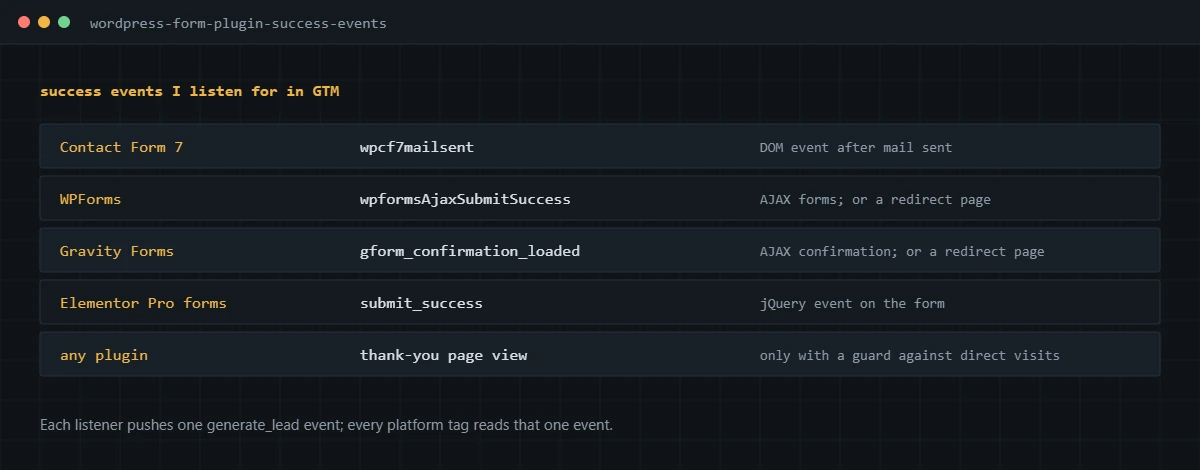
Contact Form 7 dispatches a wpcf7mailsent DOM event once the mail has been sent, documented on the Contact Form 7 DOM events page. WPForms, Gravity Forms and Elementor Pro forms fire jQuery events when an AJAX submission succeeds. This Custom HTML tag in GTM, fired on all pages, covers all four:
<script>
  window.dataLayer = window.dataLayer || [];
  function agLead(plugin, formId) {
    window.dataLayer.push({ event: 'generate_lead', form_plugin: plugin, form_id: String(formId || '') });
  }
  // Contact Form 7
  document.addEventListener('wpcf7mailsent', function (e) {
    agLead('cf7', e.detail && e.detail.contactFormId);
  });
  if (window.jQuery) {
    // WPForms (AJAX submit)
    jQuery(document).on('wpformsAjaxSubmitSuccess', function (e) {
      agLead('wpforms', jQuery(e.target).data('formid'));
    });
    // Gravity Forms (AJAX confirmation)
    jQuery(document).on('gform_confirmation_loaded', function (e, formId) {
      agLead('gravityforms', formId);
    });
    // Elementor Pro forms
    jQuery(document).on('submit_success', function (e) {
      agLead('elementor', jQuery(e.target).find('[name="form_id"]').val());
    });
  }
</script>- Add the listener as a Custom HTML tag in GTM, triggered on DOM Ready.
- Create a Custom Event trigger for generate_lead, and a data layer variable for form_id if you want to separate forms.
- Fire your Google Ads conversion, GA4 generate_lead event, Meta Lead and LinkedIn conversion tags from that trigger.
- Submit each form once in GTM Preview and confirm a single generate_lead event with the right form ID.
- Submit with a validation error and confirm nothing fires.
Forms set to redirect to a thank-you page skip the AJAX event, so for those I either switch them to AJAX with a confirmation message or use the guarded thank-you page method below. For the Google Ads side of lead tracking, including enhanced conversions, see my Google Ads conversion tracking guide.
Should you use thank-you pages or form events?
Use form events where you can. A thank-you page view only means someone loaded the page, which happens on reloads, bookmarks, shared links and crawlers as well as real submissions.
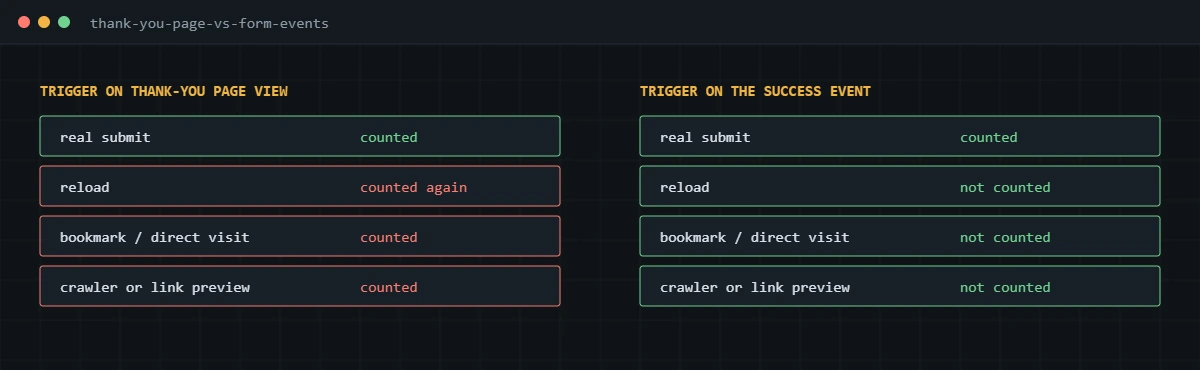
If a thank-you page is the only option, guard it. Make the form redirect with a one-time parameter, fire the conversion only when that parameter is present, and set a short-lived cookie so a reload doesn’t fire it again. Also mark the thank-you page noindex so it doesn’t pick up search traffic, which would inflate conversions further.
How do consent plugins affect WordPress conversion tracking?
They decide whether tags may use cookies and send personal data. Connected properly to Consent Mode, they let Google tags adjust; connected badly, they block everything or nothing.
For sites with visitors from regions that require consent, I set Consent Mode defaults through the consent plugin’s GTM template before any tag fires, map the plugin’s categories to ad_storage, analytics_storage, ad_user_data and ad_personalization, and then test a form submission in both states. Google’s consent mode implementation guide covers the required order. For US-only sites with an opt-out model, the same setup lets tags honor visitors who opt out. My Consent Mode v2 service goes into the details.
Which caching settings break WordPress tracking?
Settings that delay, combine or cache JavaScript and HTML. Speed plugins are the most common hidden cause of missing conversions I find on WordPress.
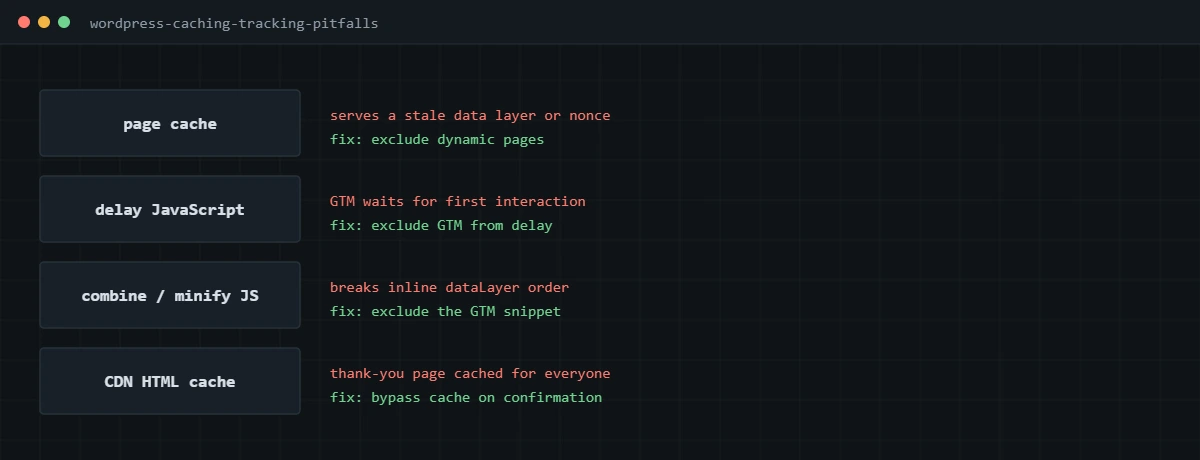
- Delay JavaScript until interaction. GTM doesn’t load until the visitor scrolls or clicks, so bounces and quick conversions are lost. Exclude googletagmanager.com and the GTM snippet.
- Combine and minify JavaScript. Inline data layer pushes can end up after the code that reads them. Exclude the GTM snippet and any data layer scripts.
- Page and CDN caching of confirmation pages. A cached confirmation page can serve another visitor’s data or skip server-side logic. Bypass cache on those pages.
- Nonce expiry on cached forms. Some form plugins reject submissions from long-cached pages, which looks like a tracking drop but is really a form failure. Test forms on a cached page, logged out.
Store owners on WooCommerce have extra considerations around the order-received page, covered in my WooCommerce Google Ads conversion tracking guide, and the wider purchase picture in my ecommerce conversion tracking guide.
If your WordPress forms show leads in the CRM that never appear in your ad platforms, or the other way round, I can audit the site and tags and fix the tracking end to end.
Frequently asked questions
What is the best way to add conversion tracking to WordPress?
Install Google Tag Manager once, through a plugin such as GTM4WP or in the theme header, then send every conversion as a data layer event. Platform plugins for each ad network work too, but they multiply scripts and make duplicates more likely.
Should I track WordPress form submissions with a thank-you page?
Only if the form redirects there after a real submission and you can stop the page counting on reloads and direct visits. Listening for the form plugin’s own success event is more reliable, because it fires once per successful submission.
Why is my Contact Form 7 conversion counting spam or failed submissions?
Usually because the trigger is a click on the submit button or a generic form submission trigger in GTM. Listen for wpcf7mailsent instead, which fires only after Contact Form 7 has validated the form and sent the mail.
Do caching plugins affect conversion tracking?
Yes. Delaying JavaScript until user interaction holds GTM back and loses page views, combining scripts can break the order of the data layer, and caching a confirmation page can show stale data. Exclude GTM from delay and minification, and do not cache confirmation pages.
How do consent plugins work with GTM on WordPress?
Plugins such as CookieYes and Complianz can set Consent Mode defaults and updates through a GTM template or their own integration. Set the default before any tag loads, then test conversions with consent granted and denied.
Can I track WordPress leads in Google Ads, Meta and LinkedIn at once?
Yes. Push one generate_lead event from the form, then fire the Google Ads, GA4, Meta and LinkedIn tags from that same trigger. Each platform gets the same lead at the same moment.
About the author
I’m Ghazanfar, founder of Analytigrow and a conversion tracking specialist. I started freelancing in 2018 building and repairing WordPress sites, and for 7+ years have set up GA4, Google Ads, Meta and server-side tracking on WordPress and WooCommerce for businesses in the US, UK, EU and UAE. I’m Top Rated on Upwork with 100% Job Success. Reach me at [email protected] or on WhatsApp.
Find out what's actually broken.
A tracking audit tells you exactly which events are wrong, why, and what it takes to fix them. No pitch deck, just the findings.