Facebook Ads conversion tracking with the Pixel and Conversions API
Last updated November 5, 2026 · Ghazanfar · 10 min read
In this post
Facebook Ads conversion tracking records purchases and leads with the Meta Pixel in the browser and the Conversions API from a server, then deduplicates the two using a shared event ID. Meta uses those events to report results, build audiences and optimize campaigns, so missing or doubled events change how your budget is spent.
The screen I open first in a Meta audit is the Overview tab in Events Manager. It tells me in under a minute whether the Pixel and server events are both arriving, whether they are being deduplicated, and how well Meta can match them to people. Most problems I fix show up right there, and most of them trace back to three things: no Conversions API, an event ID that doesn’t match, or customer data that never gets sent.
How does Facebook Ads conversion tracking work today?
It works through two channels that report the same events. The Meta Pixel is a JavaScript snippet that sends events from the visitor’s browser. The Conversions API (CAPI) is a server-to-server connection that sends the same events from your server, your store platform or a server-side tag container.
Meta combines them, removes duplicates, and matches each event to a Meta account using cookies, click IDs and hashed customer data. Matched events are credited to ads based on the attribution setting, which defaults to 7-day click and 1-day view. That default is why Meta often claims sales that GA4 credits to another channel, something I explain in my guide to conversion tracking.
Why should you run both the Pixel and the Conversions API?
Because each one loses events the other keeps. The browser misses visitors with blockers, declined consent and restricted cookies. The server can miss browser-only context unless you pass it through. Together they give Meta the most complete picture.
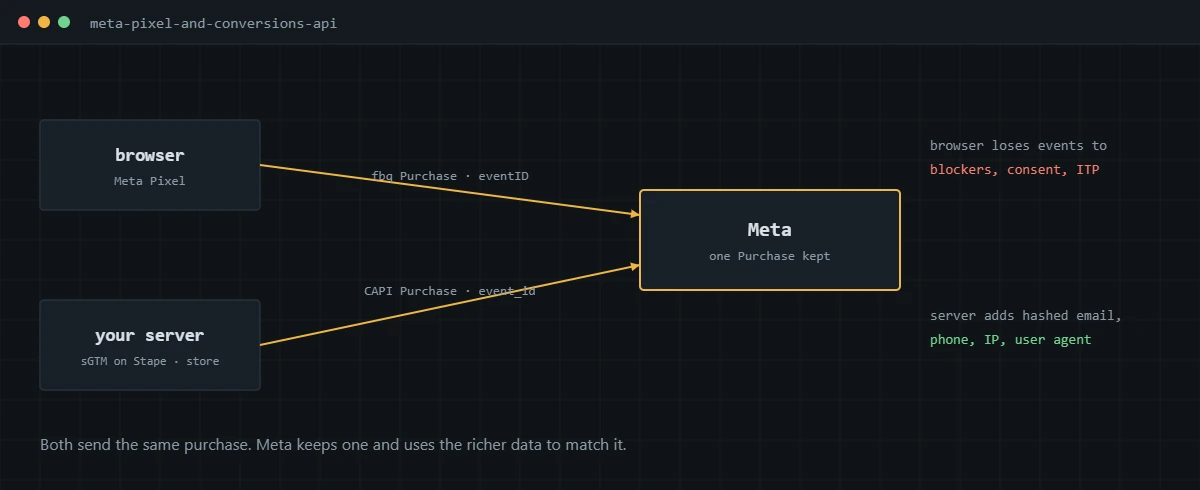
Meta’s Conversions API documentation describes it as a direct connection between your server and Meta. In practice, the server event is where I add the customer data that raises match quality, such as the email from the order and the visitor’s IP address and user agent, which the browser either can’t or shouldn’t expose to a third-party script.
How does Meta deduplicate Pixel and Conversions API events?
Meta treats two events as one when they share the same event name and the same event ID and arrive within 48 hours of each other. It generally keeps the one it received first and discards the later duplicate.
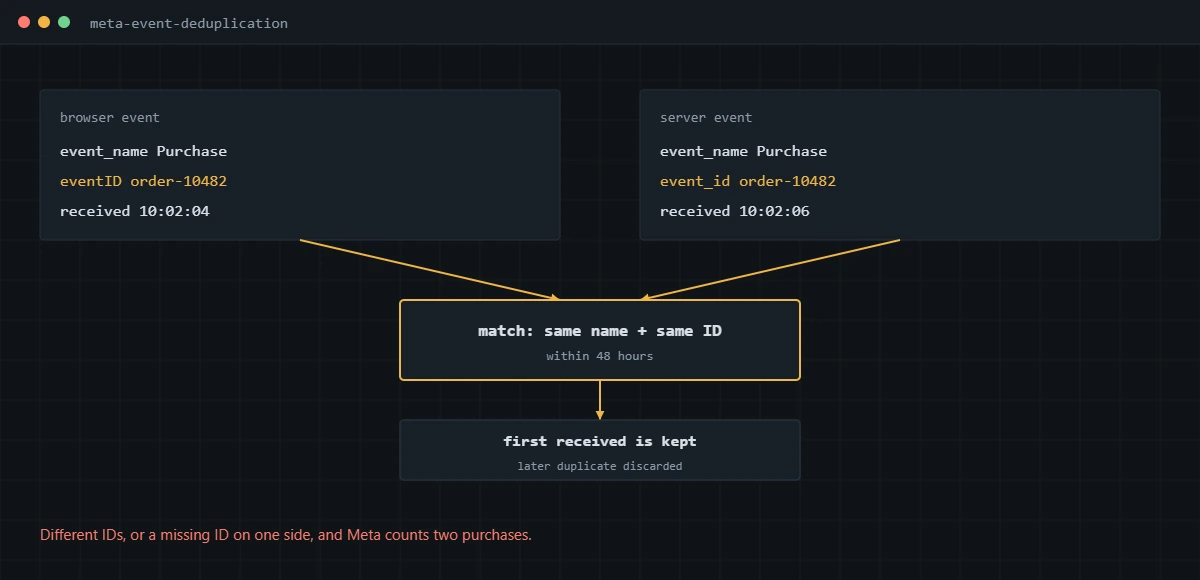
The rules come from Meta’s guide to deduplicating Pixel and server events. The Pixel passes the ID as eventID in the fourth argument of the fbq call, and the server sends it as event_id. For purchases I use the order ID, because both the browser and the server already know it:
fbq('track', 'Purchase',
  { value: 120.00, currency: 'USD' },
  { eventID: 'order-10482' }
);
For events without a natural ID, like ViewContent or Lead, I generate a random ID in the browser, push it into the data layer, and send the same value to the server container. Meta also supports a fallback that matches on fbp or external_id, but it only works when the browser event arrives first, so I don’t rely on it. LinkedIn and Microsoft Advertising also match browser and server events by ID, with different rules, which I cover in my LinkedIn conversion tracking and Microsoft Advertising conversion tracking guides.
What is Event Match Quality and how do you improve it?
Event Match Quality is Meta’s score, out of 10, for how well the customer information on an event lets Meta match it to an account. You raise it by sending more of the customer parameters you legitimately have, formatted and hashed correctly.
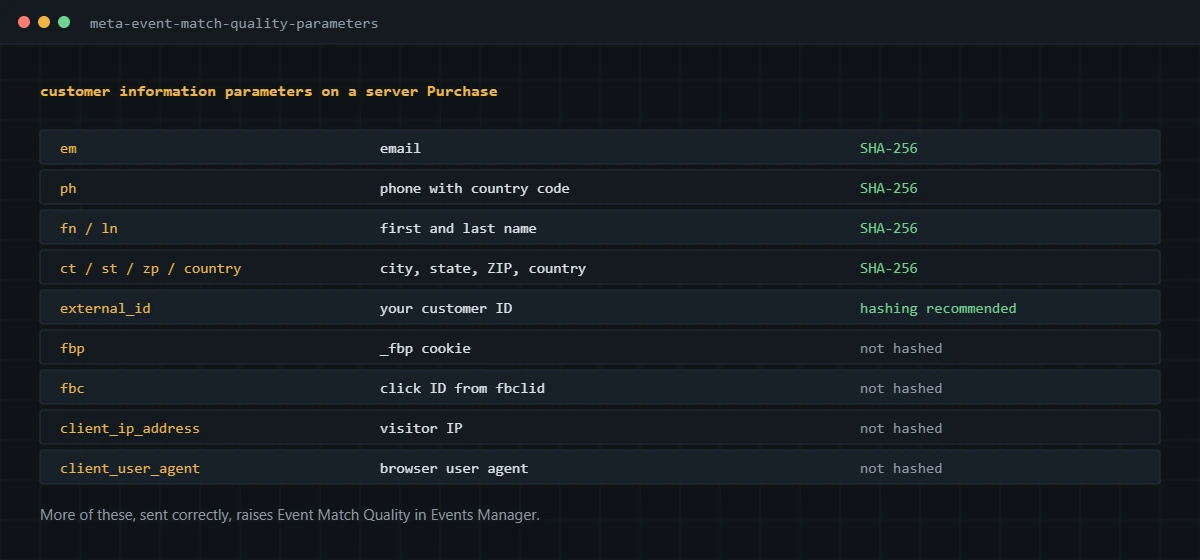
Meta lists the fields and their formats in its customer information parameters reference. Contact fields such as email, phone and name must be normalized and SHA-256 hashed. The fbp and fbc cookie values, IP address and user agent are sent unhashed. The fixes that move the score most in my audits:
- Sending email and phone on the server Purchase event, taken from the order rather than scraped from the page.
- Formatting phone numbers with the country code before hashing.
- Passing fbp and fbc from the browser to the server, so the server event carries the cookie and click IDs.
- Sending the real visitor IP and user agent, not the server’s own.
- Adding external_id, such as a customer ID, consistently on both sides.
What happened to Aggregated Event Measurement?
Meta relaxed it in 2023. Advertisers no longer have to configure and prioritize eight conversion events per domain, and domain verification stopped being mandatory, though Meta still recommends it.
Aggregated Event Measurement is the protocol Meta introduced to measure web conversions from iOS users under Apple’s tracking restrictions. Meta still processes those events with privacy limits, so iOS conversions can be delayed or modeled, but there is no event ranking to manage any more. The background is on Meta’s Aggregated Event Measurement help page. When I audit older accounts I still find campaigns built around the old eight-event list. They can be simplified.
How do you set up the Conversions API server-side with Stape?
Run a server-side GTM container on Stape, send your browser events into it, and use a Meta Conversions API tag to forward them to Meta with the same event IDs. The steps I follow:
- Create a server container in GTM and host it on Stape with a custom subdomain on your own domain, such as data.yourstore.com.
- Send events from the web container to the server container through the GA4 client, including event_id, value, currency, order ID and hashed or raw user data.
- Add the Meta Conversions API tag from the template gallery with your Pixel ID and an access token generated in Events Manager.
- Map event names to Meta standard events and pass event_id, fbp, fbc, IP address, user agent and the customer fields.
- Keep the Pixel running in the browser with the same eventID values.
- Use the Test Events tool in Events Manager to confirm each event arrives from both browser and server and shows as deduplicated.
More on how I build server containers is on my server-side tracking with Stape page, and the full Meta service is on Meta Pixel and Conversions API setup.
How do you check Meta tracking in Events Manager?
Use Test Events for a live check and the Overview and Diagnostics tabs for the ongoing picture. Then compare Meta’s purchases with your store’s orders over a full week.
- Open Test Events, enter your site URL, and complete a real purchase. Confirm one Purchase from the browser and one from the server, marked as deduplicated.
- On the Overview tab, open the Purchase event and check that both connection methods are active and that match quality is reported for server events.
- Read the Diagnostics tab for warnings about missing parameters, duplicate events or mismatched IDs.
- Check that value and currency are present on every Purchase, since value-based bidding depends on them.
- Export a week of orders and compare against Meta purchases. Remember that Meta counts view-through conversions, so it will rarely line up exactly.
If Events Manager shows duplicates, low match quality or missing server events, I can rebuild the Pixel and Conversions API setup and verify it with real orders.
Frequently asked questions
Do I need both the Meta Pixel and the Conversions API?
For most advertisers, yes. Meta recommends running both, deduplicated, because the browser and the server each catch events the other misses. The Pixel also powers features that rely on browser signals, while the server event carries richer customer data.
Why does Events Manager show my purchases twice?
Usually because the Pixel and the Conversions API send the same purchase without a matching event ID, or because two Pixel installs fire at once, such as a platform integration plus a GTM tag. Check the event ID on both sides in the Test Events tool.
What is a good Event Match Quality score?
Meta scores match quality out of 10 per event. I aim to send every customer parameter the business legitimately collects, hashed correctly, and treat the score as a symptom: a low score means data is missing or malformed, which the diagnostics usually point to.
Do I still need to verify my domain and prioritize eight events?
Meta removed the requirement to configure and prioritize eight events per domain in 2023, and domain verification became optional. I still verify the domain, because it helps with ownership and some Business Manager features.
Can I send Meta conversions server-side without coding?
Yes. Server-side GTM hosted on Stape has a Meta Conversions API tag template, and Shopify and WooCommerce have their own integrations. The data still has to be right in the browser first, especially the event ID and customer data.
Why does Meta report more conversions than my store?
Meta counts view-through conversions and uses its own attribution windows, so it will credit sales GA4 or your store attribute elsewhere. Duplicate events inflate it further. Compare purchases by order ID before deciding what is real.
About the author
I’m Ghazanfar, founder of Analytigrow and a conversion tracking specialist. For 7+ years I’ve audited and rebuilt Meta Pixel and Conversions API, Google Ads, GA4, Google Tag Manager, server-side tracking on Stape and Consent Mode v2 setups for ecommerce and lead-gen businesses in the US, UK, EU and UAE. I’m Top Rated on Upwork with 100% Job Success. Reach me at [email protected] or on WhatsApp.
Find out what's actually broken.
A tracking audit tells you exactly which events are wrong, why, and what it takes to fix them. No pitch deck, just the findings.