Conversion tracking on LinkedIn: Insight Tag, Conversions API and lead forms
Last updated November 5, 2026 · Ghazanfar · 8 min read
LinkedIn conversion tracking records leads, sign-ups and sales from people who saw or clicked your LinkedIn ads. It uses the Insight Tag on your website, the Conversions API for server and CRM data, and Lead Gen Form results recorded inside LinkedIn, all reported in Campaign Manager.
LinkedIn is usually the most expensive click in a B2B account, and it is also where tracking tends to get the least attention. In the setups I audit, the Insight Tag is installed, a page-load conversion points at a thank-you URL, and nobody has looked at it since. That counts form fills reasonably well. It says nothing about which of those leads became pipeline, which is the question LinkedIn spend is supposed to answer.
How does LinkedIn conversion tracking work?
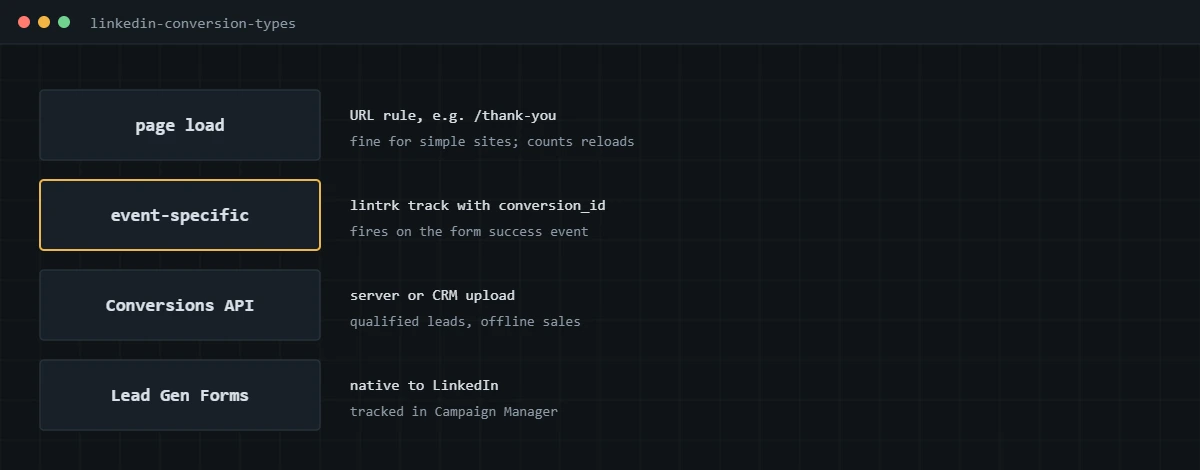
LinkedIn matches conversions to members who interacted with your ads within the click and view-through windows you choose. Conversions come in from three places, and you can combine them.
- The Insight Tag is LinkedIn’s website tag. It records conversions on page loads or on specific events you fire.
- The Conversions API is a server-to-server connection for sending conversions from your CRM or backend, including ones that happen days after the click.
- Lead Gen Forms are forms filled in on LinkedIn itself, so their submissions are counted natively.
LinkedIn’s help center has an overview in getting started with LinkedIn conversion tracking. The concepts are the same as on other ad platforms, which I cover in my conversion tracking guide.
How do you set up conversion tracking on LinkedIn?
Install the Insight Tag on every page, create a conversion in Campaign Manager, and attach it to your campaigns. I prefer event-specific conversions fired from GTM over page-load rules.
- In Campaign Manager, open the Insight Tag settings for the ad account and copy the partner ID.
- In GTM, add the LinkedIn Insight Tag with that partner ID, firing on all pages after consent where consent applies.
- Create a conversion in Campaign Manager. Choose the conversion type, such as Lead or Purchase, set the value if you have one, and set the click and view-through windows.
- Choose event-specific tracking and note the conversion ID LinkedIn gives you.
- In GTM, fire an Insight Tag event tag with that conversion ID from your form’s success event. On WordPress, that is the same generate_lead event described in my WordPress conversion tracking guide.
- Attach the conversion to each campaign that should be measured or optimized against it.
- Submit a test lead and check the conversion’s status in Campaign Manager over the next day.
Page-load conversions on a thank-you URL are quicker to set up, but they count reloads and direct visits. If you use them, keep the thank-you page out of search and out of navigation.
How does the LinkedIn Conversions API work?
It sends conversions from your server or CRM to LinkedIn with identifiers LinkedIn can match, such as a hashed email or LinkedIn’s click ID. It is the route for qualified leads and closed deals.
LinkedIn documents the API in its Conversions API overview. In practice there are three ways to run it: native CRM integrations LinkedIn supports, a server-side GTM container on Stape with a LinkedIn Conversions API tag, or your own integration. The data I send is the same as for Google’s offline uploads: hashed email, the LinkedIn click ID captured from the landing page when present, conversion time, value and a stable event ID. My offline conversion tracking guide covers how to capture click IDs into a CRM, and it applies here too.
How do you deduplicate Insight Tag and API conversions?
Send the same eventId from both. When LinkedIn receives an Insight Tag event and a Conversions API event with the same ID from the same account, it keeps the Insight Tag event and discards the API one.
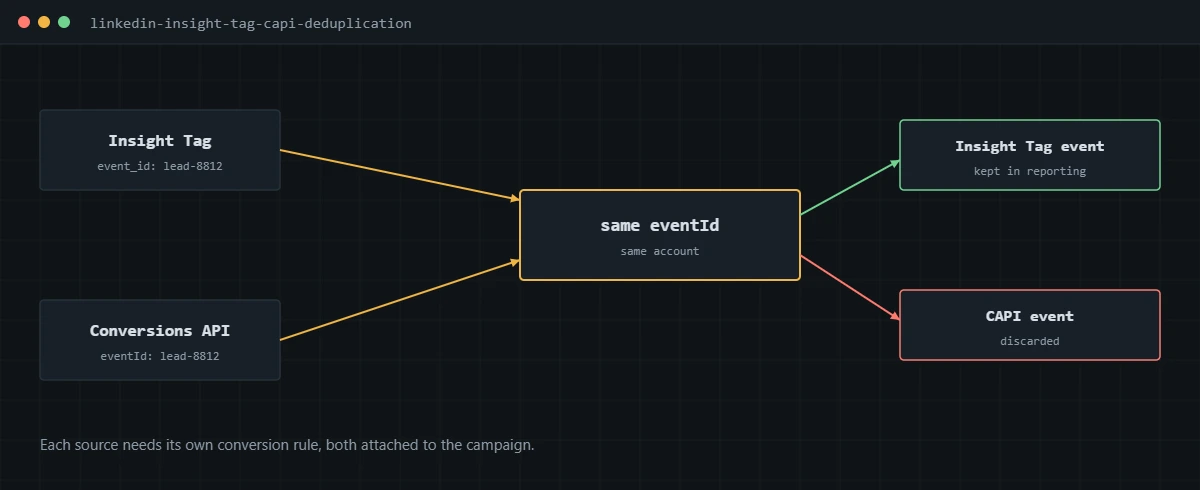
The behavior is described in LinkedIn’s deduplication documentation, which also requires a separate conversion rule for each data source, both attached to the campaign. Reporting then shows two conversions, and the server one only counts what the browser missed. With GTM, I push the ID with the form event and pass it to the Insight Tag event tag:
window.dataLayer.push({
  event: 'generate_lead',
  event_id: 'lead-8812'
});

// Insight Tag event (or the GTM template field)
window.lintrk('track', { conversion_id: 1234567, event_id: 'lead-8812' });
This is a different rule from Meta, where whichever event arrives first is kept. I explain Meta’s version in my Facebook Ads conversion tracking guide.
How are Lead Gen Form conversions tracked?
LinkedIn counts Lead Gen Form opens and submissions itself, so they need no website tag. The gap is what happens to those leads afterwards.
Lead Gen Form leads flow to your CRM through LinkedIn’s integrations or a download. To tell LinkedIn which of them became qualified or closed, send those outcomes back through the Conversions API. Without that, campaigns optimize toward the cheapest form fills, which in B2B often means the least qualified.
How do you verify LinkedIn conversion tracking?
- Check the Insight Tag status in Campaign Manager shows it as active on your domain.
- In GTM Preview, submit a test lead and confirm the Insight Tag event fires once with the right conversion ID and event ID.
- In the browser network tab, filter for px.ads.linkedin.com and confirm the conversion request is sent.
- For the Conversions API, confirm the server request succeeds and that both conversion rules are attached to the campaign.
- After a few days, compare LinkedIn conversions with LinkedIn-sourced leads in your CRM.
LinkedIn also expects consent to be respected for members in regions where it applies. I wire the Insight Tag to the same consent setup as the Google and Meta tags, so one choice controls them all. The Microsoft side of the B2B mix is in my Microsoft Advertising conversion tracking guide.
If LinkedIn reports form fills but not the pipeline behind them, I can set up the Insight Tag, the Conversions API and CRM outcomes, and verify them against your leads.
Frequently asked questions
What is the LinkedIn Insight Tag?
It is LinkedIn’s JavaScript tag for your website. It records page views and conversions from visitors who saw or clicked your LinkedIn ads, and powers website retargeting audiences.
Do I need the LinkedIn Conversions API?
If your sales happen after the form, in a CRM, yes. The Conversions API lets you send qualified leads and closed deals back to LinkedIn, which the Insight Tag can never see. It also recovers some conversions the browser tag misses.
How does LinkedIn deduplicate Insight Tag and API conversions?
When both send an event with the same eventId from the same account, LinkedIn counts the Insight Tag event and discards the Conversions API one. You need a separate conversion rule for each source, both attached to the campaign.
Do Lead Gen Form submissions need the Insight Tag?
No. Lead Gen Forms are filled in on LinkedIn, so LinkedIn records them natively in Campaign Manager. What you still need is a way to send the outcome of those leads, such as qualified or won, back through the Conversions API.
Why are my LinkedIn conversions much lower than my form submissions?
LinkedIn only counts conversions it can tie to a LinkedIn ad interaction within the attribution windows you set. Most of your form submissions come from other channels. A large gap on LinkedIn-sourced leads, though, usually points to a tag that fires late or not at all.
Can I track LinkedIn conversions with Google Tag Manager?
Yes. Load the Insight Tag base code in GTM on all pages, then fire event-specific conversions from the same form success events you use for Google Ads and Meta, passing an event ID if you also send the Conversions API.
About the author
I’m Ghazanfar, founder of Analytigrow and a conversion tracking specialist. For 7+ years I’ve set up and fixed conversion tracking across LinkedIn, Google Ads, Meta, Microsoft Advertising, GA4 and server-side GTM on Stape for B2B and ecommerce businesses in the US, UK, EU and UAE. I’m Top Rated on Upwork with 100% Job Success. Reach me at [email protected] or on WhatsApp.
Find out what's actually broken.
A tracking audit tells you exactly which events are wrong, why, and what it takes to fix them. No pitch deck, just the findings.