Bing Ads conversion tracking with Microsoft Advertising UET
Last updated November 5, 2026 · Ghazanfar · 8 min read
In this post
Bing Ads conversion tracking, now Microsoft Advertising conversion tracking, uses the Universal Event Tracking (UET) tag on your site and conversion goals in your account. The tag records visits and events, the goals define what counts as a conversion, and Microsoft uses them for reporting and automated bidding.
Microsoft Advertising (formerly Bing Ads) is the account most advertisers set up by importing their Google campaigns and then forgetting. The campaigns arrive; the tracking often does not, or arrives as a destination-URL goal pointing at a page that no longer exists. Because the audience overlaps with Google but the auction is cheaper, getting conversions right here tends to pay back quickly. This is how I set it up properly.
What is the UET tag and how does it work?
The Universal Event Tracking (UET) tag is Microsoft Advertising’s website tag. It loads on every page, records visits and events, and stores the Microsoft click ID, called msclkid, that auto-tagging adds to ad landing pages.
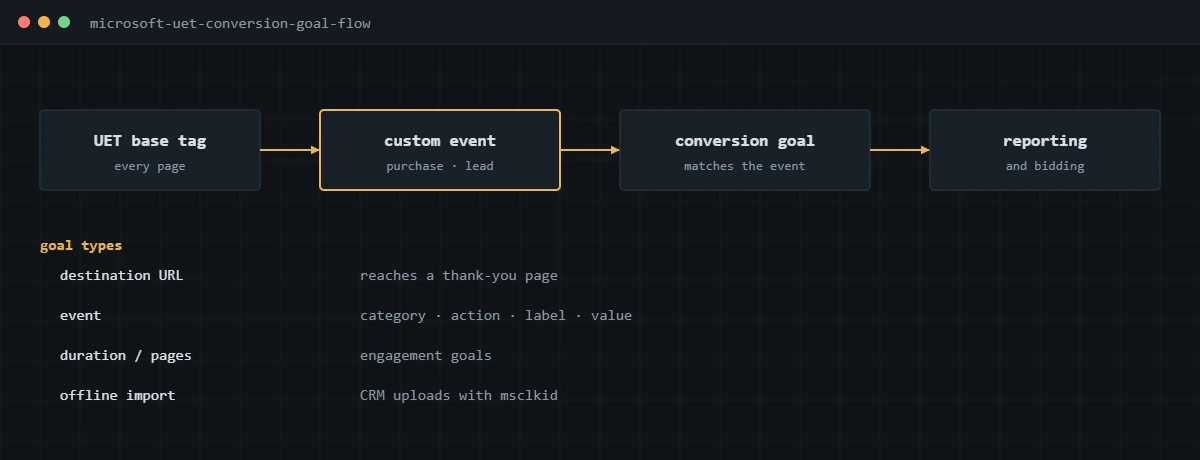
A conversion goal is the rule in Microsoft Advertising that decides which UET data counts as a conversion. Goals can be based on a destination URL, a custom event, visit duration, pages per visit, or offline imports. The UET tag is shared across goals, so one tag on the site serves all of them. The same principles apply here as on every other ad platform, which I cover in my conversion tracking guide.
How do you set up Bing Ads conversion tracking?
Create a UET tag, install it on every page through GTM, then create event goals that match events your site sends with real values.
- In Microsoft Advertising, go to Conversions, then UET tag, and create a tag. Copy the tag ID.
- In GTM, add the Microsoft Advertising UET tag template with that ID, firing on all pages, after the consent defaults are set.
- Make sure auto-tagging of msclkid is on in the account settings.
- Create a conversion goal of type Event, for example category purchase, and choose a variable revenue value.
- In GTM, fire a UET event tag from your purchase or lead data layer event, sending the event action, revenue value and currency.
- Complete a test conversion and check the goal status in Microsoft Advertising over the next day.
The event call the tag ends up making looks like this:
window.uetq = window.uetq || [];
window.uetq.push('event', 'purchase', {
  revenue_value: 120.00,
  currency: 'USD',
  event_id: 'order-10482'
});
I use event goals over destination URL goals for the same reason I avoid thank-you page triggers elsewhere: an event fires once per conversion and carries the value. If your site is on WordPress, the form events in my WordPress conversion tracking guide can drive the UET tag the same way they drive Google and Meta.
How does UET consent mode work?
The UET tag reads a default consent state on page load and an update when the visitor makes a choice. When ad storage is denied, it measures without cookies.
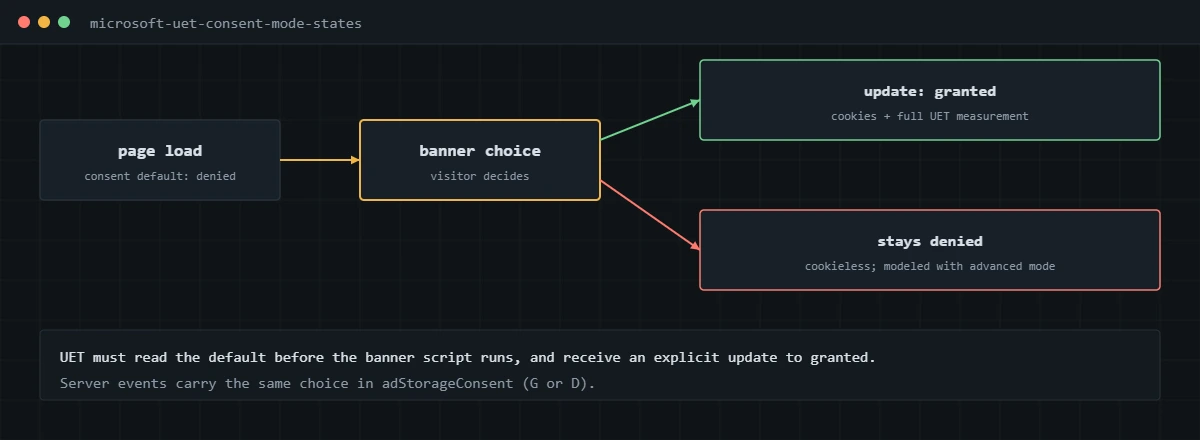
The default is set before the banner script runs, and the update follows the visitor’s choice:
window.uetq = window.uetq || [];
window.uetq.push('consent', 'default', { ad_storage: 'denied' });

// after the visitor accepts
window.uetq.push('consent', 'update', { ad_storage: 'granted' });
Microsoft explains in its post on advanced consent mode that UET has to load before the consent platform so it sees the default from the first page view, and that it stays in denied mode until it receives an explicit update. Most consent platforms, including CookieYes and Cookiebot, can send these signals through GTM. For US-only advertisers, I still wire it, because it lets the tag honor opt-outs and keeps behavior consistent with the Google tags.
How do enhanced conversions work in Microsoft Advertising?
You send a hashed email address or phone number with the conversion, and Microsoft uses it to match conversions it would otherwise miss. It can come from the UET tag in the browser or from the UET Conversions API.
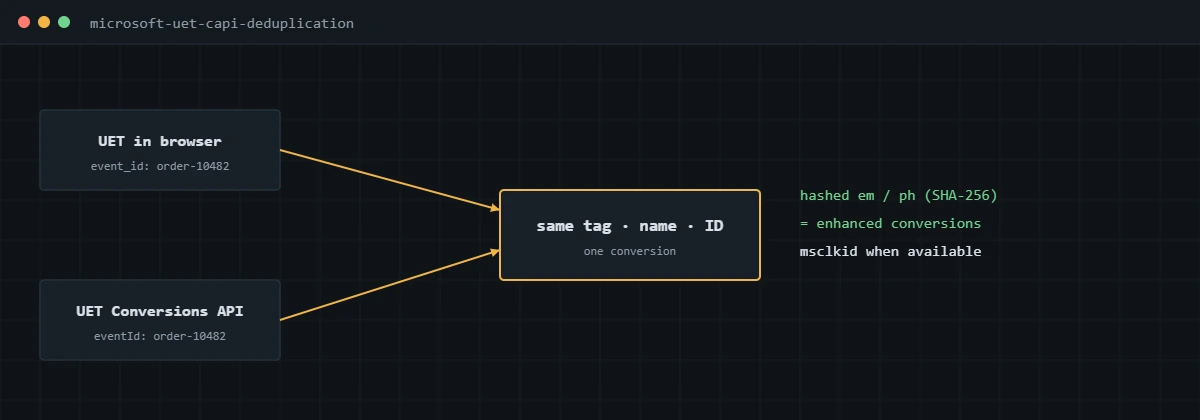
Microsoft’s UET Conversions API documentation recommends sending hashed emails and phone numbers whenever they are available, normalized and SHA-256 hashed, with phone numbers in international format. When the browser tag and the API send the same conversion, they need the same tag ID, event name and event ID so Microsoft counts it once. Server events also carry the visitor’s consent choice in the adStorageConsent field, and events marked as denied are not used for advertising.
The server side follows the same pattern as Meta’s Conversions API, which I explain in my Facebook Ads conversion tracking guide, and a Stape server container can run both.
Can you import conversion goals from Google Ads?
Microsoft’s Google Import brings campaigns across, and it can bring conversion goals too. I treat imported goals as a starting point, because each one still needs a UET event that actually fires on the site.
Microsoft lists conversion goals among the things Google Import can bring across, in its announcement of the updated Google Import. After any import I go through the goal list and check each goal is active and recording, that duplicates of the same conversion aren’t both counted, and that values match what the site sends. Imported destination URL goals pointing at old thank-you pages are the most common thing I switch off.
How do you verify Microsoft Advertising conversion tracking?
- Use the Microsoft UET Tag Helper browser extension, or the network tab filtered for bat.bing.com, and confirm the base tag loads once on every page.
- Complete a test conversion and confirm one UET event with the right action, revenue value and currency.
- Test the consent banner in both states and confirm the tag stops using cookies when denied.
- In Microsoft Advertising, check that each goal’s tracking status shows it is recording conversions.
- After a week, compare Microsoft conversions with backend orders or leads that came from Microsoft clicks.
For the other B2B platform in most accounts, see my LinkedIn conversion tracking guide.
If your Microsoft Advertising account was imported from Google and its conversion goals were never checked, I can audit and rebuild them alongside your Google and Meta tracking.
Frequently asked questions
Is Bing Ads the same as Microsoft Advertising?
Yes. Bing Ads was renamed Microsoft Advertising, and the tracking tag is the same Universal Event Tracking (UET) tag. Ads run on Bing and Microsoft’s partner network.
Can I use my Google Ads conversion tags for Microsoft Advertising?
No. Microsoft needs its own UET tag and conversion goals. You can fire both from the same data layer events in GTM, so each platform receives the same conversion at the same time.
What is the difference between UET event goals and destination URL goals?
A destination URL goal counts a visit to a page, such as a thank-you page, so it also counts reloads and direct visits. An event goal counts a specific event your tag sends, which I prefer because it fires once per real conversion and can carry the order value.
Does Microsoft Advertising have enhanced conversions?
Yes. You can send a hashed email or phone number with conversions, from the UET tag or the UET Conversions API, to improve matching. Microsoft recommends sending them whenever they are available.
How does UET consent mode work?
The UET tag reads a default consent state, usually denied where consent is required, and an update to granted when the visitor accepts. When denied, it does not use cookies. Server events pass the same choice in the adStorageConsent field.
Why does Microsoft Advertising report different conversions from Google Ads?
Each platform counts only conversions from its own ad clicks and views, with its own attribution settings. Compare each one against your backend orders or leads rather than against each other.
About the author
I’m Ghazanfar, founder of Analytigrow and a conversion tracking specialist. For 7+ years I’ve set up and fixed conversion tracking across Microsoft Advertising, Google Ads, Meta, LinkedIn, GA4 and server-side GTM on Stape for businesses in the US, UK, EU and UAE. I’m Top Rated on Upwork with 100% Job Success. Reach me at [email protected] or on WhatsApp.
Find out what's actually broken.
A tracking audit tells you exactly which events are wrong, why, and what it takes to fix them. No pitch deck, just the findings.