Conversion tracking is the setup that records when a visitor completes an action you care about, such as a purchase, a lead form or a booked call, and reports it to your analytics and ad platforms along with the click or campaign that drove it. Google Ads, Meta and GA4 all rely on it to decide which ads make money.
Most of the audits I run start the same way. Someone has three dashboards open, none of them agree, and the ad account is bidding on numbers nobody trusts. This guide is the explanation I end up giving in those calls, written down once: what conversion tracking actually is, how the data travels, where it breaks, and how I check a setup from the ground up.
What is conversion tracking?
Conversion tracking is the measurement layer that connects an ad interaction to a result. Without it, an ad platform knows who clicked but has no idea who bought.
A few terms come up constantly, so here is how I use them. A conversion is a valuable action a visitor completes, like a purchase or a submitted form. A conversion action is how an ad platform defines and counts that action, including its value, counting rules and attribution window. A tag (or pixel) is the snippet of code that reports the action. A click ID is the identifier an ad platform adds to the landing page URL, such as Google’s gclid or Meta’s fbclid, so a later conversion can be matched back to the click.
In GA4 the vocabulary changed in 2024. What GA4 used to call conversions are now key events, and the word conversion is reserved for Google Ads conversions, as Google explains in its key events and conversions help article. I cover how the two relate in my GA4 conversion tracking guide.
How does conversion tracking work?
It works by carrying an identifier from the ad click to the moment of conversion, then handing both to the platform so it can credit the right campaign. Every reliable setup I build follows the same chain.
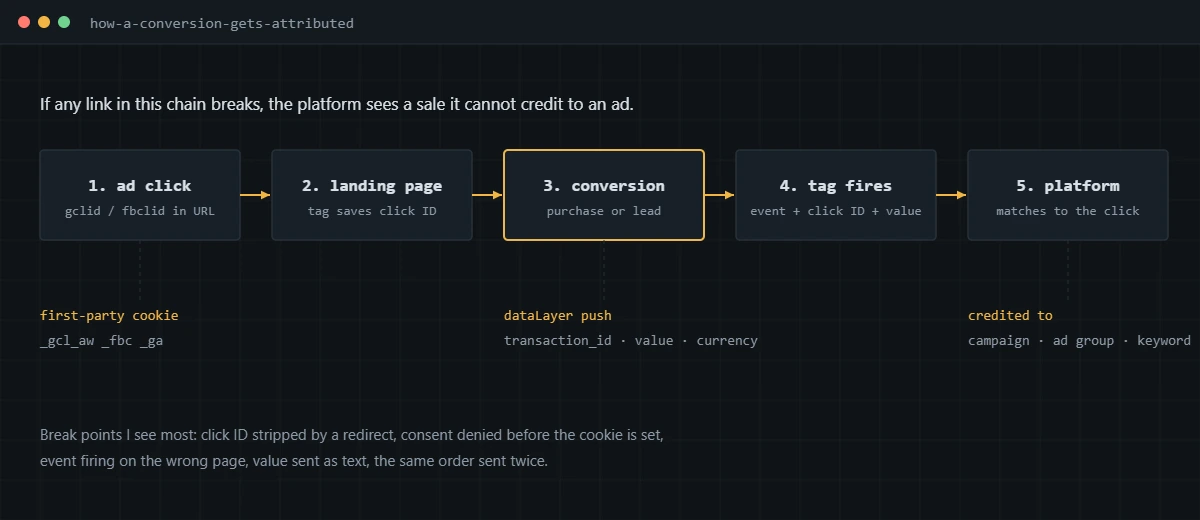
- A visitor clicks an ad and lands on your site with a click ID in the URL.
- A tag on the landing page reads that ID and stores it in a first-party cookie, for example _gcl_aw for Google Ads or _fbc for Meta.
- The visitor converts. The site pushes the details, such as order ID, value and currency, into the data layer.
- The conversion tag fires and sends the event, the stored click ID and any hashed customer data to the platform.
- The platform matches the event to the original click and credits the campaign, ad group and keyword.
When I find a broken setup, the fault is nearly always one link in that chain. A redirect strips the click ID. A consent banner blocks the cookie before it is written. The purchase tag fires on a page view of the thank-you page, so every refresh counts again. The value arrives as a text string and the platform ignores it.
Which conversions should you track?
Track the actions that represent money or a clear step toward it, and optimize your bidding on only one or two of them.
For an online store, the purchase with its real value is the one that matters. Add to cart and begin checkout are useful for diagnosis, but I keep them as secondary actions so they inform reporting without steering bids. For lead generation, the qualified lead is the target. A form submission is a start, and a lead that your sales team marks as qualified or closed is better. That second step usually means connecting your CRM, which is where offline conversion tracking comes in.
In Google Ads, this split is formalized as primary and secondary conversion actions. Primary actions feed the Conversions column and bidding. Secondary actions appear in All conversions for observation only. The single most common bidding mistake I see is a page view or a scroll event sitting as a primary action next to purchases.
How does PPC conversion tracking work across ad platforms?
PPC conversion tracking works the same way on every network: a platform tag records the conversion and matches it to that platform’s own ad clicks. The differences are in how each platform collects data and what it accepts from your server.
- Google Ads uses the Google tag or a GTM conversion tag, with optional enhanced conversions that send hashed email or phone data. Google’s conversion tracking overview lists the supported sources. I go through setup step by step in my Google Ads conversion tracking guide.
- Meta uses the Meta Pixel in the browser and the Conversions API from a server, deduplicated by a shared event ID. My Facebook Ads conversion tracking guide covers the setup.
- LinkedIn uses the Insight Tag and its own Conversions API, plus native lead gen form conversions.
- Microsoft Advertising uses the UET tag with conversion goals and its own consent mode.
Each platform only sees its own clicks. Meta has no idea a buyer also clicked a Google ad an hour earlier, so both platforms can claim the same sale. That is expected behavior, and it is one reason the totals across ad accounts will add up to more than your real orders.
Where does GA4 fit in?
GA4 is your cross-channel record of what happened on the site. It sees organic search, email, social and paid traffic together, so it is the best place to compare channels against each other.
You can import GA4 key events into Google Ads as conversions, but I rarely make that the main bidding source. Google states that imported conversions only start counting from the day you import them, with no historical backfill, in its guide to creating Google Ads conversions from key events. Google also notes that enhanced conversions in Google Ads do not work for imported Analytics conversions. For accounts that rely on bidding, I prefer a native Google Ads conversion tag for purchases and leads, with GA4 imports kept as secondary.
What is the difference between client-side and server-side tracking?
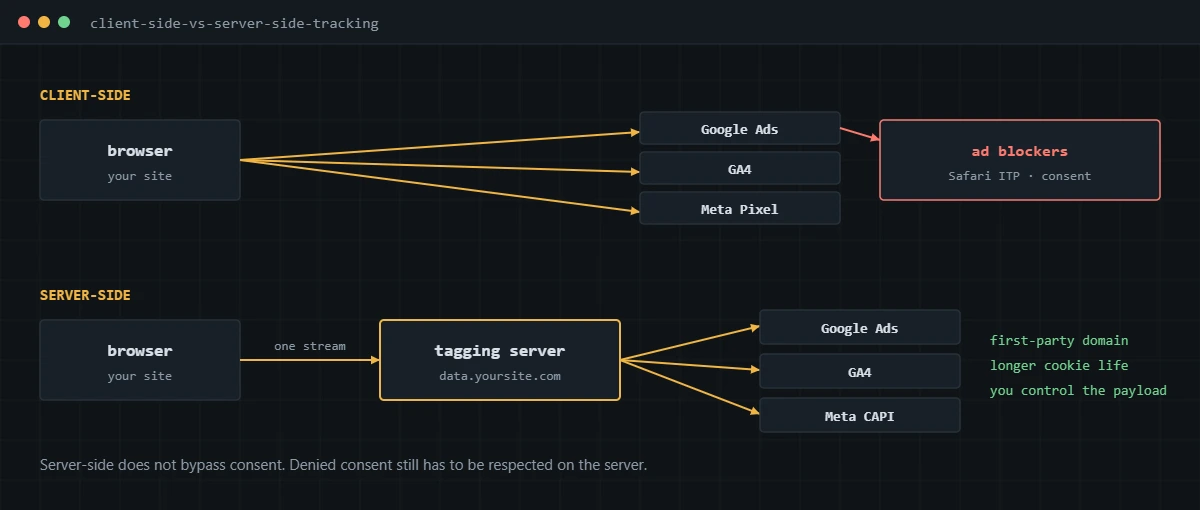
Client-side tracking sends data straight from the visitor’s browser to each platform. Server-side tracking sends one stream from the browser to a tagging server you control, which then forwards the data to each platform.
| Client-side | Server-side | |
|---|---|---|
| Where tags run | In the visitor’s browser | In a server container, such as server-side GTM hosted on Stape |
| Domain the browser talks to | Each vendor’s domain | Your own subdomain |
| Affected by ad blockers | Heavily | Much less |
| Control over data sent | Limited to what each tag collects | Full: you can enrich, filter or remove fields |
| Running cost | None beyond setup | Monthly hosting fee |
| Setup effort | Low | Moderate, and it still needs a clean client-side layer |
Server-side is an upgrade on top of a working browser setup. If the purchase event in the browser is wrong, the server just forwards the wrong data more reliably. I always fix the client-side layer first, then move the platforms that benefit most, usually Meta’s Conversions API and Google Ads, to the server. My server-side tracking service covers how I set that up with Stape.
How does consent affect conversion tracking?
Consent decides what your tags are allowed to collect, and Google’s tags read that decision through Consent Mode. If consent signals are missing or wrong, conversions either disappear or get collected when they shouldn’t be.
Consent Mode is Google’s framework for passing a visitor’s choices to its tags. Version 2 added two signals on top of ad_storage and analytics_storage: ad_user_data, which covers sending user data to Google for advertising, and ad_personalization, which covers remarketing. Google’s consent mode documentation notes that when ad_user_data is denied, hashed data for enhanced conversions is not sent.
For US businesses, the practical picture is mixed. Consent Mode is a requirement for traffic from the European Economic Area and the UK, and many US stores sell there without realizing it. Inside the US, several state privacy laws give visitors the right to opt out of data sharing for advertising, and Consent Mode is a clean way to make your tags respect that choice. I set it up through the consent platform’s GTM template, then check every tag’s behavior in both the granted and denied states. More on that in my Consent Mode v2 service.
Why don’t Google Ads, GA4 and Meta show the same numbers?
They don’t match because each tool counts different clicks, over different windows, on different dates. A gap between them is normal. A gap you can’t explain is the problem.
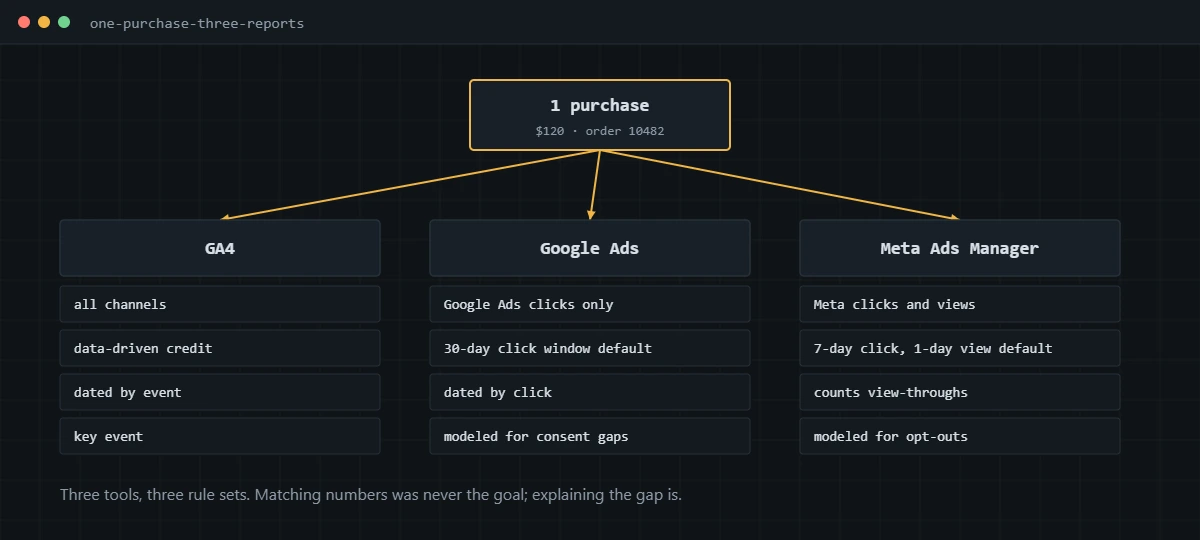
Here is what I check when a client asks why the numbers disagree:
- Scope. GA4 credits every channel. Each ad platform only credits its own ads, and Meta also counts view-through conversions from people who saw an ad without clicking.
- Attribution windows. Google Ads defaults to a 30-day click window. Meta defaults to 7-day click and 1-day view. GA4 uses its own lookback settings.
- Dating. Google Ads reports a conversion on the date of the click. GA4 reports it on the date the event happened. A sale on Monday from a click on Friday lands in different weeks.
- Modeling. Google Ads and Meta add modeled conversions where consent or browser limits hide the real ones. GA4 reports observed key events.
- Duplicates and gaps. This is the part that is actually broken: the same order sent twice, or orders that never fire a tag at all.
The fastest way to separate expected gaps from broken tracking is to compare against your source of truth, meaning the store backend or CRM. I walk through that comparison for Shopify in why your GA4 revenue doesn’t match Shopify, and the platform-agnostic version in my ecommerce conversion tracking guide, with WooCommerce specifics in WooCommerce Google Ads conversion tracking.
How do you audit your conversion tracking?
Audit it against real conversions and your own backend records, one platform at a time. This is the order I work in:
- List every conversion action in every platform and mark which ones are primary. Anything primary that isn’t a real business outcome gets flagged.
- Open GTM Preview and Tag Assistant, complete a real test conversion, and count how many times each tag fires. One conversion should produce one event per platform.
- Check the payload on each hit: order or lead ID, value as a number, currency, and hashed user data where enhanced matching is on.
- Test the consent banner in both states. With consent denied, tags should hold back. With consent granted, they should fire normally.
- Click a real ad or add a test gclid to the URL, then confirm the click ID survives redirects and lands in the first-party cookie.
- Pull a full week of orders or leads from the backend and compare them to each platform, by ID where possible. Lost, duplicated and mis-valued conversions show up straight away.
- Fix in that order: duplicates first, then missing events, then value and data quality, then server-side and consent improvements.
None of this is finished until it has been verified on the live site with real conversions. I don’t sign off on a fix until the numbers in the platform line up with the backend for a full reporting period.
If you’d rather have this audit done on your own accounts, I run it as a fixed-scope engagement: audit first, fixes second, live verification with proof at the end.
Frequently asked questions
Is conversion tracking the same as Google Analytics?
No. GA4 is an analytics tool that records events across every channel. Conversion tracking is the wider setup that tells each ad platform which clicks led to a purchase or lead. GA4 can feed Google Ads, but Meta, LinkedIn and Microsoft Advertising each need their own tag or API connection.
Do I need Google Tag Manager for conversion tracking?
You don’t strictly need it, since platform tags and store integrations can work on their own. I use GTM on almost every site because it keeps every tag, trigger and data point in one place, which makes duplicates and missing parameters much easier to find and fix.
Is server-side tracking worth it for a small business?
It depends on spend and audience. If you spend meaningfully on Meta or Google and a large share of your buyers use Safari or ad blockers, server-side usually pays for itself. For a site with a handful of monthly leads, a clean client-side setup is the better first step.
How long does it take for conversions to show up in Google Ads?
In the accounts I work in, tag-based conversions usually start showing within a few hours. Conversions imported from GA4 take longer because they wait on GA4 processing first, and offline conversions only appear after each upload is processed.
Why is my conversion tag showing as inactive or unverified?
Most often the tag isn’t on the page where the conversion happens, it fires before consent is given, or no conversion has occurred since it was installed. Check the tag with Tag Assistant on a real test conversion before changing anything in the ad platform.
Can I track phone calls and offline sales?
Yes. Calls can be tracked with call extensions, website call tracking or a call tracking tool. Sales that close later in a CRM are tracked by storing the click ID or the customer’s hashed email with the lead and sending the result back to the ad platform when the deal closes.
About the author
I’m Ghazanfar, founder of Analytigrow and a conversion tracking specialist. For 7+ years I’ve audited and rebuilt GA4, Google Tag Manager, server-side tracking on Stape, Meta Pixel and Conversions API, and Consent Mode v2 setups for ecommerce and lead-gen businesses in the US, UK, EU and UAE. I’m Top Rated on Upwork with 100% Job Success. You can reach me at [email protected] or on WhatsApp.