Ecommerce conversion tracking that reconciles with your store
Last updated November 5, 2026 · Ghazanfar · 11 min read
In this post
Ecommerce conversion tracking records each order, with its ID, value, currency and items, and sends it to GA4 and your ad platforms so they can attribute revenue to channels and campaigns. It works when every platform receives one purchase per order, with the same values, and the totals reconcile against your store backend.
I judge an ecommerce setup by one test: can I take last week’s orders from the store, line them up against what GA4 and the ad platforms recorded, and explain every difference? If I can, the tracking is healthy even when the totals disagree. If I can’t, the platforms are bidding on numbers nobody understands. This guide is about passing that test. It assumes you know the basics of how conversion tracking works, which my conversion tracking guide covers.
What should an ecommerce purchase event contain?
It should carry everything any platform needs, in one consistent data layer push: the order ID, value as a number, currency, tax, shipping, the items, hashed customer data and an event ID for deduplication.
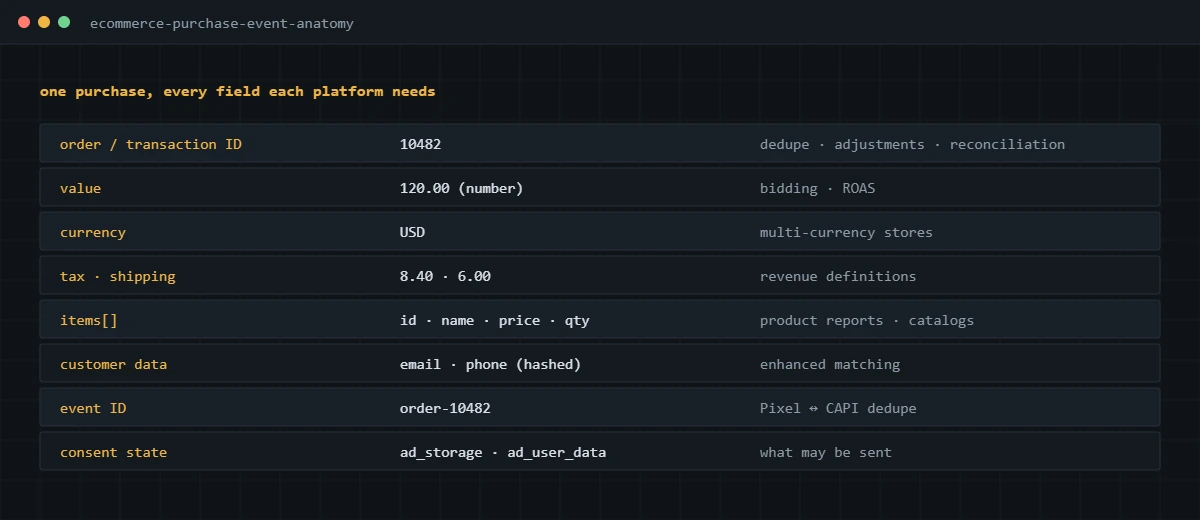
GA4 defines the purchase parameters in Google’s GA4 ecommerce developer guide, and I use that structure as the base even for stores that don’t care about GA4, because Google Ads and Meta tags can read from it in GTM. The order ID matters more than people expect. It is what Google Ads uses to drop duplicates, what Meta deduplication can key on, what refunds and adjustments reference, and what makes reconciliation possible at all.
Where should the purchase event fire from?
From the moment the platform confirms the order, either in the browser on the confirmation event or from the server on the order webhook. A page view of the thank-you URL is the weakest option, and it is still the one I find most often.
| Trigger | Reliability | Risks |
|---|---|---|
| Thank-you page view | Low | Fires again on reload, back button and bookmarks; misses buyers who close the tab before it loads |
| Platform confirmation event in the browser | Good | Still lost to blockers and declined consent; needs a reload guard on some platforms |
| Server event from the order webhook | Highest | Needs browser identifiers passed through to attribute the order; more setup |
On Shopify, the confirmation event is checkout_completed in Customer Events, which I cover in my Shopify Google Analytics conversion tracking guide. On WooCommerce, it is the order-received page, which needs a guard so reloads don’t resend the order. I walk through that in my WooCommerce Google Ads conversion tracking guide.
How do you stop duplicate purchases across platforms?
Send each order from one source, once, with the order ID attached. Each platform then has its own safety net, but none of them should be relied on to clean up a setup that fires twice.
- Google Ads drops conversions that repeat an order ID for the same conversion action, which is why the Order ID field on the tag matters.
- Meta merges a Pixel and a Conversions API event when they share an event name and event ID within 48 hours. Two Pixel installs firing the same purchase are a different problem and still double count. My Facebook Ads conversion tracking guide covers the details.
- GA4 is the one where I don’t assume any cleanup. If a store app and a GTM tag both send purchase, GA4 records both, so the fix is removing one source.
The most common duplicate source I find is a native platform integration left running after someone added GTM tags for the same platform. Every app that says it “adds tracking” is a candidate.
How do you reconcile tracked revenue with your store backend?
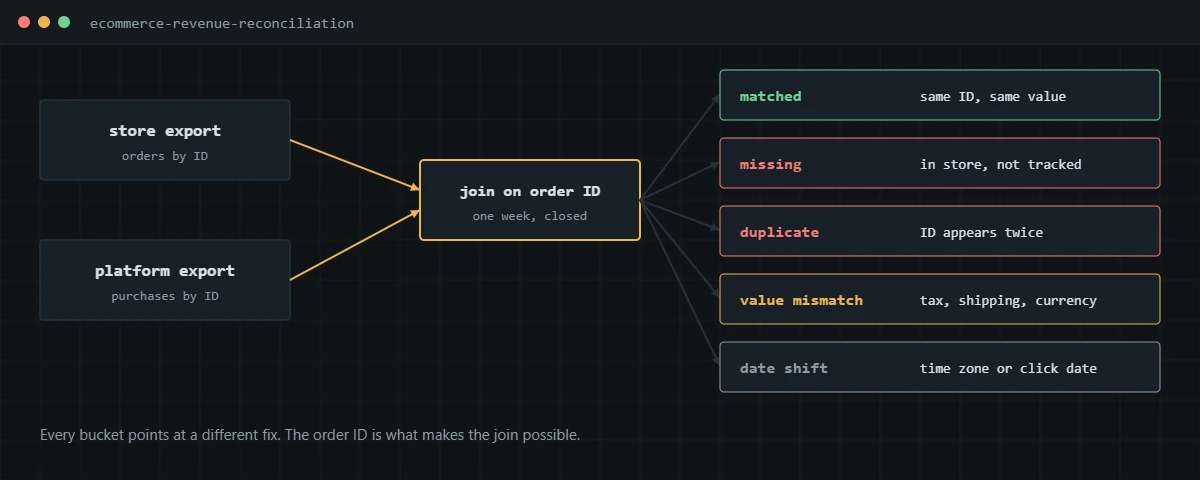
Export a closed week of orders from the store, export purchases by transaction ID from each platform, and join them on the order ID. Each mismatch falls into a bucket, and each bucket points at a different fix.
- Pick a full week that ended at least three days ago, so late-arriving data has settled.
- Export orders from the store with order ID, created time, subtotal, tax, shipping, discounts, currency and status.
- Export GA4 purchases by transaction ID for the same dates, using an Exploration or the BigQuery export.
- Join the two on order ID and label each row: matched, missing from GA4, duplicated, or matched with a different value.
- Look at what the missing orders share. If they cluster on one payment method, device or country, the cause is usually a redirect, an offsite payment page or a consent rule.
- Repeat for Google Ads and Meta where you can export by order ID, keeping in mind their attribution differs from GA4.
- Fix in order: duplicates, then missing purchases, then value definitions, then timing.
A small gap where GA4 is lower than the store is normal, because some buyers never load the confirmation page with tracking allowed. What matters is that the gap is explained and stable. The Shopify version of this exercise is in why your GA4 revenue doesn’t match Shopify.
How should you handle refunds and cancellations?
Handle them per platform, because each one supports something different, and keep the store as the record for net revenue.
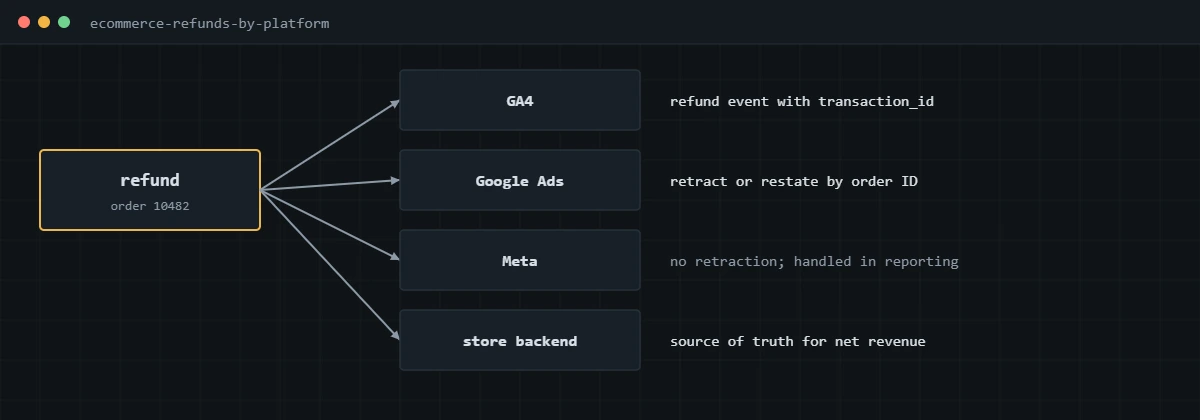
GA4 accepts a refund event with the transaction ID, which reduces revenue in ecommerce reports. Google Ads lets you retract a conversion or restate its value using the order ID, as Google explains in its guide to conversion adjustments. For stores with high return rates, I send restatements so value-based bidding learns from net revenue. Meta has no retraction that I can use, so I account for returns when reading Meta ROAS. In every case, refunds are sent from the backend when they are processed, never from the browser.
When does server-side tracking help an ecommerce store?
It helps when you are losing purchases to blockers and browser restrictions, or when you want the ad platforms to receive better customer data than the browser can safely send. It does not fix a broken purchase event.
The pattern I build is a server GTM container on your own subdomain, hosted on Stape, that receives the purchase from the browser and forwards it to GA4, the Google Ads tag and the Meta Conversions API with the same order ID and event ID. For stores where the browser purchase is unreliable, the order webhook can feed the server container directly. Details are on my server-side tracking service page.
How do you run one setup across GA4, Google Ads and Meta?
Build one data layer and let every platform tag read from it. When each tag scrapes the page or uses its own app, values drift apart and duplicates creep in.
- Define the purchase data layer once, with the fields above, and document what value means.
- Remove native platform integrations that send purchases on their own, or turn off their purchase events.
- In GTM, trigger the GA4, Google Ads and Meta purchase tags on the same custom event, mapping each field from the same variables.
- Wire Consent Mode and the consent platform so every tag respects the same choices.
- Run a test order and confirm one purchase per platform with identical order ID, value and currency.
- Reconcile against the store after the first full week.
For the Google side specifically, my Google Ads conversion tracking guide and GA4 conversion tracking guide go deeper.
If your tracked revenue doesn’t reconcile with your store, I can audit and rebuild the purchase tracking across GA4, Google Ads and Meta, and prove the fix against your orders.
Frequently asked questions
Which number should I trust: my store, GA4 or the ad platforms?
The store backend is the source of truth for orders and revenue. GA4 tells you which channels drove them, and each ad platform tells you what it thinks its own ads drove. I use the store to judge whether tracking is healthy and the other tools for attribution.
Should purchase value include tax and shipping?
Pick one definition and use it on every platform. I usually send product revenue after discounts and before tax and shipping as value, and send tax and shipping as separate parameters where the platform accepts them. Mixing definitions across tools makes reconciliation impossible.
How do I stop the same order being counted twice?
Fire the purchase once, from the order confirmation event or the server, and send the order ID with it. Google Ads uses the order ID to drop duplicates, and Meta uses the shared event ID. For GA4, the fix is making sure only one source sends the purchase.
Do I need server-side tracking for ecommerce?
Not always. It helps most when a large share of buyers use Safari or ad blockers, or when you want Meta and Google to receive richer customer data. A clean browser setup comes first, because the server only forwards what it receives.
How should refunds be tracked?
Send a GA4 refund event with the transaction ID, retract or restate the Google Ads conversion using the order ID, and treat the store as the record for net revenue. Meta has no retraction I can use, so I account for returns in reporting.
How often should I reconcile tracking against the store?
Weekly for a new or recently changed setup, then monthly once it is stable. Any theme change, checkout change or new app is a reason to run the comparison again.
About the author
I’m Ghazanfar, founder of Analytigrow and a conversion tracking specialist. For 7+ years I’ve audited and rebuilt ecommerce tracking on Shopify and WooCommerce across GA4, Google Ads, Meta Pixel and Conversions API and server-side GTM on Stape, for stores in the US, UK, EU and UAE. I’m Top Rated on Upwork with 100% Job Success. Reach me at [email protected] or on WhatsApp.
Find out what's actually broken.
A tracking audit tells you exactly which events are wrong, why, and what it takes to fix them. No pitch deck, just the findings.