
GA4 data retention: what it actually deletes and what I set
Published November 23, 2026 · Ghazanfar · 7 min read
GA4 data retention controls how long event-level and user-level data is kept for explorations and funnel reports. Standard properties can choose 2 or 14 months, and standard aggregated reports are not affected by the setting. If yours is on 2 months, any exploration that looks back further than that comes up empty. This post is for US marketers and analysts who want year-over-year analysis in GA4 and are not sure what the setting deletes.
It is one of the first settings I check in a property audit, because it is the one people discover too late. Somebody builds a funnel exploration to compare Black Friday with last year, and the data is not there.
What does the GA4 data retention setting affect?
Explorations and funnel reports. Google says the data retention setting only affects explorations and funnel reports, and that standard aggregated reports, including their primary and secondary dimensions, are not affected (Google Analytics Help: data retention). The setting applies to user-level and event-level data associated with cookies, user identifiers and advertising identifiers.
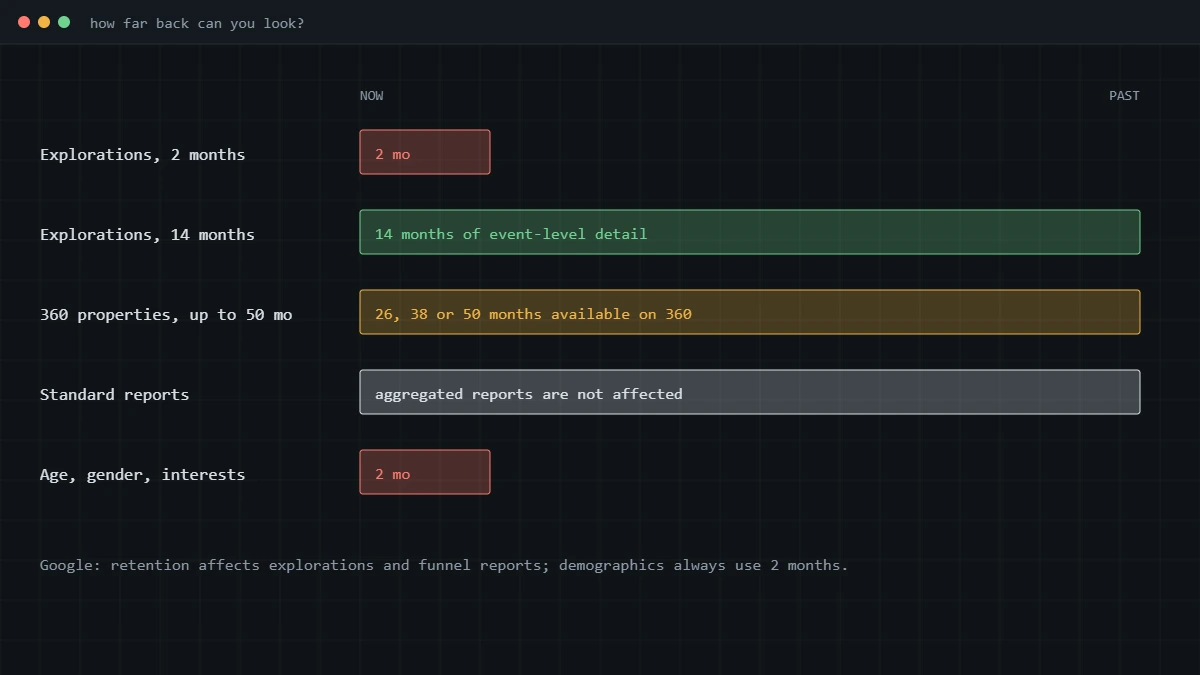
So the Traffic acquisition or Pages report for last year still works on a 2-month property. What breaks is anything built in Explore: free-form tables with custom breakdowns, funnels, path explorations and segment overlaps over older date ranges.
Should I choose 2 months or 14 months?
14 months, unless your privacy policy or legal advice says otherwise. On standard properties, event data can be kept for 2 or 14 months; GA4 360 properties can also choose 26, 38 or 50 months. Google also lists user-level data separately, at 2 or 14 months, and says key events follow that setting (Google).
Fourteen months gives you a full year plus a buffer, which is what year-over-year comparisons in explorations need. Two months only makes sense when there is a specific reason to minimize stored user-level data, and in that case the decision should be written down with the reason.
How do I change data retention in GA4?
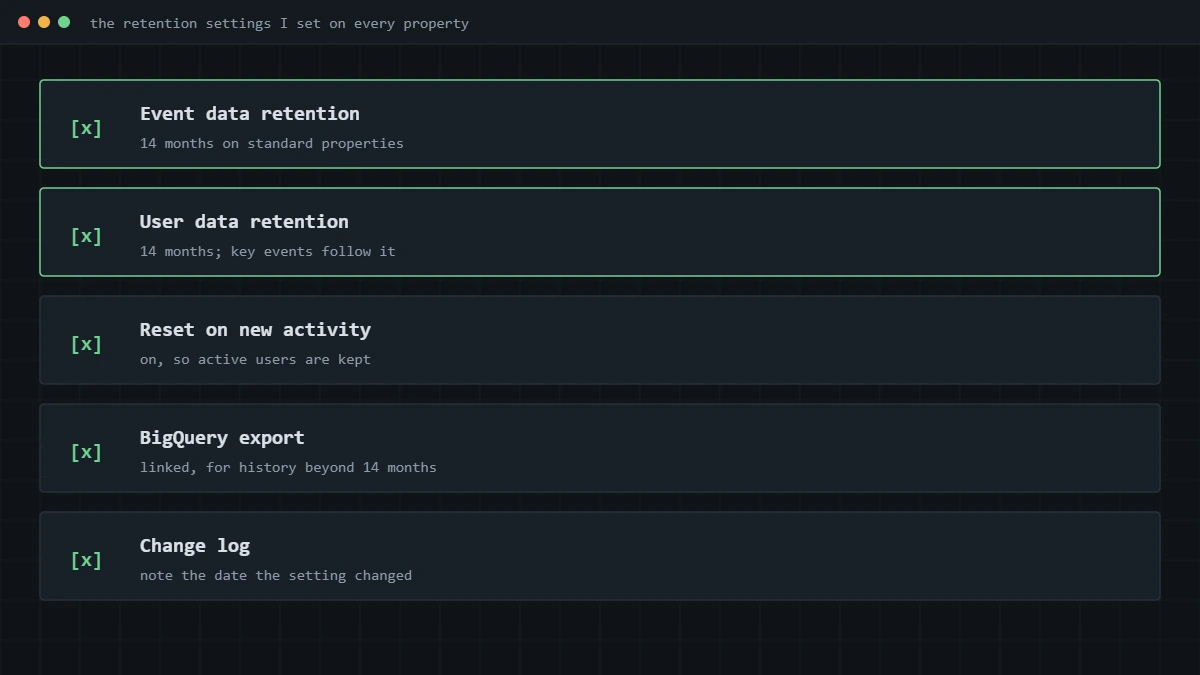
- In Admin, under Data collection and modification, open Data retention.
- Set event data retention and user data retention to 14 months.
- Decide on Reset user data on new activity. When it is on, each new event from a user restarts that user’s retention period. I leave it on, so active customers are not dropped from user-level analysis.
- Save, and note the date in your change log.
Google says changes take effect after a 24-hour wait, and you can revert during that window without affecting your data. Increasing the period also extends it to data already collected, as long as that data has not been deleted yet. Reducing it means affected data is removed in the next monthly deletion run.
What 14 months cannot do is bring back data that 2 months already removed. If a property sat on 2 months for a year, the older event-level data is gone, and only standard reports cover that period. That is why I change it on day one of any new property.
Which data ignores the retention setting?
Two exceptions from Google’s documentation. Age, gender and interest data always use a two-month retention period, whatever you choose. And Google signals data expires after 26 months by default, capped at 26 months regardless of settings. So a demographic breakdown in an exploration over last quarter will be thin even on a 14-month property.
How do I keep GA4 data longer than 14 months?
Link GA4 to BigQuery and export daily. The export sends raw events into tables in your own Google Cloud project, and how long they stay there is governed by your BigQuery settings, which you control. For most small and mid-sized US businesses the storage cost is low, and it is the only way I know to keep event-level history beyond 14 months on a standard property. Do it early, because the export starts from the day you link it.
Retention is one of the property settings my free GA4 audit tool checks along with key events and filters. For the internal traffic side of property hygiene, see setting up the GA4 internal traffic filter, and for how this all feeds conversion reporting, GA4 key events set up right and how conversion tracking works.
If you want your GA4 property settings checked and fixed in one pass, that is part of my GA4 and GTM setup work.
Frequently asked questions
Does GA4 data retention delete my standard reports?
No. Google says the setting only affects explorations and funnel reports. Standard aggregated reports such as Traffic acquisition and Pages and screens keep their data regardless of whether retention is 2 or 14 months.
What is the maximum data retention in GA4?
Standard properties can keep event data for up to 14 months. GA4 360 properties can choose 26, 38 or 50 months. For longer event-level history on a standard property, export to BigQuery.
Can I recover data after changing retention from 2 to 14 months?
Only data that has not been deleted yet. Increasing retention extends the period for data already collected, but anything removed under the 2-month setting is gone from explorations.
What does reset user data on new activity do?
When it is on, each new event from a user restarts that user’s retention period, so returning customers stay available for user-level analysis. When it is off, their data is removed once the retention period ends regardless of activity.
Why are demographics missing in my older GA4 explorations?
Age, gender and interest data always use a two-month retention period in GA4, regardless of your setting. Explorations over older ranges will not show those dimensions even on a 14-month property.
About the author
I’m Ghazanfar, founder of Analytigrow and a conversion tracking specialist. For 7+ years I’ve set up GA4, GTM, server-side tracking and ad platform conversions for ecommerce and lead-gen businesses in the US, UK, EU and UAE. I’m Top Rated on Upwork with 100% Job Success. Reach me at [email protected] or on WhatsApp.
Find out what's actually broken.
A tracking audit tells you exactly which events are wrong, why, and what it takes to fix them. No pitch deck, just the findings.