
GA4 landing page (not set): why it happens and how I fix it
Published November 23, 2026 · Ghazanfar · 8 min read
GA4 shows (not set) as a landing page when a session has no page_view event. Something started the session, such as a click, a scroll, a server-sent event or a consent update, but no page view was recorded in it, so GA4 has no page to call the landing page. This guide is for US site owners and analysts who see a (not set) row near the top of the Landing page report and want to know whether it is harmless or hiding broken tracking.
Google states the cause in one line: (not set) can appear for the landing page dimension when a session does not have a page_view event (Google Analytics Help: what (not set) means). Everything below is about finding out why your sessions lack one.
How do I find out which event started the (not set) sessions?
Build a free-form exploration. Rows: Landing page + query string, filtered to exactly (not set). Then add Event name as a second row dimension and Event count as the value. Whatever event dominates is your lead. I also add Session source / medium and Device category, because a cause that only shows on one device or one traffic source narrows the search a lot. Explorations only reach back as far as your data retention setting allows, so check that first if older months look empty.
The patterns I see most:
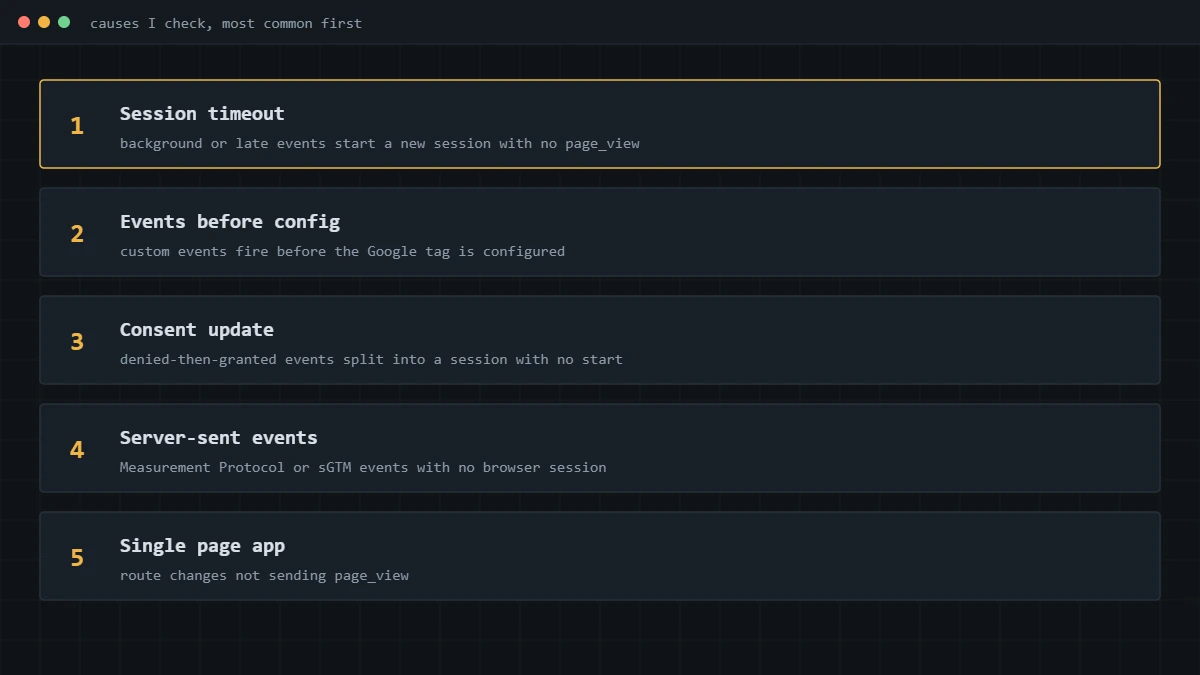
user_engagement,scrollorclickwith nopage_view: almost always the session timeout case below.- A custom event name like
purchaseorgenerate_lead: an event fired before the Google tag was configured, or sent from a server. - Traffic concentrated on one source with source also (not set): a tagging or consent problem, often the same one causing Unassigned traffic in GA4.
Why do sessions start without a page view after a timeout?
Because a web session ends after 30 minutes of inactivity by default (Google: Session), and the next event, whatever it is, starts a new session. If a visitor leaves a tab open, comes back after 40 minutes and clicks something, the click starts session two. That session has no page view and therefore no landing page.
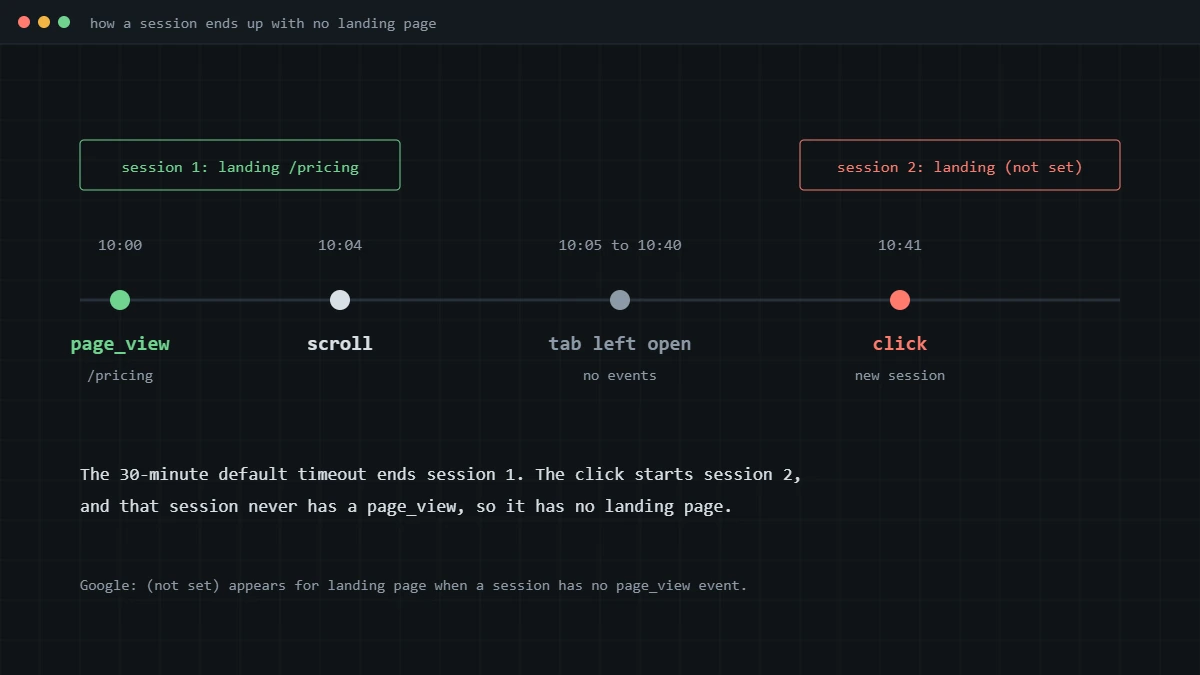
Some of this is normal behavior and I leave it alone. It becomes a problem on sites built around long content, video or tools, where people stay passive for a long time. Google’s session guidance says it does not recommend custom code that pings Analytics to prevent timeouts, and points to adjusting the session timeout instead (Google Developers: measure sessions). The setting is under the web stream’s tag settings, Adjust session timeout, and the maximum is 7 hours and 55 minutes.
Can tag firing order cause (not set) landing pages?
Yes. Google’s tagging best practices say to avoid firing custom events before the config command, or they are batched with session_start (Google). Google also says parameters missing from the first event of a session can show as (not set), because the parameters of that first event are what the session keeps. In GTM, I check three things:
- The Google tag fires on the Initialization trigger, or Consent Initialization only if your setup requires it.
- No GA4 event tag fires on a trigger that can run before the Google tag, such as a custom event pushed in the page head.
- There is only one Google tag configuration per property on the page, and no hardcoded gtag snippet running alongside GTM.
How does consent mode create sessions with no landing page?
Through how consent states change mid-visit. Google warns that putting every consent value in the default command, including values meant for after the banner interaction, can mean the initial event with session_start is lost, and that events sent with denied consent after a user granted it are treated as a separate session without a session_start (Google). The fix is to set denied defaults once, then use update when the visitor chooses. My notes on consent mode in GTM show how I set that order.
Do server-side events cause (not set) landing pages?
They can, if they arrive without a browser session to attach to. An event sent through the Measurement Protocol with a client_id but no session_id, or long after the session ended, has no page view of its own. Google says that to tie an event to a specific session you include session_id and send it within 24 hours of the session start. I explain the payload in sending events with the GA4 Measurement Protocol. With server-side GTM, Google also advises routing all of a property’s events through the server container instead of splitting them between server and a separate client-side setup.
What about single page apps?
On sites where navigation happens without a full page load, the first page view comes from the initial load and later views depend on history change events. If the app only sends the first one, any session that starts after a timeout on a later screen has no page view. I check that enhanced measurement’s page changes based on browser history events setting is on, or that the app pushes its own page_view on every route change.
A few percent of (not set) is normal on most sites. When it grows, or when key events sit in those sessions, it is worth fixing, because the same root causes usually distort attribution too. I explain how these issues ripple into conversion numbers in GA4 key events set up right and in the overview of how conversion tracking works.
If your (not set) row is large and you want it traced to the tag or consent setting causing it, I can do that as part of a GA4 and GTM review.
Frequently asked questions
Is (not set) landing page traffic real?
Yes, those are real sessions with real events. What is missing is a page_view inside the session, so GA4 cannot name the page where it started. The visits themselves are counted in your totals.
How much (not set) landing page traffic is normal in GA4?
Google does not publish a threshold. On the sites I work on, a small single-digit share caused by session timeouts is common. A share that grows after a GTM or consent change, or that holds key events, points to a setup problem.
Will increasing the session timeout remove (not set) landing pages?
It reduces the timeout-driven ones, because fewer passive visitors cross the limit. It does nothing for event order, consent or server-sent causes, so check which event starts your (not set) sessions before changing the setting.
Why does my purchase show a (not set) landing page?
Usually the purchase arrived in a session with no page view: sent by a server or platform integration, sent after a timeout on the confirmation page, or fired before the Google tag was configured. Check the event name and source in an exploration to see which.
Does (not set) landing page affect SEO reports?
It affects how organic sessions are grouped by landing page in GA4, so page-level organic numbers look lower than reality. Search Console page data is collected separately and is not affected.
About the author
I’m Ghazanfar, founder of Analytigrow and a conversion tracking specialist. For 7+ years I’ve set up GA4, GTM, server-side tracking and ad platform conversions for ecommerce and lead-gen businesses in the US, UK, EU and UAE. I’m Top Rated on Upwork with 100% Job Success. Reach me at [email protected] or on WhatsApp.
Find out what's actually broken.
A tracking audit tells you exactly which events are wrong, why, and what it takes to fix them. No pitch deck, just the findings.