
TikTok Events API: setting it up next to the pixel without double counting
Published November 23, 2026 · Ghazanfar · 9 min read
The TikTok Events API is TikTok’s server-to-server connection for sending conversion events, and TikTok recommends running it alongside the pixel with event deduplication. Done right, the server copy fills gaps the browser misses and TikTok counts each purchase once. This guide is for US ecommerce and lead-gen advertisers who run TikTok ads and want the Events API set up without inflating conversions.
TikTok calls it “a secure server-to-server interface” and says it recommends an Events API integration with your existing pixel, using both together with deduplication (TikTok: About Events API). TikTok also lists pixel or Events API setup as a prerequisite for the Web Conversions objective. So for most advertisers the question is how to add the server side cleanly, not whether to.
Which TikTok Events API setup should I choose?
Pick by how much control you need over event values and IDs. There are three routes I use, and they differ mostly in who generates the event_id.
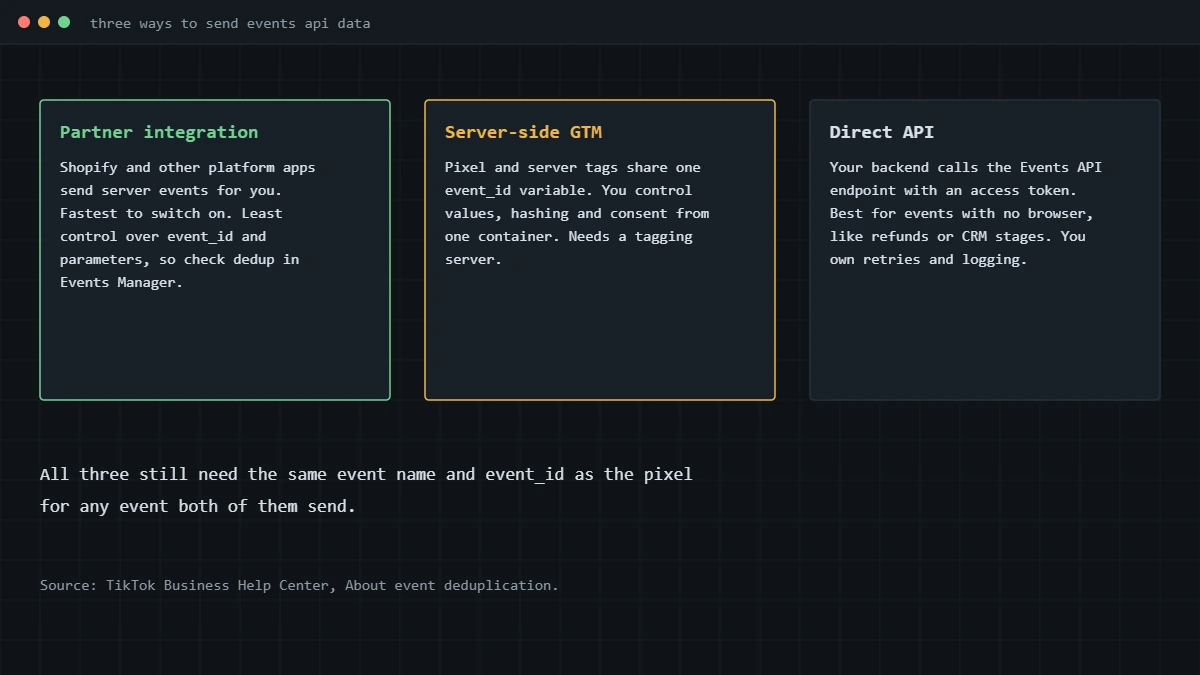
- Partner integration. Shopify and similar platforms can switch on server events from their TikTok app. It is the fastest path. The trade-off is that you inherit the partner’s event names and IDs, so I always check in Events Manager that pixel and server copies are actually being deduplicated. Meta offers a similar no-code route in its Conversions API Gateway.
- Server-side GTM. The pixel tag in web GTM and the TikTok tag in the server container read the same
event_idvariable. I prefer this when the site already runs a tagging server, because values, hashing and consent live in one place. The background on running a tagging server is on my server-side tracking page. - Direct API. Your backend posts events to the Events API endpoint with an access token generated for the pixel. I use this for events that never touch a browser, such as a CRM stage change or a subscription renewal.
How does TikTok deduplicate pixel and Events API events?
TikTok treats two events as duplicates when they share the same event name and the same event_id, and it keeps the first one received. Its help article says you must share the Event ID through both the pixel and the Events API for deduplication to take place, and it records the first event received for measurement and reporting (TikTok: About event deduplication).
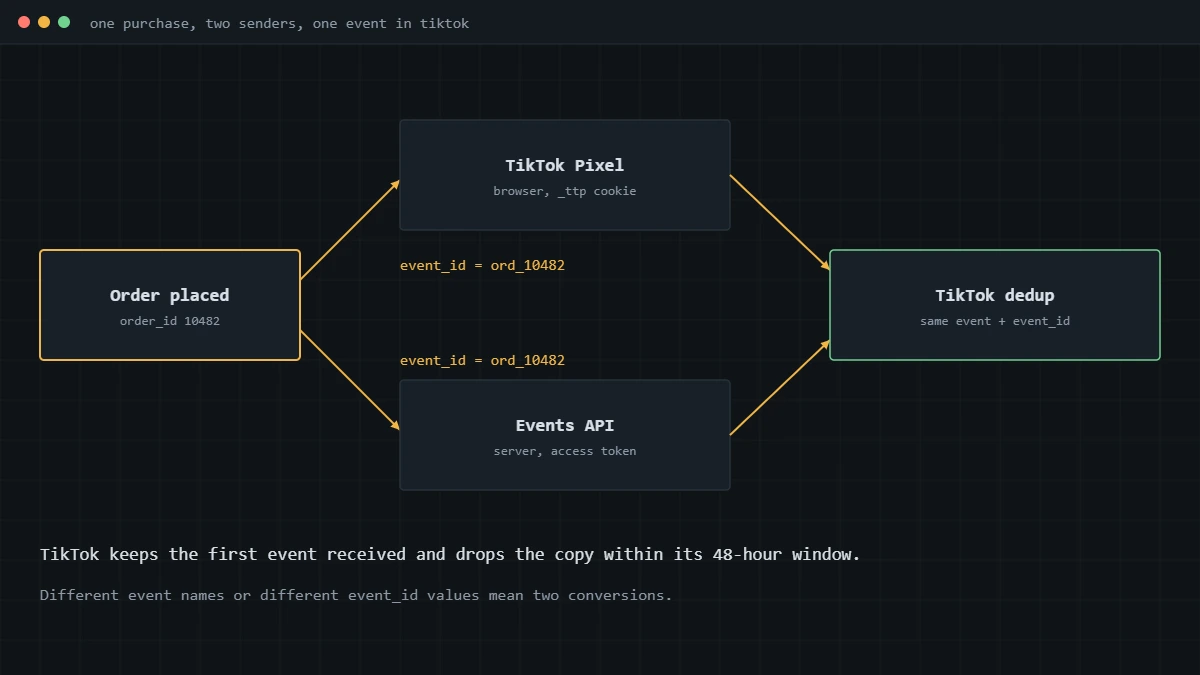
The timing rules in that article are worth knowing exactly:
- Pixel duplicates of each other, and Events API duplicates of each other, are removed when the identical event and
event_idarrive within 48 hours of the first event. - A pixel event and an Events API event with the identical event and
event_idare merged or deduplicated when they arrive within the 48-hour window from the first event. - Deduplication is not needed when the two channels send different events, for example AddToCart from the pixel and Purchase from the Events API.
TikTok’s article also mentions that when no event_id arrives from the Events API but the _ttp cookie does, it attempts to deduplicate on the cookie value. I do not rely on that. A shared event_id is the documented contract, and it is the only thing I can check in a payload.
// Browser: pixel purchase with the order ID as event_id
ttq.track("CompletePayment", {
  value: 129.00,
  currency: "USD",
  content_type: "product"
}, { event_id: "ord_10482" });

// Server: same event name, same event_id, sent to
// https://business-api.tiktok.com/open_api/v1.3/event/track/
{
  "event_source": "web",
  "event_source_id": "YOUR_PIXEL_ID",
  "data": [{
    "event": "CompletePayment",
    "event_id": "ord_10482",
    "event_time": 1764000000,
    "user": { "email": "<sha256>", "ttp": "<_ttp cookie>", "ttclid": "<from landing URL>" },
    "properties": { "value": 129.00, "currency": "USD" }
  }]
}
I use the order ID, or a lead ID for form events, as the event_id. It is stable, it exists in both the browser and the backend, and it makes reconciliation against the store trivial. Random IDs generated separately on each side are the most common reason I find pixel and server counts both landing in Events Manager.
What customer data should I send with the Events API?
Send every match key you legitimately have. TikTok lists hashed email and phone, a hashed external ID such as a customer ID, and the ttp first-party cookie value when you also run the pixel (TikTok: matching events with Events API). TikTok says emails and phone numbers are hashed with SHA-256 before matching (Advanced Matching for Web). I also pass the ttclid from the landing page URL, stored in a first-party cookie, plus the visitor IP and user agent on server events.
Normalize before hashing: trim spaces and lowercase emails, and format phone numbers with the country code. A hash of ” [email protected]” and a hash of “[email protected]” are different values, and only one of them matches.
How do I check the Events API setup is working?
Three checks, in this order:
- Place a test order and read both payloads. The pixel request and the server request should carry the same event name and
event_id. - In TikTok Events Manager, confirm the event shows both browser and server as sources and that deduplication is reported for it.
- Compare a week of CompletePayment counts with real orders from the store. If TikTok is close to double, deduplication is failing. If it is far lower, the server side is not sending or is missing match keys.
The same pattern applies to Meta, where the Pixel and Conversions API also dedupe on a shared event ID; I wrote that up in Facebook Ads conversion tracking with the Pixel and CAPI. For how purchase events should be structured once and reused across platforms, see ecommerce conversion tracking that reconciles, and the overview is in how conversion tracking works.
If TikTok is reporting more purchases than your store, or none from the server, I can trace it event by event and fix it.
Frequently asked questions
Do I need the TikTok Events API if I already have the pixel?
TikTok recommends running both. The pixel depends on the browser, so ad blockers and lost cookies cost you events, while the Events API sends from your server. Used together with deduplication, you keep browser signals and fill the gaps without counting twice.
What is event_id in the TikTok Events API?
It is the identifier TikTok uses to recognize that a pixel event and a server event describe the same action. Both copies need the same event name and the same event_id. I use the order ID for purchases because both the browser and the backend know it.
Why is TikTok counting my purchases twice?
Usually the pixel and the server send different event_id values, or no event_id at all on one side, or slightly different event names such as CompletePayment and Purchase. TikTok only deduplicates identical event and event_id pairs.
Can I send the TikTok Events API through server-side GTM?
Yes. A TikTok tag in a server container can send Events API requests, while the pixel runs in web GTM. The key is reading the same event_id variable in both containers and passing the _ttp and ttclid values through to the server.
Does the Events API work without cookies or consent?
You should only send what your consent setup allows. The Events API is not a way around a declined banner. For US traffic, check your state privacy obligations and your CMP settings before sending hashed customer data.
About the author
I’m Ghazanfar, founder of Analytigrow and a conversion tracking specialist. For 7+ years I’ve set up GA4, GTM, server-side tracking and ad platform conversions for ecommerce and lead-gen businesses in the US, UK, EU and UAE. I’m Top Rated on Upwork with 100% Job Success. Reach me at [email protected] or on WhatsApp.
Find out what's actually broken.
A tracking audit tells you exactly which events are wrong, why, and what it takes to fix them. No pitch deck, just the findings.