
GA4 referral exclusion: stop payment gateways taking credit for your sales
Published November 23, 2026 · Ghazanfar · 8 min read
Referral exclusion in GA4 is done with the List unwanted referrals setting on your web data stream. You add domains such as a payment gateway, and GA4 stops treating visits that return from them as new referral traffic, so the sale keeps its real source. This guide is for US ecommerce and booking sites whose GA4 reports show purchases credited to paypal.com, stripe.com or a booking engine.
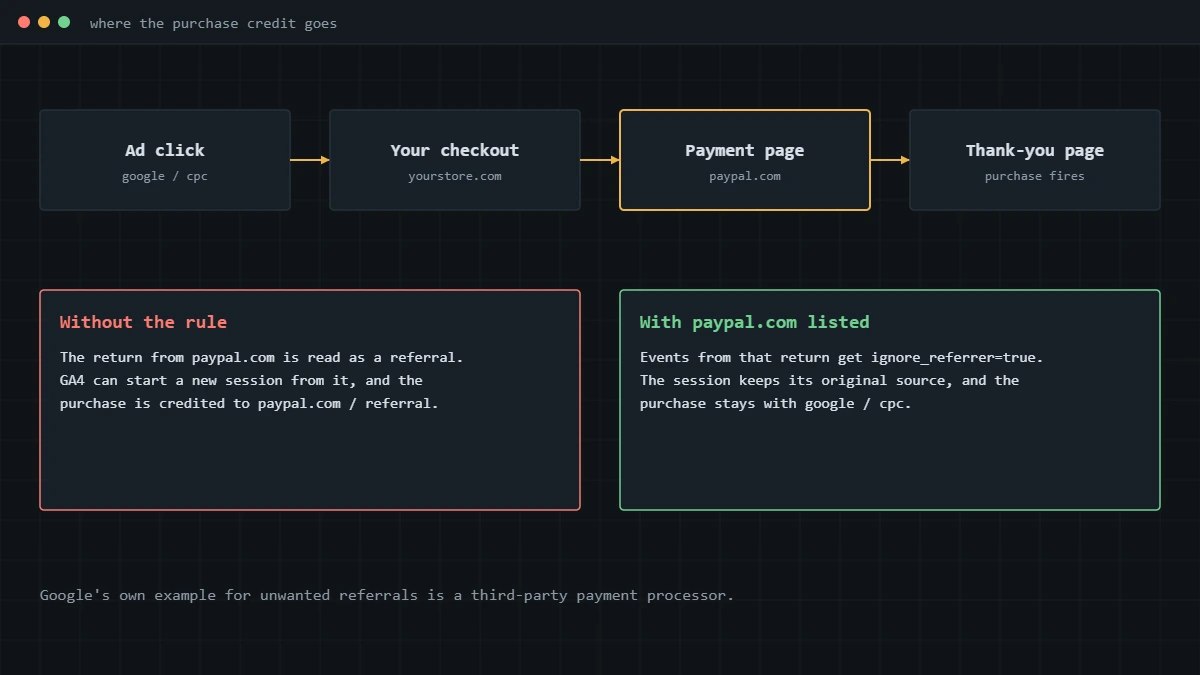
The classic symptom is a Traffic acquisition report where a payment provider shows up as one of your best-converting referrers. Nobody found your store through PayPal. They clicked an ad, went to pay, and came back. Google’s own common-use example for this setting is exactly that: an ecommerce site whose customers return from a third-party payment processor after checkout (Google Analytics Help: identify unwanted referrals).
How does referral exclusion work in GA4?
GA4 marks matching events so their referrer is ignored for attribution. Google says events from a listed domain get the ignore_referrer parameter set to true, which tells Analytics not to show that referrer as a traffic source. The setting is per web data stream, with up to 50 unwanted referrals per stream (Google).
One detail worth knowing: Google notes that any value of ignore_referrer, including “false” or “0”, results in the referrer being ignored. If someone set it manually in a tag to “false” thinking it switches the behavior off, it does the opposite. I remove the parameter entirely when it is not wanted.
How do I add an unwanted referral in GA4?
- In Admin, under Data collection and modification, open Data streams and select the web stream. You need Editor access.
- Click Configure tag settings, then Show all in the Settings section.
- Click List unwanted referrals.
- Choose a match type and enter the domain, for example
paypal.com. Add more conditions with Add condition; they are joined with OR. - Save.
Which domains to add depends on your stack. For US stores I usually list the payment providers in use (PayPal, Stripe checkout pages, Klarna, Afterpay, Affirm), 3D Secure or bank verification pages if they redirect back, and any hosted booking or scheduling tool. I find the full list by filtering Traffic acquisition to Session source / medium containing referral and sorting by key events. A referrer with almost no sessions but many purchases is a gateway.
Should I use unwanted referrals or cross-domain measurement?
It depends on who owns the other site. Unwanted referrals are for third-party domains you cannot tag. Cross-domain measurement is for your own domains that run your GA4 tag, where you want one continuous user journey.
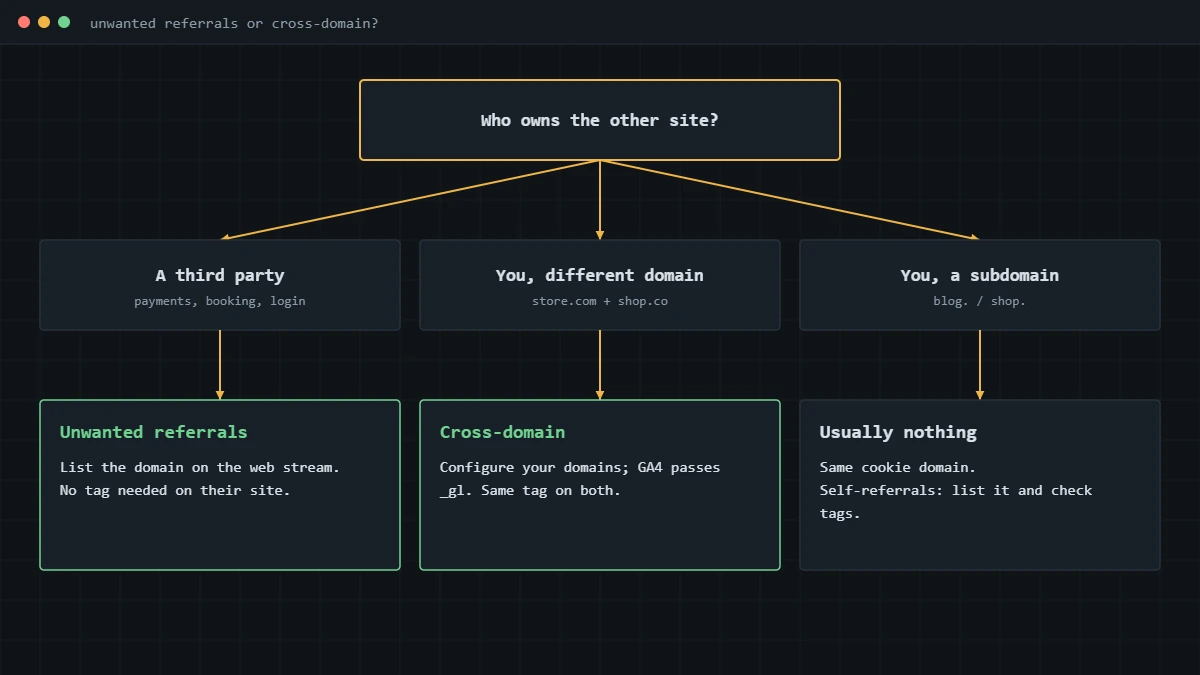
Cross-domain is set up under the same tag settings, in Configure your domains, with up to 100 conditions. GA4 then passes identifiers between your domains in the _gl URL parameter (Google: set up cross-domain measurement). For subdomains that cause self-referrals, Google recommends tagging every page, making sure subdomains share the same cookie domain, and adding the subdomains to the exclusion list. If you see your own domain as a referrer, fix the tagging first; listing it only hides the symptom.
Does adding a referral exclusion fix past data?
No. Google is explicit that changes do not undo earlier attribution: a session credited to a domain before you excluded it stays credited to it. Google also gives an example where, under last non-direct click attribution, a later direct return visit can still be credited to the previously credited domain. So expect gateway referrals to fade over the following weeks, not to vanish the next morning.
Annotate the date you made the change. When someone compares this quarter with last quarter and sees referral revenue drop and paid search revenue rise, the annotation saves a long conversation.
How do I check it is working?
Run a real test purchase through the gateway with GTM Preview and Tag Assistant open. On the return to your thank-you page, the GA4 events should carry ignore_referrer set to true. The purchase in DebugView should sit in the same session as the earlier checkout events. Then watch the referral rows for that gateway in Traffic acquisition over the next weeks.
Gateway referrals are one of the reasons GA4 revenue by channel never matches what Google Ads or Meta report. I cover the others in why GA4 revenue does not match Shopify and in ecommerce tracking that reconciles with the store. The general picture is in how conversion tracking works.
If your checkout runs across several domains or payment providers and you want attribution checked end to end, that is part of my GA4 and GTM setup work.
Frequently asked questions
Where is referral exclusion in GA4?
It is called List unwanted referrals. Go to Admin, Data streams, select the web stream, Configure tag settings, Show all, then List unwanted referrals. It is set per web stream.
Should I exclude PayPal in GA4?
Yes, if customers leave your site to pay on PayPal and come back to a confirmation page. Without it, the return can be read as a referral and the purchase credited to paypal.com instead of the channel that brought the buyer.
How many unwanted referrals can I add in GA4?
Google allows up to 50 unwanted referrals per web data stream. One condition can cover a whole domain, so most stores need only a handful.
Do I need to exclude my own domain in GA4?
Normally no. GA4 does not treat navigation within your own site as a referral. If your domain appears as a referrer, look for pages missing the tag, subdomains with different cookie domains, or cross-domain gaps, and fix those before adding it to the list.
Does referral exclusion affect Google Ads conversions?
It does not change conversions Google Ads measures with its own tag. It changes how GA4 credits sessions and key events, which matters for GA4 reports and for key events you import into Google Ads.
About the author
I’m Ghazanfar, founder of Analytigrow and a conversion tracking specialist. For 7+ years I’ve set up GA4, GTM, server-side tracking and ad platform conversions for ecommerce and lead-gen businesses in the US, UK, EU and UAE. I’m Top Rated on Upwork with 100% Job Success. Reach me at [email protected] or on WhatsApp.
Find out what's actually broken.
A tracking audit tells you exactly which events are wrong, why, and what it takes to fix them. No pitch deck, just the findings.