
Meta Conversions API Gateway: when it is enough and when it is not
Published November 24, 2026 · Ghazanfar · 8 min read
The Meta Conversions API Gateway is a no-code way to add the Conversions API to a site that already runs the Meta Pixel. You deploy it from Events Manager into a cloud account, and it copies each pixel event to Meta server to server with a shared deduplication ID. For a US store or lead-gen site that only needs Meta covered, it is often enough. If you need backend events or several ad platforms, it is not.
Meta describes it as a self-serve configuration option in Events Manager that sends events through the pixel and the Conversions API in a redundant setup, with no coding required (Meta for Developers: Conversions API Gateway). I get asked about it most by store owners who have seen a “set up with Conversions API Gateway” prompt in Events Manager and want to know if it replaces a proper server-side setup.
How does the Conversions API Gateway work?
It sits next to the pixel and mirrors what the pixel sends. According to Meta, a pixel configured with the Gateway endpoint sends events to both Meta and the Gateway; the Gateway receives the browser event data and forwards it to the Conversions API; and an event_id is generated automatically so the two copies can be deduplicated (Meta).
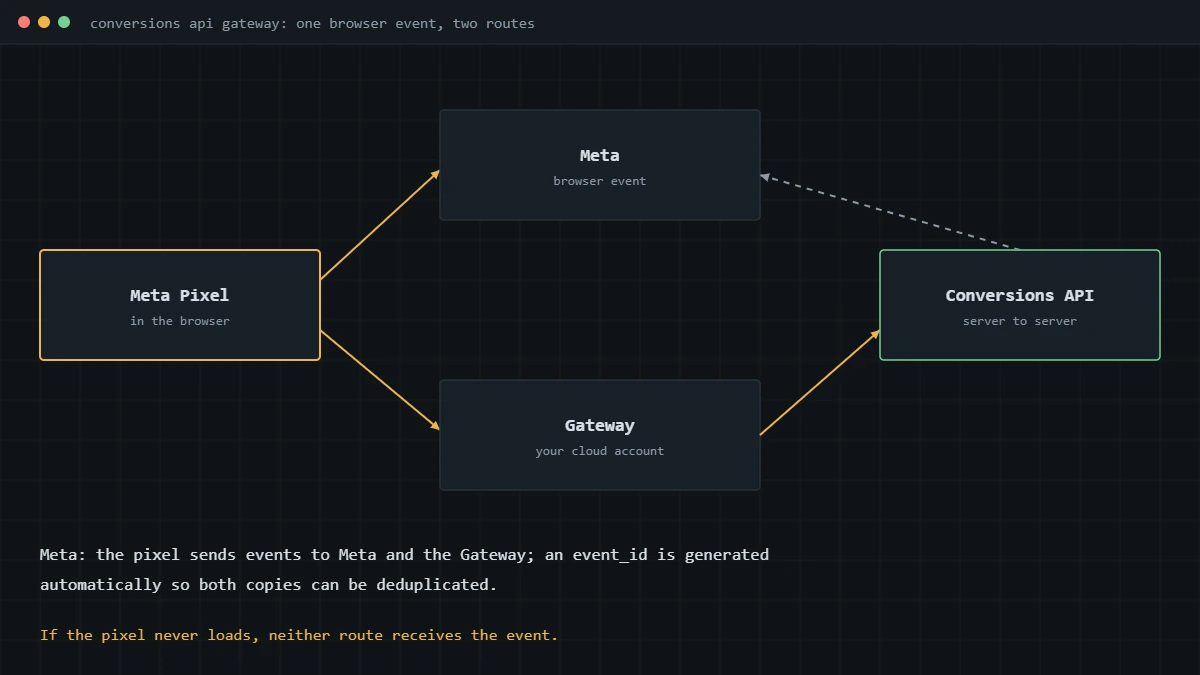
The Gateway itself is a server instance in a cloud account your business owns, with a small admin portal where you can open or close connections per pixel and see event volume from both channels. One instance can serve multiple domains and multiple pixels. Because it receives what the pixel sends, anything the pixel never sends, for example when its script is blocked before it loads, does not reach the Gateway either. That is the main design trade-off to understand before choosing it.
How do I set up the Conversions API Gateway, and what does it cost?
Meta lists three prerequisites: a Meta business account, cloud infrastructure and a DNS provider (Meta setup guide). The flow starts in Events Manager, under the pixel’s Settings tab, at “Set up with Conversions API Gateway”. You choose whether to enhance events with advanced matching data and whether to enable health monitoring, then a cloud setup. Meta’s guide lists two AWS options, ECS Express from 40 dollars a month and Elastic Kubernetes Service from 300 dollars a month. AWS builds the stack through CloudFormation, which Meta says takes about 30 to 40 minutes, and data can take from 5 minutes to 2 hours to appear.
Meta recommends adding a custom domain in the Gateway admin, through AWS Certificate Manager or Cloudflare, and says it may help optimize data routing and reduce costs. If you would rather not run cloud infrastructure, hosting partners run the Gateway for you; Stape, for example, advertises Meta CAPI Gateway hosting at $10 a month per pixel (Stape pricing page). Check current pricing before deciding, since partner plans change.
Conversions API Gateway vs server-side GTM vs a direct integration: which should I use?
Choose by what has to reach Meta. The Gateway mirrors browser events with almost no setup work. Server-side GTM gives you one container that feeds Meta and every other platform with full control. A direct integration sends events from your own backend.
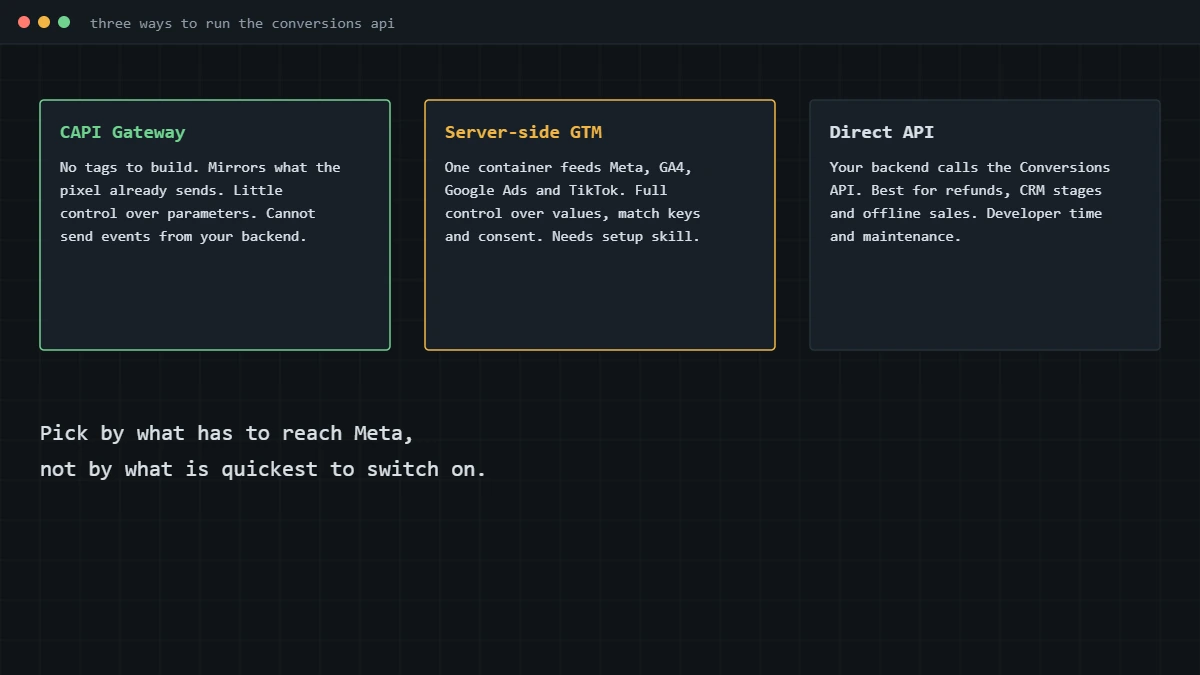
- I recommend the Gateway when Meta is the main paid channel, the pixel already sends clean events with value and currency, and nobody on the team will maintain a tagging server.
- I recommend server-side GTM when the business also runs Google Ads, GA4 or TikTok, needs control over which match keys are sent, or wants consent handled in one place. The same container then serves the TikTok Events API with shared event IDs as well. My server-side tracking setup covers how I build that.
- I recommend a direct integration, often alongside one of the others, for events that never happen in a browser: refunds, subscription renewals, phone sales and CRM stages.
What can the Conversions API Gateway not do?
It cannot fix a bad pixel. If the pixel sends purchases twice, with the wrong value or without currency, the Gateway forwards the same mistakes. It does not create events that happen outside the browser, so backend events still need their own route. And it only covers Meta. These are the points I check before recommending it:
- Open Events Manager test events and confirm each standard event carries value, currency and content IDs where relevant.
- Check for a second Meta integration, such as a Shopify app or a GTM pixel, that would also send server events.
- Confirm your consent setup controls the pixel, since the Gateway follows what the pixel sends.
- Look at what the business needs Meta to optimize on. If that is qualified leads or net revenue from the backend, the Gateway alone will not get there.
A common mistake I find: a store turns on the Gateway while a Shopify or WooCommerce plugin already sends Conversions API events. Now two server routes send the same purchase, and only one of them shares the pixel’s event ID. Pick one server route per pixel.
How Meta tracking fits together, including deduplication and Event Match Quality, is in my guide to Meta conversion tracking with the Pixel and Conversions API. For the cross-platform view, start with how conversion tracking works.
If you are deciding between the Gateway and a full server-side setup, I can look at what your pixel sends today and tell you which one fits.
Frequently asked questions
Is the Conversions API Gateway free?
Meta does not charge for the Gateway itself, but it runs on cloud infrastructure you pay for. Meta’s setup guide lists AWS options starting around 40 dollars a month, and hosting partners such as Stape advertise plans from about $10 a month per pixel.
Does the Conversions API Gateway need Google Tag Manager?
No. It works from the Meta Pixel you already have and is set up from Events Manager. GTM is only involved if your pixel itself is deployed through GTM.
Does the Conversions API Gateway deduplicate events?
Yes. Meta says an event_id is generated automatically and passed along so events from the pixel and the Gateway can be deduplicated. Problems start when another integration also sends server events with a different ID.
Can the Conversions API Gateway send offline or CRM events?
No. It mirrors events the browser pixel sends. Refunds, phone sales and CRM stage changes need a direct Conversions API integration or another server-side route.
Is the Conversions API Gateway better than server-side GTM?
It is simpler, but it covers only Meta and only what the pixel sends. Server-side GTM takes more setup and gives control over every platform, parameter and consent rule. The right choice depends on how many platforms you run and what Meta needs to optimize on.
About the author
I’m Ghazanfar, founder of Analytigrow and a conversion tracking specialist. For 7+ years I’ve set up GA4, GTM, server-side tracking and ad platform conversions for ecommerce and lead-gen businesses in the US, UK, EU and UAE. I’m Top Rated on Upwork with 100% Job Success. Reach me at [email protected] or on WhatsApp.
Find out what's actually broken.
A tracking audit tells you exactly which events are wrong, why, and what it takes to fix them. No pitch deck, just the findings.