
Email conversion tracking: UTMs, GA4 and platform revenue
Last updated November 5, 2026 · Ghazanfar · 8 min read
In this post
Email conversion tracking measures the sales and leads that come from your emails. It relies on UTM parameters on every email link so GA4 can attribute the visit to the Email channel, and on your email platform’s own attribution, which uses opens and clicks and almost always reports more revenue than GA4.
The email question I get most from store owners is a pair of screenshots: Klaviyo says email made one number, GA4 says it made a much smaller one. Both are usually working as designed. The difference comes from how each counts, plus a couple of setup mistakes I see often, the main one being UTM values that GA4 doesn’t recognize as email at all. This guide sorts out which is which.
How should you tag email links with UTM parameters?
Tag every email link with utm_medium=email, a consistent utm_source and a readable utm_campaign. The medium is the part that decides whether GA4 counts the visit as email.
UTM parameters are tags added to a link’s URL, such as utm_source and utm_medium, that tell analytics tools where a visit came from. These are the conventions I set for clients:
| Parameter | Value I use | Why |
|---|---|---|
| utm_medium | Matches GA4’s Email channel rule | |
| utm_source | klaviyo, mailchimp, or the list name | Separates platforms or lists in reports |
| utm_campaign | campaign or flow name, lowercase with hyphens | Groups sends for comparison |
| utm_content | link or block name, optional | Shows which link in the email drove the click |
Both main platforms can add these automatically. Klaviyo’s UTM tracking settings add parameters to links in campaigns and flows, and since June 2, 2025 the default utm_medium reports the message type, such as email or SMS, which lines up with GA4. Accounts that still carry the older campaign and flow values won’t land in GA4’s Email channel. Mailchimp’s Google Analytics link tracking also adds UTM parameters, with a campaign title built from the email name and date. Whichever you use, open a sent email, click a link, and read the URL.
How does GA4 attribute email traffic?
GA4 puts a visit in the Email channel when its source or medium is email or a close variant, and then credits conversions to channels according to your attribution settings.
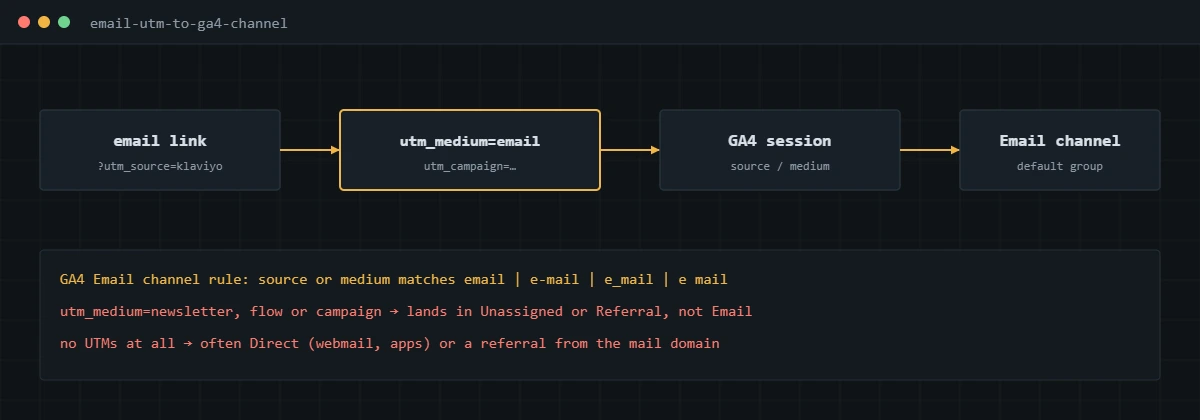
The rule is in Google’s default channel group definitions: source or medium equal to email, e-mail, e_mail or e mail, case-insensitive. A medium of newsletter or flow falls outside it, so those visits show up as Unassigned, or as Referral if the click came through a webmail domain. Untagged clicks from mail apps often arrive as Direct.
Once the traffic is classified correctly, check the conversions themselves. Email-driven purchases depend on the same purchase event as every other channel, which I cover in my ecommerce conversion tracking guide and, for GA4 setup, my GA4 conversion tracking guide.
Why do email platforms and GA4 report different revenue?
Because they answer different questions. The email platform asks whether the buyer recently interacted with an email. GA4 asks which session led to the sale, across every channel.
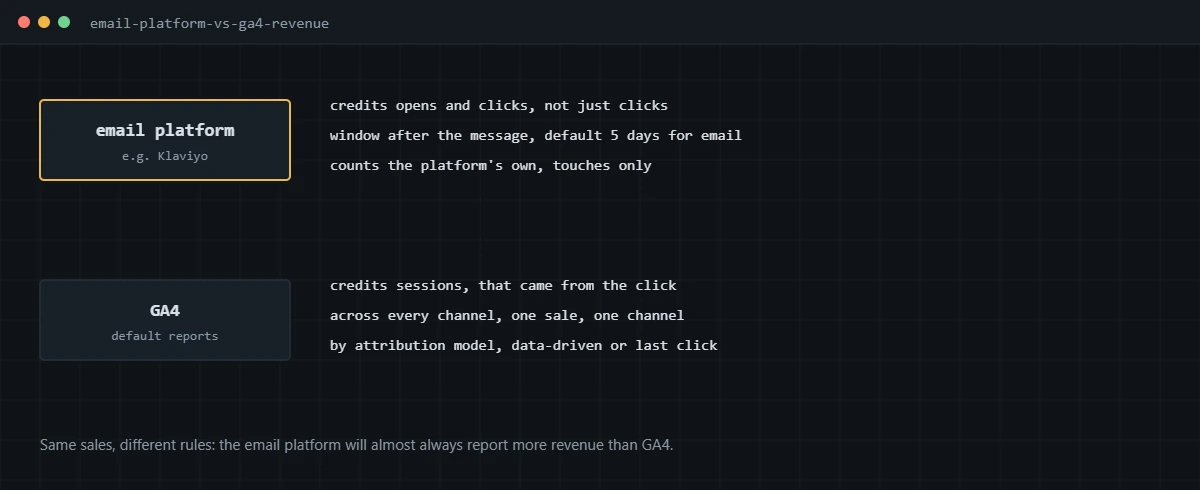
Klaviyo, for example, attributes a conversion to the last eligible message interaction, counting opens, clicks and deliveries depending on channel. Its attribution documentation gives defaults for new accounts of five days for email clicks and five days for email opens, and the windows can be changed. So a customer who opened an email on Monday and clicked a Google ad on Wednesday counts as an email sale in Klaviyo and a paid search sale in GA4. Neither is wrong.
What I do with clients is pick the question first. For “how much revenue would we lose without email”, the platform number with sensible windows is a reasonable starting point. For “how does email compare with paid social”, GA4 is the fairer view, because it applies one set of rules to every channel. The general version of this problem is in my conversion tracking guide.
How does Apple Mail Privacy Protection affect email tracking?
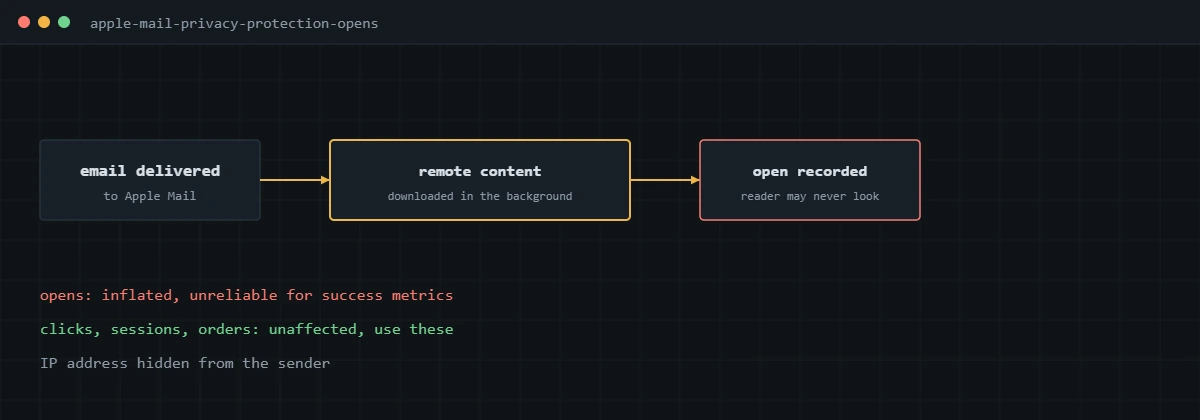
It makes opens unreliable. Apple says that with Protect Mail Activity on, the reader’s IP address is hidden and remote content is downloaded privately in the background, so an open is recorded whether or not the email is read.
Apple describes the feature on its Mail privacy support page. The practical effects I plan around:
- Open rates are inflated for Apple Mail users, so they no longer work as a success measure.
- Open-triggered automations, such as “opened but didn’t click”, fire for people who never read the email.
- Open-based attribution in the email platform credits sales to emails that weren’t read. Klaviyo lets you exclude Apple Privacy opens from attribution, which I usually turn on.
- Clicks, sessions and orders are unaffected, so I build email reporting on those.
How do you set up email conversion tracking end to end?
- Turn on automatic UTM tracking in the email platform and set utm_medium to email.
- Standardize utm_source and utm_campaign naming, lowercase, and document it.
- Send a test email, click each link type, and confirm the parameters survive any redirects on your site.
- In GA4, check the traffic acquisition report for the Email channel the next day, and look for email sources stuck in Unassigned.
- Confirm the purchase or lead event fires for those sessions, so email gets credit in GA4.
- In the email platform, review attribution windows and exclude Apple Privacy opens from attribution if available.
- Report email on clicks, sessions, conversions and revenue, with both GA4 and platform numbers labelled by their method.
On Shopify stores, where Klaviyo is most common, the purchase side is covered in my Shopify Google Analytics conversion tracking guide.
If your email platform and GA4 tell two different stories and you want to know which parts are setup problems, I can audit both and fix the tracking.
Frequently asked questions
What UTM parameters should I use for email?
Use utm_medium=email on every email link, utm_source for the platform or list, such as klaviyo or mailchimp, and utm_campaign for the campaign or flow name. Keep them lowercase and consistent, because GA4 treats different spellings as different sources.
Why does Klaviyo show more revenue than GA4 for email?
Klaviyo credits a sale to an email if the person opened or clicked within its attribution window, which defaults to five days for new accounts. GA4 credits sales to the session that led to them, across every channel. The same order can be counted by Klaviyo and credited by GA4 to paid search.
Why is my email traffic showing as Unassigned or Referral in GA4?
Usually because utm_medium is something other than email, such as newsletter, flow or campaign. GA4’s Email channel only matches when the source or medium is email or a close variant.
Are email open rates still reliable?
Not for Apple Mail users with Mail Privacy Protection on. Apple downloads remote content in the background, so opens get recorded whether or not the person read the email. Use clicks, sessions and orders for decisions.
Should I turn on automatic UTM tracking in my email platform?
Yes, then check the defaults. Automatic tracking stops campaigns going out untagged, but the default medium and campaign values may not match your naming or GA4’s channel rules.
Can I track email conversions without GA4?
Your email platform will report its own attributed revenue using its tracking. GA4, or another analytics tool, is what lets you compare email fairly against your other channels with one set of rules.
About the author
I’m Ghazanfar, founder of Analytigrow and a conversion tracking specialist. For 7+ years I’ve set up GA4, GTM, server-side tracking and ad platform conversions for ecommerce and lead-gen businesses in the US, UK, EU and UAE, including Klaviyo and Mailchimp attribution. I’m Top Rated on Upwork with 100% Job Success. Reach me at [email protected] or on WhatsApp.
Find out what's actually broken.
A tracking audit tells you exactly which events are wrong, why, and what it takes to fix them. No pitch deck, just the findings.