
GA4 unassigned traffic: what it is and how to fix it
Published November 23, 2026 · Ghazanfar · 8 min read
Unassigned in GA4 means Analytics could not match a session’s traffic source to any channel rule. It is either real traffic with source and medium values the default channel rules do not recognize, or traffic whose source was never captured at all. This post is for US marketers who see a growing Unassigned row in Traffic acquisition and want to know which of the two they have and how to fix it.
Google puts it plainly: the unassigned row appears when Analytics cannot categorize the source of traffic, either because of user-defined source and medium values that match no predefined rule or because session or user identity is missing (Google Analytics Help). Those two causes need completely different fixes, so the first job is telling them apart.
How do I see what is inside Unassigned in GA4?
Open Reports, Acquisition, Traffic acquisition. Change the primary dimension from Session primary channel group to Session source / medium, and add a filter where Session primary channel group exactly matches Unassigned. Sort by sessions. Now you are looking at the actual values GA4 could not place.
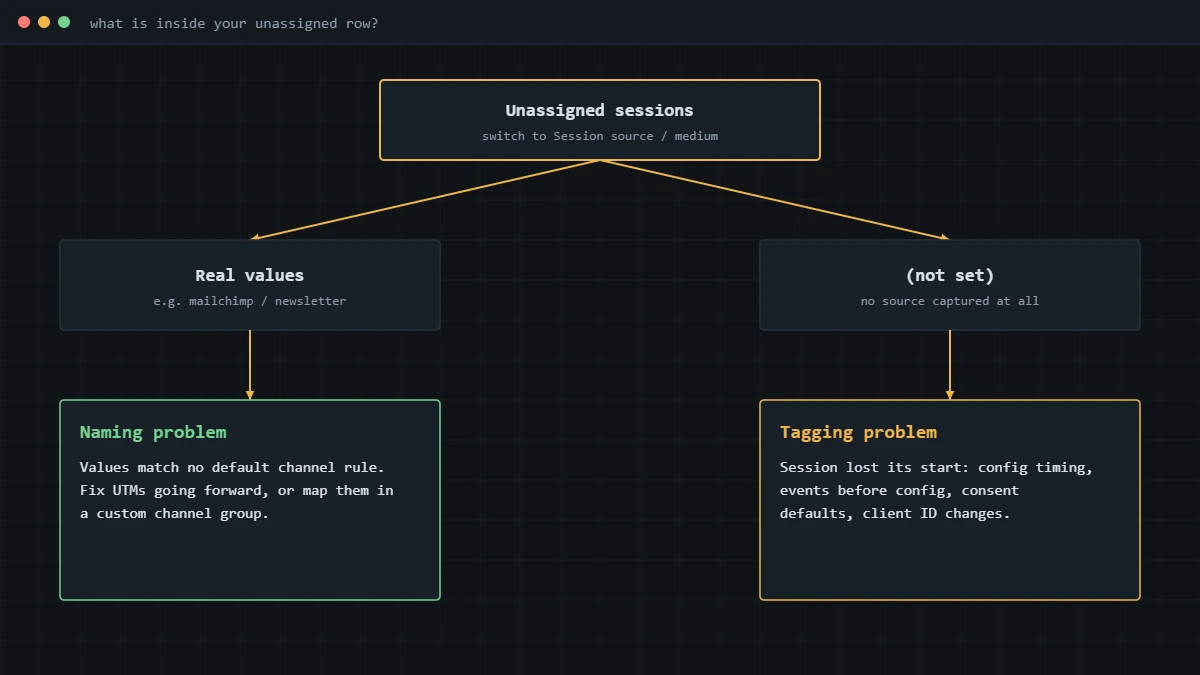
What you see falls into one of two shapes. Real values like mailchimp / newsletter or flyer / qr mean a naming problem. A large (not set) / (not set) row means a tagging problem. Many properties have both, and I fix them separately.
Why do my UTM-tagged campaigns land in Unassigned?
Because GA4 assigns channels from fixed rules on source, medium and sometimes campaign, and your values do not satisfy any of them. Google’s default channel group definitions list every rule, and default channel groups cannot be edited (Google: default channel group).
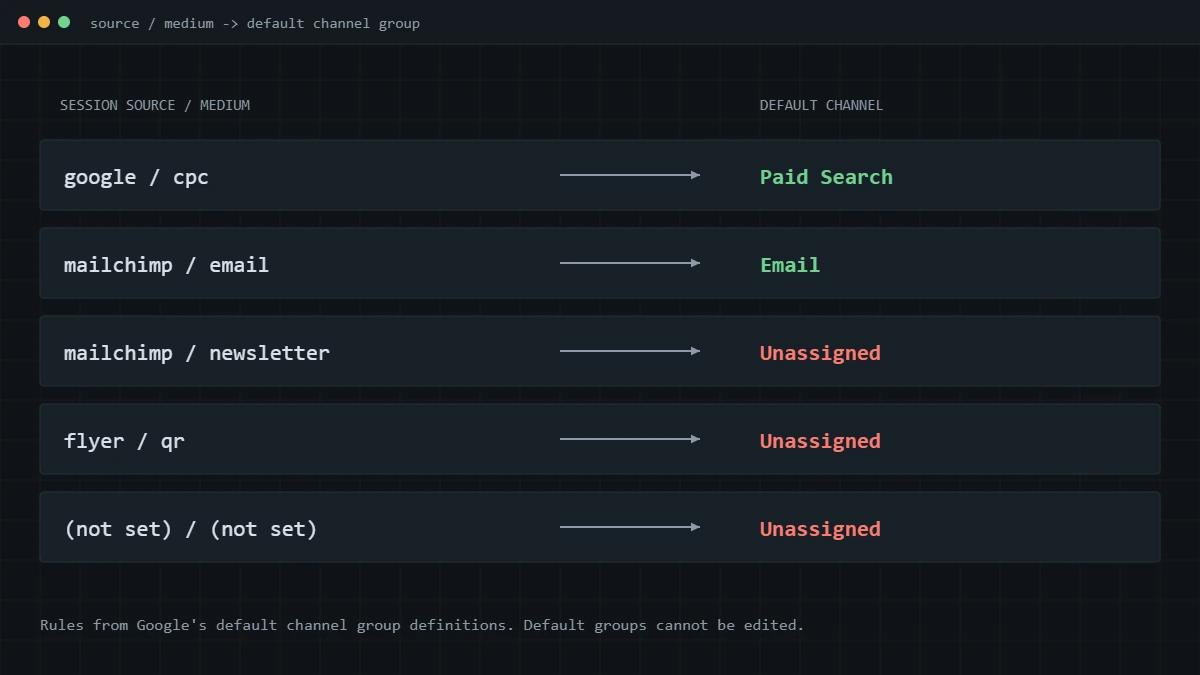
Typical examples I find in audits: utm_medium=newsletter instead of email, utm_medium=qr on print material, utm_medium=influencer with a source that is not on Google’s social list, and agency tracking templates using paid_social spelled in a way that does not match the paid pattern. The fix has two parts:
- Write a short UTM convention using mediums GA4 recognizes, such as
cpc,email,social,affiliate,referral,display, and share it with everyone who builds links. - For traffic you cannot retag, such as printed QR codes already in circulation, create a custom channel group. I copy the default group, then add a channel such as Offline print matching
medium = qr, and place it above the default rules.
A custom channel group changes how reports group traffic. It does not change attribution for key events imported into Google Ads, and fixing the source values is still better where you can. Email naming is the single most common case, and I covered its UTM conventions in email conversion tracking with UTMs and GA4.
Why is my Unassigned traffic (not set) / (not set)?
Because the session never got a source. Google says that when session source / medium is (not set), traffic shows as Unassigned in the default channel group, since no channel rules match, and that source / medium reports (not set) for sessions where the session_start event is missing (Google: what (not set) means). Causes Google lists across its help articles include:
- The Google tag in GTM not firing on the Initialization trigger.
- Custom events sent before the config command, which then get batched with
session_start(Google). - Consent mode set up with all values in the
defaultcommand instead of usingupdateafter the banner choice, which Google says can lose the initial event that carriessession_start. - A changed cookie prefix, or manually overwritten
client_idandsession_id, which break the link between events and their session. - A server-side container where some events bypass the server tag while others go through it.
These same causes also produce a (not set) landing page, so if that report is affected too, my step-by-step for it is in GA4 landing page (not set).
What else sends traffic to Unassigned?
Two more I check. Google Ads traffic from an account that is not linked to the GA4 property can show as (not set), because Google says those key events cannot be mapped to a particular click. Linking the accounts and keeping auto-tagging on fixes it. Payment gateways showing up as referrers is a different symptom with its own fix, in GA4 referral exclusion. And sessions that only contain events sent by your server, with no matching browser session, often have no source to inherit. If you send server events, my notes on the GA4 Measurement Protocol cover how to tie them to the right session.
How much Unassigned is acceptable? There is no official threshold. I treat a few percent of sessions as noise and anything that grows month over month as a setup problem, especially if it carries key events.
Channel attribution is one input into how GA4 and ad platforms report conversions differently, which I explain in how conversion tracking works and why the numbers differ.
If a large share of your sessions or key events sits in Unassigned and you want it traced, I check the tagging and the campaign naming together.
Frequently asked questions
Is Unassigned the same as Direct in GA4?
No. Direct means GA4 found no referrer or campaign information and classified the session as direct. Unassigned means there was source information, or a missing session start, that GA4 could not fit into any channel rule.
Can I fix Unassigned traffic retroactively?
Not by changing UTMs, since past sessions keep the values they arrived with. A custom channel group does apply to historical data in reports, so it is the way to regroup old traffic, while tagging fixes only help from the day you publish them.
Why did Unassigned traffic increase after a GTM change?
Usually the Google tag moved off the Initialization trigger, or new events started firing before it. Both can stop session_start from being recorded properly. I compare the GTM publish date with the day the Unassigned row started growing.
Does Unassigned traffic affect Google Ads conversions?
It can affect how GA4 credits key events, which changes what you see in GA4 attribution reports. Conversions you import into Google Ads are attributed by Google Ads to ad interactions, so fix tagging causes first since they can also drop key events from imported data.
What UTM medium should I use so traffic is not Unassigned?
Use the mediums the default channel rules expect: cpc or ppc for paid search, email for email, social for organic social, affiliate, referral and display where they apply. Keep values lowercase and consistent across every team that builds links.
About the author
I’m Ghazanfar, founder of Analytigrow and a conversion tracking specialist. For 7+ years I’ve set up GA4, GTM, server-side tracking and ad platform conversions for ecommerce and lead-gen businesses in the US, UK, EU and UAE. I’m Top Rated on Upwork with 100% Job Success. Reach me at [email protected] or on WhatsApp.
Find out what's actually broken.
A tracking audit tells you exactly which events are wrong, why, and what it takes to fix them. No pitch deck, just the findings.