
GTM audit: the container checklist I actually use
Published November 23, 2026 · Ghazanfar · 10 min read
A GTM audit is a structured review of a Google Tag Manager container to find tags that fire twice, fire without consent, send wrong values, or should not exist anymore. I check six areas in a fixed order: access, versions, tags, triggers, consent and data quality. This checklist is for US marketers and site owners who inherited a container from an agency or a past developer and no longer trust what it sends.
Most containers I open have been edited by three or four different people over a few years. None of them did anything unusual. Each added what they needed, nobody removed anything, and the result is a container where a purchase can be counted by a native integration and a GTM tag at the same time. The audit is how you get back to a container where every tag has a reason to exist.
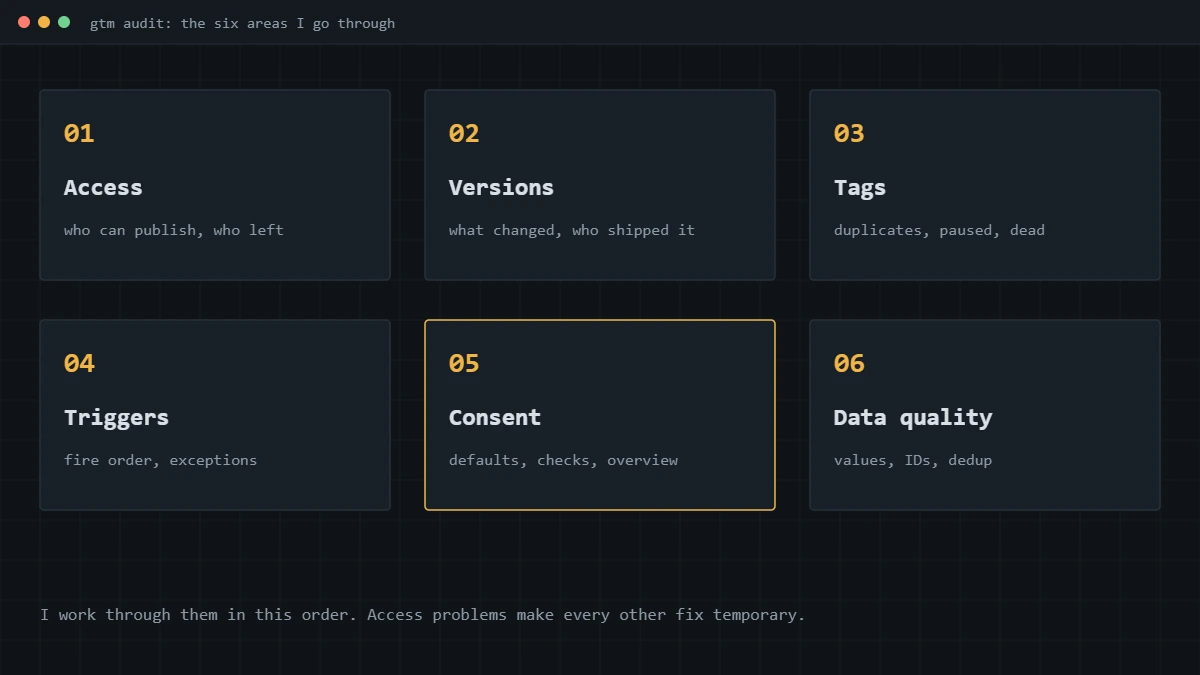
Who has access to the container?
Start with users, because a fix you make today can be undone tomorrow by someone who should not be there. Google’s container permissions are Read, Edit, Approve and Publish. Edit lets someone create workspaces and make changes but not create versions or publish, Approve adds creating versions, and Publish has full rights (Tag Manager Help: users and permissions).
- List every account and container user. Remove former agencies, freelancers and staff.
- Keep Publish to the one or two people accountable for what goes live.
- Make sure at least two people from the business are account administrators, so a departure cannot lock you out.
What changed recently, and who published it?
The version history tells you what the container looked like when the numbers last looked right. Tag Manager keeps a publish history showing when versions went live and who published them (Google). I line up publish dates against any sudden change in GA4 or ad platform conversions. A conversion spike that starts on a publish date is rarely a coincidence.
I also look at open workspaces. Standard accounts can have up to three concurrent workspaces, a default one plus two custom ones (Google: workspaces). Old workspaces full of half-finished changes are a risk, because publishing one later can bring back tags that were removed in the meantime.
Which tags are duplicated, dead or doing too much?
This is where most of the findings come from. For every tag I write down what it sends, where, and whether anything outside GTM sends the same thing. My usual list:
- Two GA4 setups on the same property, for example a Google tag in GTM and a hardcoded gtag snippet or a platform integration. That doubles page views and events.
- Purchase or lead conversions sent both by a native integration (Shopify, WooCommerce plugins) and by a GTM tag.
- Measurement IDs and conversion IDs typed into individual tags instead of one constant variable.
- Custom HTML tags holding old pixels for tools nobody pays for anymore.
- Paused tags kept “just in case”. I export the container as a backup and remove them.
- Community templates from unknown authors with broad permissions.
Duplicate purchases are the finding with the biggest money impact. If your GA4 revenue runs well above the store, my breakdown of why GA4 revenue does not match Shopify walks through the usual double counts.
Do the triggers fire at the right moment?
Check what each conversion tag fires on and what could make it fire again. Triggers I flag:
- Purchase tags on a thank-you page view with no once-per-order guard, so a refresh counts again.
- Form tags on a click instead of a confirmed successful submit.
- Configuration tags that are not on the Initialization or Consent Initialization triggers, so events can go out before the Google tag is configured.
- Exception triggers nobody remembers adding.
Are consent settings blocking or leaking tags?
Consent problems go both ways: tags that fire before a choice is made, and tags blocked so hard that Google gets nothing. GTM has a Consent Initialization trigger, per-tag consent settings and a Consent Overview page, which you enable under Admin, Container Settings (Tag Manager consent mode support). Google also says the two most common causes of blocked Google tags in Tag Manager are exception triggers and additional consent checks (Google: unblock tags).
- Open Consent Overview and look for tags marked as not configured.
- Google tags with built-in consent checks usually should not also have additional consent checks, or they stop sending the cookieless pings that consent mode relies on.
- Non-Google pixels, such as Meta or TikTok, need additional consent checks because they have no built-in ones.
- The consent default must be set before any tag fires.
I go deeper on this in setting up consent mode in GTM.
Is the data each tag sends correct?
A tag can fire at the right time and still send the wrong thing. In Preview mode I walk through the key journeys, such as product view, add to cart, checkout, purchase and lead submit, and read the actual values:
- Purchase value matches the order total you decided on, with tax and shipping treated consistently.
- Currency is set on every value-carrying event.
- Transaction or event IDs exist and are shared with server-side copies for deduplication. TikTok is a frequent miss, see TikTok pixel and Events API deduplication.
- GA4 property settings next to the container, including data retention, which decides how far back explorations reach.
- No personal data is going into GA4 parameters or page URLs.
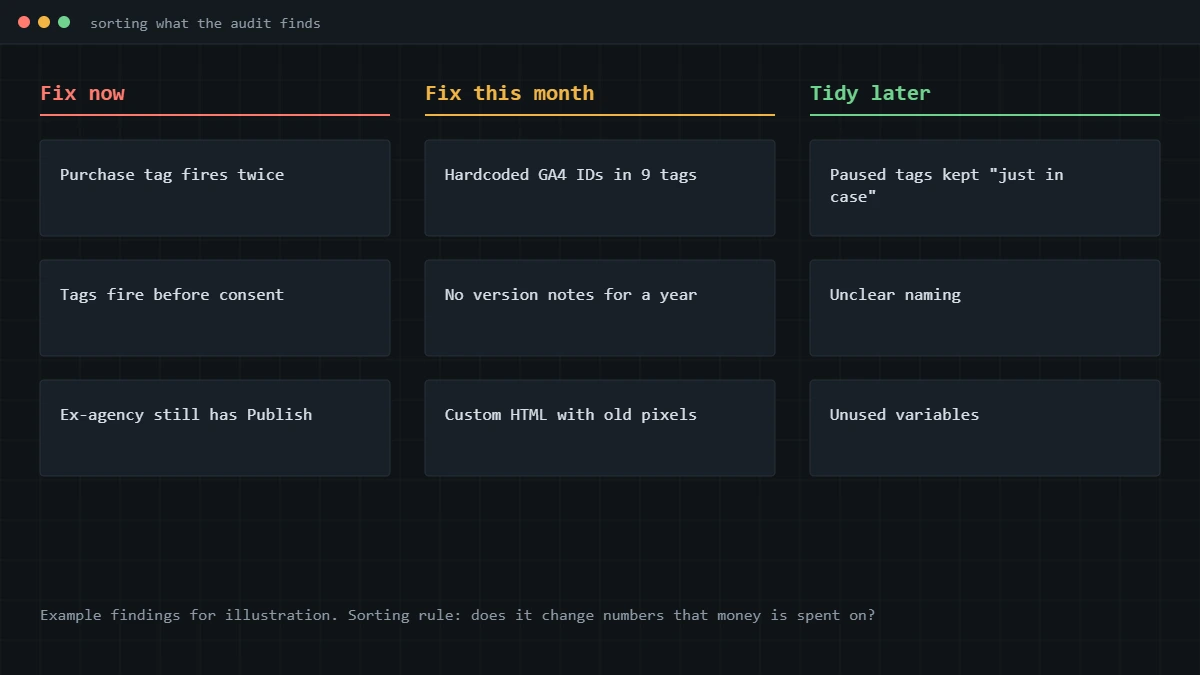
How do I decide what to fix first?
I sort findings by one question: does this change numbers that money is spent on? Duplicate purchases feeding Smart Bidding, tags firing without consent and access by people who left go first. Hardcoded IDs and missing version notes come next. Naming and unused variables last. Every fix goes into a new version with a description, and I test it in Preview before publishing, so the next person who audits the container can read what happened.
The container is one layer. How it connects to GA4 key events and ad platforms is covered in GA4 key events set up right, and the tools I use for audits are listed in my conversion tracking tool stack. For the full picture, start with how conversion tracking works and why it breaks.
If you would rather hand the container over, I run this audit and send back findings sorted by impact, with the fixes if you want them.
Frequently asked questions
How long does a GTM audit take?
For a typical small business container with a few dozen tags, I need a few hours to review it and test the main journeys in Preview. Large containers with many Custom HTML tags or several connected platforms take longer, mostly because each tag has to be traced to what it sends.
Can I audit GTM without Publish access?
Yes. Read access is enough to review tags, triggers, variables and versions, and Edit access lets you run Preview. You only need Publish, or Approve plus someone who can publish, when it is time to ship fixes.
Should I delete paused tags in GTM?
I export the container first as a backup, then remove paused tags that nobody can explain. A paused tag does not fire, but it adds noise to every future audit and can be unpaused by mistake.
What is the most common problem found in a GTM audit?
In my audits it is duplicate tracking: the same purchase or page view sent by GTM and by a platform integration or hardcoded snippet. It inflates GA4 numbers and, when imported into ad platforms, the conversions used for bidding.
Is there a free GTM audit tool?
Tag Assistant and GTM Preview are free and cover most of what you need to see what fires. For GA4 property settings I built a free GA4 audit tool on this site. None of them replace reading the container yourself, because tools cannot tell why a tag exists.
About the author
I’m Ghazanfar, founder of Analytigrow and a conversion tracking specialist. For 7+ years I’ve set up GA4, GTM, server-side tracking and ad platform conversions for ecommerce and lead-gen businesses in the US, UK, EU and UAE. I’m Top Rated on Upwork with 100% Job Success. Reach me at [email protected] or on WhatsApp.
Find out what's actually broken.
A tracking audit tells you exactly which events are wrong, why, and what it takes to fix them. No pitch deck, just the findings.