
Consent mode in GTM: defaults, updates and tag checks in the right order
Published November 23, 2026 · Ghazanfar · 10 min read
Consent mode in GTM comes down to three things done in order: set a consent default before any tag fires, send a consent update when the visitor makes a choice, and configure each tag so it respects that state. Google tags adjust themselves through built-in consent checks; everything else needs consent checks you add in GTM. This guide is for US businesses that also get EU or UK traffic, or that are adding a banner for state privacy laws, and need consent mode working in Tag Manager.
I am not a lawyer, and nothing here decides what your banner must say or which visitors must see it. That is a decision for you and your legal advice. What follows is the technical side: once the choice exists, how GTM passes it to tags correctly.
What consent types does GTM consent mode use?
Four matter for Google tags: ad_storage, analytics_storage, and the two added in consent mode v2, ad_user_data for sending user data to Google for advertising and ad_personalization for personalized advertising (Google: set up consent mode). GTM also supports functionality_storage, personalization_storage and security_storage, and you can add custom types for your own tags (Tag Manager consent mode support).
In what order should consent mode run in GTM?
Default first, then tags, then update. Google is blunt about it: call the default command on every page before any measurement commands, and if consent code runs out of order, consent defaults will not work (Google).
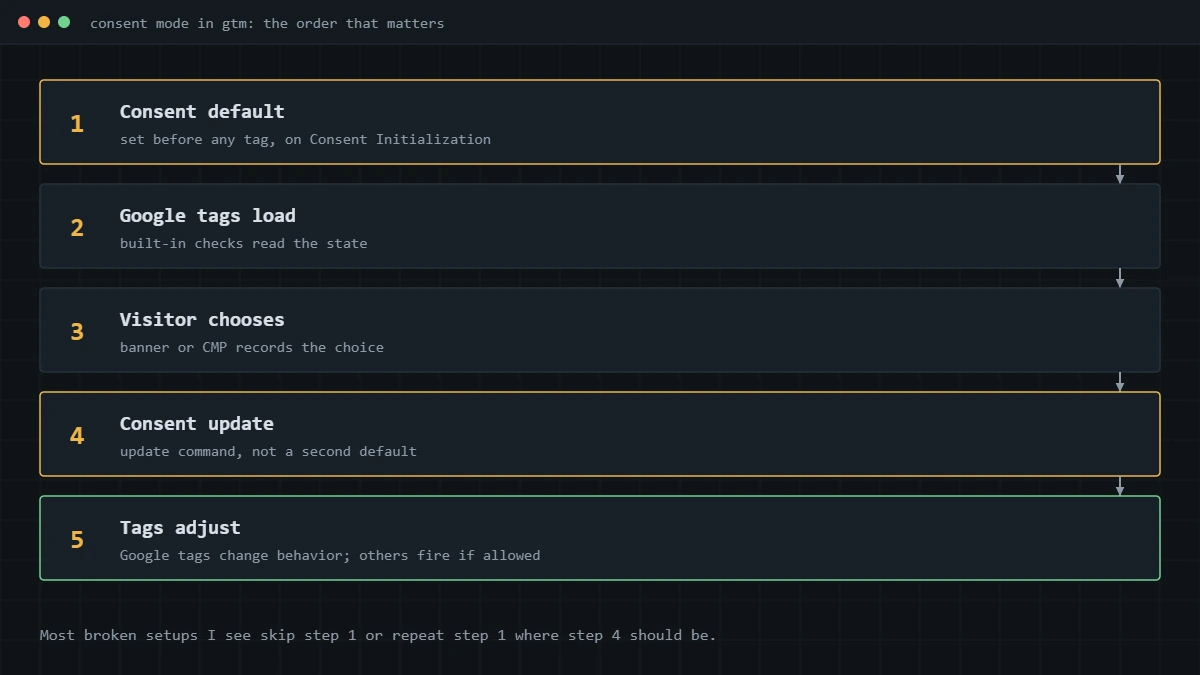
- Fire your CMP template or consent default tag on the Consent Initialization trigger, which exists so consent settings are honored before any other triggers fire (Google).
- Fire the Google tag on Initialization, after the default is set.
- When the visitor chooses, the CMP sends
gtag('consent', 'update', ...). Google says consent mode does not store choices, so the CMP must also re-send the stored choice on later pages. - For banners that load asynchronously, set
wait_for_updatein milliseconds so tags give the banner a moment to send its update.
// Defaults by region (ISO 3166-2). Denied for EEA, UK and Switzerland,
// granted elsewhere. Your legal advice decides the regions.
gtag("consent", "default", {
  ad_storage: "denied", analytics_storage: "denied",
  ad_user_data: "denied", ad_personalization: "denied",
  wait_for_update: 500,
  region: ["AT","BE","BG","HR","CY","CZ","DK","EE","FI","FR","DE","GR","HU","IE",
           "IS","IT","LV","LI","LT","LU","MT","NL","NO","PL","PT","RO","SK","SI",
           "ES","SE","GB","CH"]
});
gtag("consent", "default", {
  ad_storage: "granted", analytics_storage: "granted",
  ad_user_data: "granted", ad_personalization: "granted"
});

// Later, from the banner:
gtag("consent", "update", { analytics_storage: "granted", ad_storage: "denied",
  ad_user_data: "denied", ad_personalization: "denied" });
Google documents that a default without a region parameter applies to every visitor not covered by a region-specific command, which is how the second default above works. Most CMPs with a GTM template generate this for you; I still read what they send.
Should I use basic or advanced consent mode?
Basic blocks Google tags until the visitor interacts with the banner, so no data reaches Google before that. Advanced loads Google tags immediately with denied defaults, and while consent is denied they send cookieless pings (Google Ads Help: set up consent mode). Google says the pings support conversion and behavioral modeling, with basic using a general model and advanced an advertiser-specific one (consent mode overview).
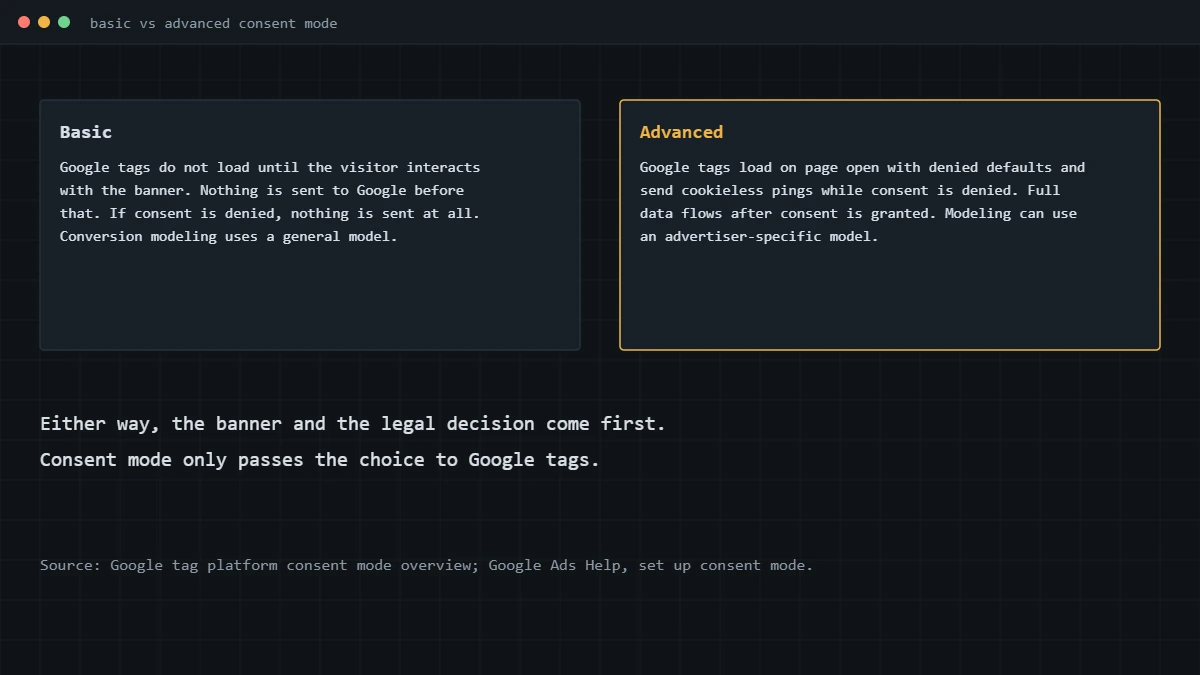
Which one fits is partly a legal question, so I set out the trade-off and let the business decide. Technically, basic is set up through blocking (the CMP or GTM triggers hold Google tags back), while advanced depends on Google tags firing normally and reading the consent state.
How should each tag be configured for consent in GTM?
Open any tag, Advanced Settings, Consent Settings. Tags with built-in consent checks, such as the Google tag, GA4 event tags and Google Ads tags, already change behavior based on consent state. For tags without built-in checks you choose “Require additional consent for tag to fire” and list the types, and the tag only fires when all of them are granted (Google).
- Meta, TikTok, LinkedIn, Microsoft and other non-Google pixels: require
ad_storage, and for analytics-type toolsanalytics_storage. The server side of TikTok needs the same care, covered in TikTok Events API setup. - Google tags in advanced mode: no additional consent checks. Google says the two most common causes of blocked Google tags in Tag Manager are exception triggers and additional consent checks (Google: unblock tags), and blocking them removes the cookieless pings advanced mode relies on.
- Enable Consent Overview under Admin, Container Settings, then use it to find tags still marked as not configured.
How do I test consent mode in GTM?
Use Tag Assistant. Google’s debugging guide shows how to check the On-page Default and On-page Update columns in the Consent tab, which tags check which consent types, and whether required consent was granted when each tag triggered (Google: troubleshoot consent mode). My test pass:
- Load the page from an EU location or VPN in a fresh browser. Before touching the banner, the Consent tab should show denied defaults and no non-Google pixels firing.
- Reject all. Non-Google tags should stay blocked. In advanced mode, Google tags still fire with consent denied.
- Accept all on a fresh session. The update should appear, followed by full tags.
- Repeat from a US location to confirm the regional default behaves as intended.
Wrong consent order is also a common cause of broken sessions in GA4, which I cover in GA4 landing page (not set). Consent settings are one of the six areas in my GTM audit checklist, and how consent affects Google Ads conversions is in Google Ads conversion tracking that holds up. The overall picture is in how conversion tracking works.
If your banner and GTM are not talking to each other properly, I wire them together and test every tag against every choice.
Frequently asked questions
Do US websites need consent mode?
Google requires consent mode for using EEA and UK user data in its ad products, so US sites with European traffic usually need it for those visitors. Whether US visitors need a banner depends on state laws and your legal advice. Consent mode itself only passes the choice to tags.
What is the Consent Initialization trigger in GTM?
It is a trigger that fires before all other triggers, including Initialization. Google designed it so consent settings are applied before any tag fires. Put your consent default or CMP template tag on it.
Should Google tags have additional consent checks in GTM?
Not if you use advanced consent mode. Google tags already have built-in consent checks. Adding required consent blocks them entirely, so they stop sending the cookieless pings that modeling depends on. Add additional checks to non-Google tags instead.
Why does my consent update not change tag behavior?
Usually the CMP sends a second default command instead of an update, or the update fires after the tags already ran with no wait_for_update set. Check the Consent tab in Tag Assistant for the On-page Update column.
Can I set different consent defaults for the US and Europe in GTM?
Yes. The consent default command accepts a region parameter with ISO 3166-2 codes, and a default without a region applies to everyone else. Many CMP templates expose this as region settings, so you rarely need custom code.
About the author
I’m Ghazanfar, founder of Analytigrow and a conversion tracking specialist. For 7+ years I’ve set up GA4, GTM, server-side tracking and ad platform conversions for ecommerce and lead-gen businesses in the US, UK, EU and UAE. I’m Top Rated on Upwork with 100% Job Success. Reach me at [email protected] or on WhatsApp.
Find out what's actually broken.
A tracking audit tells you exactly which events are wrong, why, and what it takes to fix them. No pitch deck, just the findings.