
GA4 Measurement Protocol: sending server events without breaking your data
Published November 23, 2026 · Ghazanfar · 9 min read
The GA4 Measurement Protocol lets your server send events to Google Analytics over HTTP, for things that never happen in a browser: refunds, subscription renewals, offline sales, CRM stage changes. It is meant to add to your normal web tagging, and it only joins your existing data correctly if you send the IDs the browser created. This guide is for US developers and marketers who need server events in GA4 without creating orphan sessions and (not set) traffic.
Google states that the intent of the Measurement Protocol is to augment automatic collection through gtag, Tag Manager and Firebase, not to replace it, and that you need one of those tagging methods to use it (Google Developers: Measurement Protocol). Most broken implementations I see ignore that sentence and send purchases from the server as a substitute for a browser purchase event that was hard to get right.
When should I use the GA4 Measurement Protocol?
For events that have no browser moment. My usual list:
- Refunds and partial refunds processed in the store admin or payment provider.
- Subscription renewals charged by the billing system.
- Phone or in-store sales tied back to an online lead.
- Lead quality updates from the CRM, such as qualified or won.
For a purchase that happens on your site, I keep the browser event and fix it there. Server-side GTM is a different tool: it receives events from the browser and forwards them, while the Measurement Protocol creates events from your backend. Google also notes the protocol is mature with no planned deprecation, and recommends the Data Manager API for server-to-server integrations, so check that option before building something new.
Which IDs do I need to send with Measurement Protocol events?
At minimum the client_id the Google tag set in the visitor’s browser, so GA4 can join the event to that user. Add session_id if you want the event inside a specific session. Google says that to tie an event to a session’s geographic and device information you include session_id and send the event within 24 hours of the session start; otherwise the latest information for the client_id is used (Google).
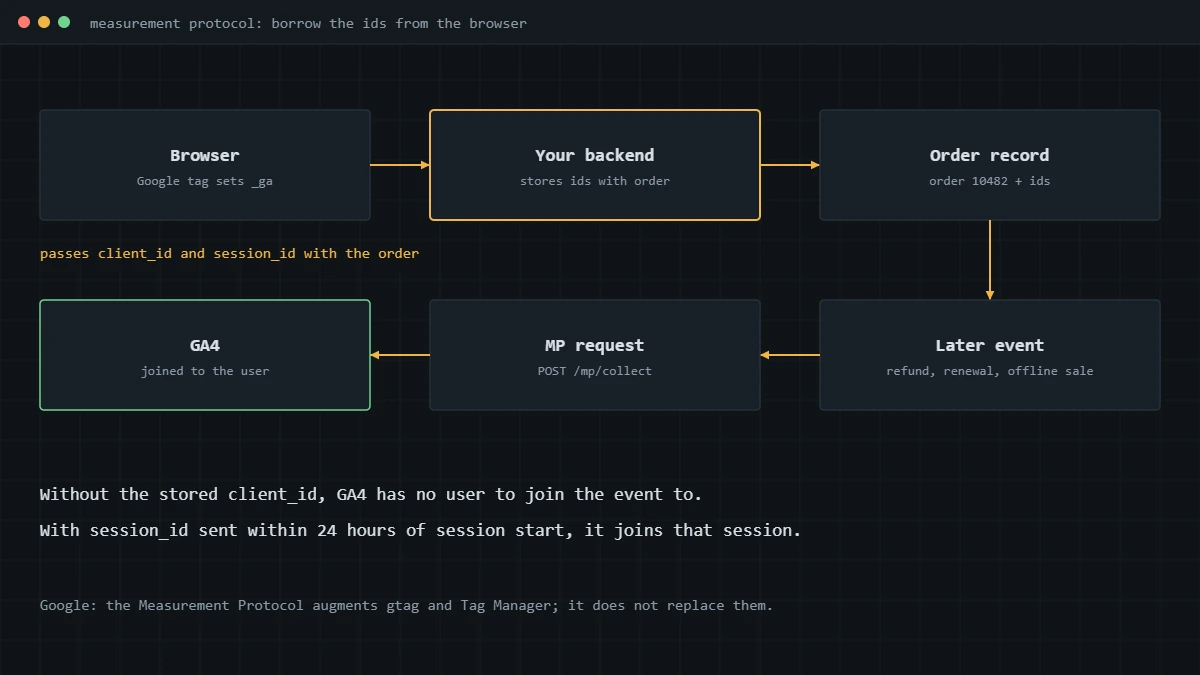
In practice I capture both IDs in the browser at checkout or form submit and save them on the order or lead record:
// Browser: read the IDs from the Google tag and pass them with the form/order
gtag("get", "G-XXXXXXX", "client_id", id => { document.querySelector("#ga_cid").value = id; });
gtag("get", "G-XXXXXXX", "session_id", id => { document.querySelector("#ga_sid").value = id; });

// Server, later: a refund for order 10482
POST https://www.google-analytics.com/mp/collect?measurement_id=G-XXXXXXX&api_secret=SECRET
{
  "client_id": "1234567890.1764000000",
  "events": [{
    "name": "refund",
    "params": {
      "transaction_id": "10482",
      "currency": "USD",
      "value": 129.00,
      "session_id": "1764000000"
    }
  }]
}
The API secret is created on the web data stream in GA4 Admin under Measurement Protocol API secrets. Treat it like a password: keep it on the server and out of front-end code. Refunds should reuse the original transaction_id so GA4 can tie them to the purchase.
How do I validate Measurement Protocol events?
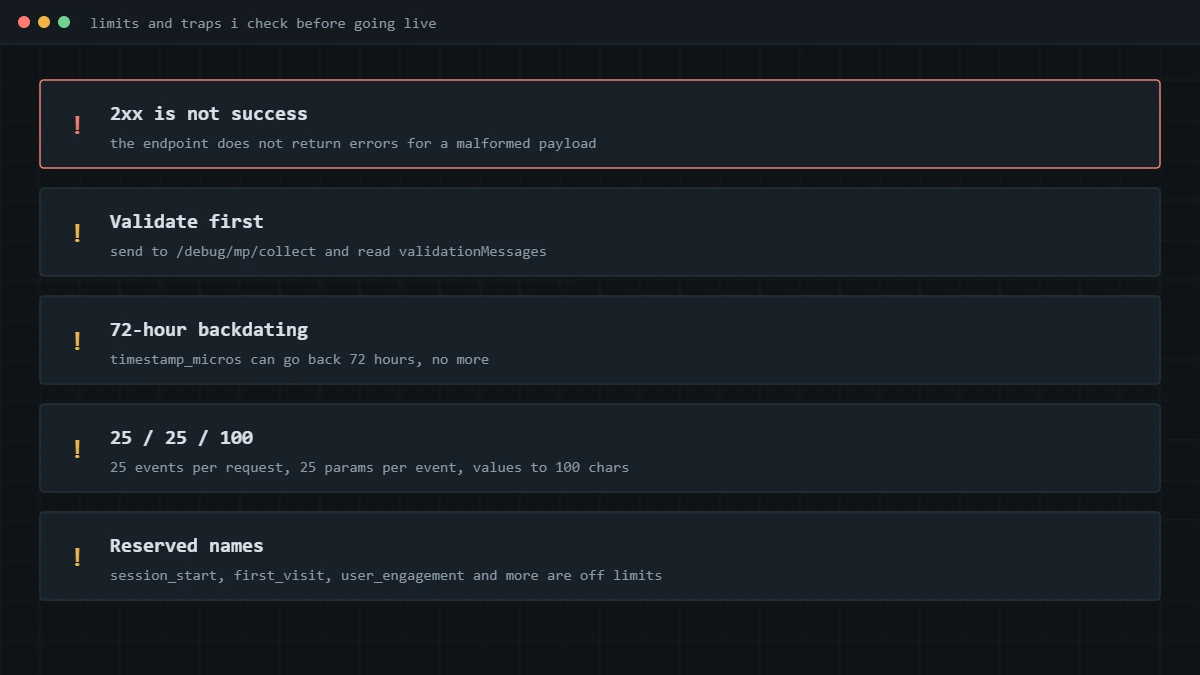
Send the same payload to the validation server first. It uses the path /debug/mp/collect instead of /mp/collect, returns a validationMessages array that is empty when there are no issues, and events sent there do not appear in reports (Google: validating events).
The live endpoint will not tell you when you are wrong. Google’s reference says the Measurement Protocol does not return an error code if the payload is malformed (protocol reference). A 2xx response only means the request arrived.
What limits does the GA4 Measurement Protocol have?
From Google’s reference: up to 25 events per request; up to 25 parameters per event; event and parameter names up to 40 characters; parameter values up to 100 characters on standard properties; a JSON body under 130 kB; and timestamp_micros can backdate events by up to 72 hours. Some names are reserved, including session_start, first_open and user_engagement, and parameter names cannot start with _, firebase_, ga_, google_ or gtag. (Google).
Two more behaviors catch people out. Google says rules you create in the GA4 interface to generate or rename events do not run on Measurement Protocol events, so your code has to send the final names. And if tagging did not collect device information, events default to desktop for web streams.
Why do my Measurement Protocol events show (not set) or create new users?
Because the IDs were invented on the server instead of read from the browser. A made-up client_id creates a new user with no acquisition source, and an event outside any session lands with (not set) values. The fix is capturing real IDs at the moment of the browser interaction, which is the same discipline behind fixing (not set) landing pages and Unassigned traffic.
If the goal is sending offline sales to Google Ads rather than GA4, that is a different pipeline, using enhanced conversions for leads or click ID uploads, covered in offline conversion tracking for Google Ads. For refunds in an ecommerce reporting setup, see ecommerce conversion tracking that reconciles, and the overall picture is in how conversion tracking works.
If you need refunds, renewals or CRM outcomes in GA4 and want the IDs and payloads done right the first time, I build and verify that.
Frequently asked questions
Is the GA4 Measurement Protocol the same as server-side GTM?
No. Server-side GTM receives events that start in the browser and forwards them from your own server. The Measurement Protocol lets your backend create events directly, which suits refunds, renewals and offline sales that never touch a browser.
Can I send purchases with the GA4 Measurement Protocol instead of the browser?
You can, but Google describes the protocol as a way to augment browser tagging, not replace it. Purchases sent only from the server lose session and source information unless you pass the browser IDs, so I keep the purchase in the browser and use the server for what happens later.
Why are my Measurement Protocol events not showing in GA4?
The live endpoint returns 2xx even for malformed payloads, so check the request against the validation server, then check for reserved event names, missing currency on value events, and a wrong measurement ID or API secret.
How far back can I send events with the Measurement Protocol?
Google allows timestamp_micros to backdate an event by up to 72 hours. Older events cannot be sent with their original time, so schedule uploads like refunds to run at least daily.
Where do I find the Measurement Protocol API secret?
In GA4 Admin, open Data streams, select the web stream, and open Measurement Protocol API secrets. Create a secret per integration so you can revoke one without breaking the others.
About the author
I’m Ghazanfar, founder of Analytigrow and a conversion tracking specialist. For 7+ years I’ve set up GA4, GTM, server-side tracking and ad platform conversions for ecommerce and lead-gen businesses in the US, UK, EU and UAE. I’m Top Rated on Upwork with 100% Job Success. Reach me at [email protected] or on WhatsApp.
Find out what's actually broken.
A tracking audit tells you exactly which events are wrong, why, and what it takes to fix them. No pitch deck, just the findings.