
Conversion tracking tools and software, layer by layer
Last updated November 5, 2026 · Ghazanfar · 10 min read
In this post
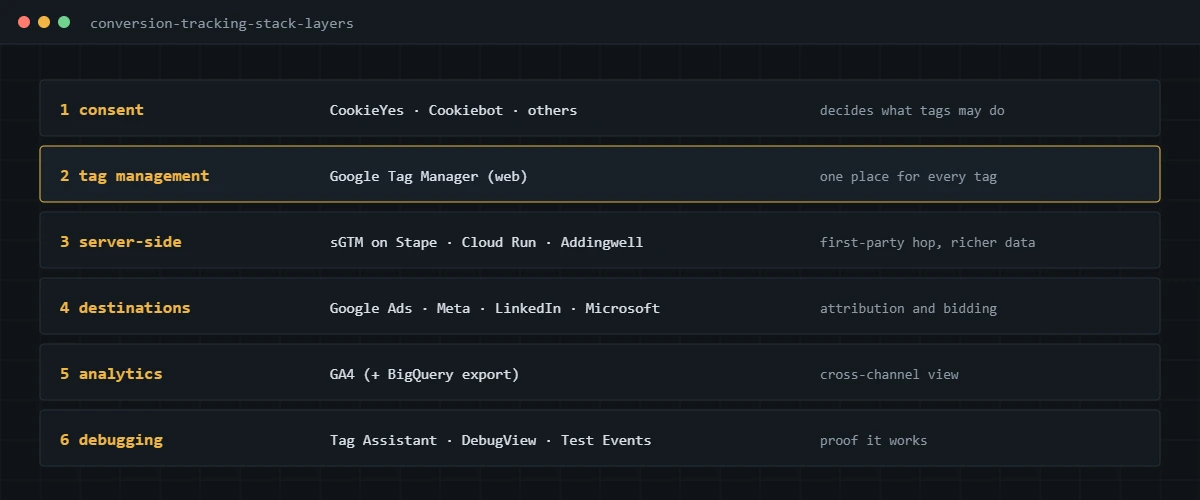
Conversion tracking tools fall into six layers: a consent platform, a tag manager, an optional server-side container, the ad platforms’ own tags and APIs, an analytics tool, and debugging tools. Most businesses need Google Tag Manager and GA4 at the core, plus the tags for each ad platform they use.
People ask me which conversion tracking software to buy as if there were one product that does the job. There isn’t, and the vendors that suggest otherwise usually sell one layer and rebadge the rest. What follows is how I think about the stack, layer by layer, with the tools I actually use. I’ve stuck to features stated on each vendor’s own site, and I’m not affiliated with any of them. I haven’t ranked them, because the right choice depends on the business.
Which tag management tool should you use?
Google Tag Manager, for almost every site I work on. It is free, it holds every tag in one place, and every ad platform supports it with templates.
A tag manager is a tool that loads and controls your tracking tags from one container, so you change tracking without editing site code. GTM has web containers for browsers and server containers for server-side tagging. The alternative most sites have by accident is no tag manager at all: platform plugins and pasted snippets, each firing on its own, which is where most of the duplicates I find come from. Consolidating into one GTM container is usually the first fix in an audit.
What are the options for server-side tracking?
Run a server-side GTM container, hosted either by you on Google Cloud or by a managed service. The container is the same; the difference is who maintains the infrastructure.
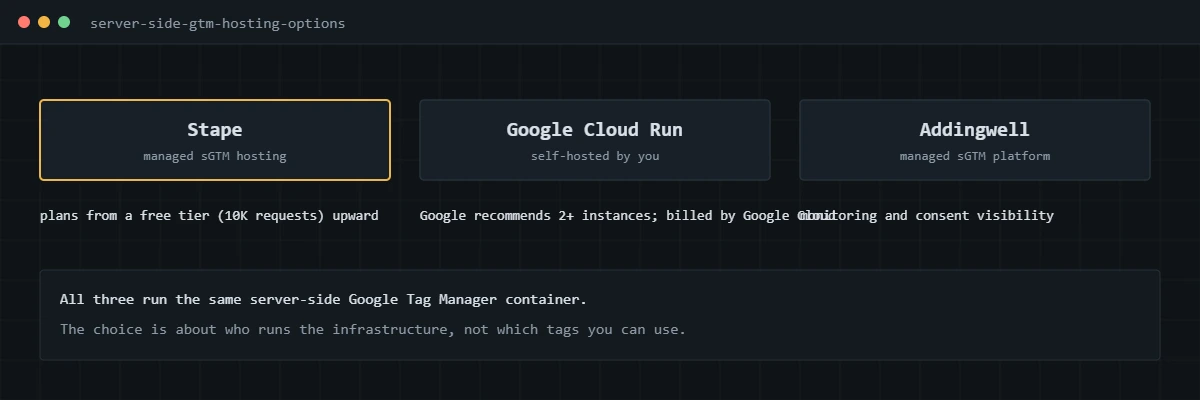
| Google Cloud Run (self-hosted) | Stape | Addingwell | |
|---|---|---|---|
| Who runs it | You, in your Google Cloud project | Stape | Addingwell |
| How it’s priced | Google Cloud usage; Google’s guide estimates about $45 per server per month for its example setup | Plans by monthly request volume, starting with a free tier of up to 10K requests | See vendor |
| What the vendor highlights | Google recommends at least two instances to reduce data loss | Custom loader, request analytics and tracking add-ons by plan | Tag health monitoring, multi-region servers, consent visibility per request |
| Best fit | Teams with cloud skills who want full control | Most businesses that want managed hosting | Teams that want monitoring and consent tooling built in |
Sources are Google’s Cloud Run setup guide, Stape’s pricing page and Addingwell’s site. I use Stape for most clients, mainly because it takes infrastructure off the client’s plate. If you are weighing whether server-side is worth it at all, my conversion tracking guide explains what it does and doesn’t fix, and my server-side tracking service covers how I set it up.
Which analytics tool should you use for conversions?
GA4 for most businesses. It is free, it sees every channel, and it connects to Google Ads.
GA4 is the cross-channel record; it is where you compare email against paid social against organic search. It is not a replacement for each ad platform’s own conversion tracking, because the ad platforms bid on their own data. The BigQuery export, available on standard GA4 properties, is worth turning on early if you expect to reconcile at order level. How I set GA4 up for conversions is in my GA4 conversion tracking guide.
What native tools do the ad platforms provide?
Every major ad platform provides a browser tag and a server-side API, free. These are the tools that actually feed bidding, so they matter more than any third-party product.
- Google Ads: the Google tag or GTM conversion tag, enhanced conversions, and Data Manager for offline uploads. See my Google Ads guide and offline conversion tracking guide.
- Meta: the Meta Pixel and the Conversions API. See my Facebook Ads guide.
- LinkedIn: the Insight Tag and the LinkedIn Conversions API. See my LinkedIn guide.
- Microsoft Advertising: the UET tag and the UET Conversions API. See my Microsoft Advertising guide.
Store platforms add their own layer. Shopify uses app and custom pixels; WooCommerce has plugins such as Google for WooCommerce. My Shopify and WooCommerce guides cover when to use them and when to use GTM instead.
Which tools do you use to audit and debug tracking?
Free ones, mostly from the platforms themselves, plus the browser’s network tab. They tell you exactly what each tag sent.
- GTM Preview and Google Tag Assistant to see which tags fired on each event and with which values.
- GA4 DebugView to inspect events and parameters as GA4 receives them.
- Meta Events Manager Test Events to confirm browser and server events and their deduplication.
- Microsoft UET Tag Helper to check the UET tag and events.
- The browser network tab, filtered by each platform’s endpoint, which is the final word on what left the page.
- Your store or CRM export, which is the tool that tells you whether any of it is right.
For a quick first check of a GA4 property, I also built a free GA4 audit tool on this site.
Which consent management platforms work with conversion tracking?
Any consent platform that sends Google Consent Mode v2 signals and integrates with GTM. For ads, that integration matters more than the banner design.
Two I use often: CookieYes describes itself as a Google-certified CMP that integrates with Consent Mode v2 and provides a GTM template, per its Consent Mode documentation. Cookiebot says it integrates with Google Consent Mode, including the v2 settings, on its Consent Mode page. Whatever you choose, check that it also controls non-Google tags such as Meta, LinkedIn and Microsoft UET, and that the default is set before any tag fires. More in my Consent Mode v2 service.
How do you choose the right conversion tracking tools?
Start from the platforms you spend on and the place your conversions really happen, then add layers only when they solve a problem you have.
- List the ad platforms you use and where conversions occur: online checkout, lead form, phone or CRM.
- Put one tag manager in charge and remove duplicate plugins and snippets.
- Add each platform’s tag, and its API where browser loss is significant or conversions happen offline.
- Add server-side hosting when blocker loss or data control justifies the cost.
- Pick a consent platform that works with every tag you run.
- Reconcile against the backend before and after each change.
If you’re not sure which of these layers your setup is missing, I can audit the stack and fix it end to end.
Frequently asked questions
What is the best conversion tracking software?
There isn’t one product that does it all. A working setup combines a consent platform, a tag manager, the ad platforms’ own tags or APIs, an analytics tool and debugging tools. For most businesses that means Google Tag Manager and GA4 at the core, with a server container added when it pays off.
Is Google Tag Manager free?
Yes. The standard Google Tag Manager is free for web and server containers. A server container still needs hosting, either on your own Google Cloud project or through a hosting service such as Stape, which has its own costs.
Do I need a paid conversion tracking tool?
Not to start. The core tools from Google and the ad platforms are free. Costs come in with server-side hosting, consent platforms on larger sites, and specialist tools for monitoring or attribution.
Stape or Google Cloud Run for server-side tagging?
Cloud Run gives you full control and Google Cloud billing, and Google recommends running at least two instances. Stape is managed hosting with a free tier and paid plans by request volume, plus add-ons built for tracking. I use Stape for most clients because it removes infrastructure work.
What tools do you use to debug conversion tracking?
GTM Preview and Google Tag Assistant for tags, GA4 DebugView for events, Meta’s Test Events tool, the Microsoft UET Tag Helper, and the browser network tab for everything else. They are all free.
Do conversion tracking tools replace an audit?
No. Tools show what fires; an audit checks whether what fires matches the orders and leads in your backend. That comparison is where most problems are found.
About the author
I’m Ghazanfar, founder of Analytigrow and a conversion tracking specialist. For 7+ years I’ve built tracking stacks with Google Tag Manager, GA4, server-side GTM on Stape and the native tools of Google Ads, Meta, LinkedIn and Microsoft Advertising for businesses in the US, UK, EU and UAE. I’m not paid by any vendor mentioned here. Reach me at [email protected] or on WhatsApp.
Find out what's actually broken.
A tracking audit tells you exactly which events are wrong, why, and what it takes to fix them. No pitch deck, just the findings.